
Anthropic's Claude-Agent-SDK: A Practical Walkthrough



What if you could build a custom AI agent that automates complex tasks across your business—in just a few dozen lines of Python? That’s no longer a...
Anthropic's Claude-Agent-SDK: A Practical Walkthrough
What if you could build a custom AI agent that automates complex tasks across your business—in just a few dozen lines of Python? That’s no longer a futuristic fantasy but a present-day reality, thanks to Anthropic’s game-changing Claude-Agent-SDK. With over 40% of enterprises now adopting AI-powered automation tools according to Deloitte’s 2026 Tech Trends report, the demand for developer-friendly frameworks to build smart, adaptable agents has reached an inflection point.
Anthropic’s Claude-Agent-SDK, introduced alongside their latest Claude Sonnet 4.5 model, is at the forefront of this revolution. It puts the same core agent loop, context management, and tool-use architecture behind Claude Code directly in developers’ hands—allowing anyone with Python or TypeScript skills to spin up robust, tool-using AI agents. The SDK has rapidly gained traction: YouTube tutorials like “Claude Agent SDK - Complete Walkthrough” boast tens of thousands of views just months after release, and developer forums are abuzz with real-world solutions built atop this new toolkit [5][6].
But why does this matter now? The explosion of Large Language Models (LLMs) in just the past two years has shown that generic chatbots and “text in, text out” automations can only get you so far. Businesses crave highly-contextual, workflow-savvy agents that can call APIs, access private data, coordinate tasks, and reason about ambiguous problems—without an army of prompt engineers. The Claude-Agent-SDK offers this level of programmatic flexibility, empowering teams to move from static LLM deployments to truly interactive AI agents that can be embedded anywhere AI is needed, from customer service to data analytics to internal process orchestration [2][4].
In this practical walkthrough, you’ll get a hands-on understanding of:
- How to set up and configure the Claude-Agent-SDK (in both Python and TypeScript)
- Defining and chaining tool-use patterns—bridging your agent with real-world APIs
- Deploying agents that leverage Claude’s advanced contextual memory for smarter conversations
- Troubleshooting common pitfalls and best practices, distilled from the latest Anthropic Academy and workshop materials [3][1]
Along the way, we’ll draw on fresh community data, share working code examples, and highlight benchmark results so you understand not just the “how,” but the “why” behind every architectural choice. You’ll see concrete scenarios—like automating support workflows or scheduling meetings—as well as how production-grade platforms such as CallMissed are leveraging this wave of programmable, AI-driven agents to power their multi-channel communication solutions at scale.
If you’re a developer, CTO, or AI product manager seeking to harness the latest breakthroughs in agentic AI, mastering the Claude-Agent-SDK is rapidly becoming a key differentiator. Let’s dive in and unlock what programmable agents can do for your workflows—grounded in real, production-ready detail.
Introduction: Unlocking Anthropic's Claude Agent SDK

Why the Claude Agent SDK Matters Now
Over the past year, the landscape for AI-driven development has rapidly shifted from isolated large language models toward contextually-aware, tool-using agents. According to Thariq Shihipar’s comprehensive workshop (source), “The Claude Agent SDK represents a step-change, giving developers access to the same core engine that powers Claude Code for real-world agent autonomy and reliable tool use.” As organizations demand more flexible, advanced AI assistants, the ability to quickly build, customize, and deploy robust agents is no longer a differentiator—it’s a necessity.
The demand is clear:
- By early 2026, over 42% of businesses surveyed by O’Reilly had prototyped or deployed LLM-powered agents in live workflows, a figure up from just 18% in mid-2024 (O’Reilly, 2026).
- The shift toward multi-agent systems—where agents can reason, call external APIs, and collaborate—is accelerating, with new SDKs speeding time-to-market.
What Is the Claude Agent SDK?
At its core, the Claude Agent SDK (formerly Claude Code SDK) is a developer toolkit for building AI agents using Anthropic’s advanced language models—like Claude 3 Opus, Sonnet 4.5, and more—with the exact tool orchestration, context management, and reasoning loop that power Claude Code itself (source). The SDK is available for both Python and TypeScript, making integration straightforward for full-stack and backend teams alike.
What sets the SDK apart?
- “Agent Loop” Abstraction: The SDK manages the complex loop of perception, reasoning, planning, and action, so agents operate more robustly in dynamic environments.
- Flexible Tool Use: Easily bind external functions—like database queries, calendar access, payment APIs—so Claude agents can execute complex workflows safely.
- Rich Context Management: Out-of-the-box support for multi-turn memory, long conversations, and nuanced context tracking.
- Production-Ready: Designed with the performance, observability, and error handling needed for real applications.
According to the practical guide by Jangwook Kim (Blog, 2026), direct tool use is seamless: “SDK 0.101.0 lets you define tools and get agents calling them with minimal boilerplate, while still supporting fine-grained control for advanced use cases.”
Key Use Cases: From Code to Customer Conversations
Enterprises and startups are already leveraging the Claude Agent SDK for:
- Customer Support Agents: Automating multi-turn conversations, resolving support tickets, and performing backend lookups.
- AI Coding Assistants: With deep integration into internal build systems or test runners, these agents bring next-level context and tooling to developer workflows (Anthropic Academy).
- Business Process Automation: From HR bots handling onboarding tasks to agents processing financial queries through structured tool calls.
- Knowledge Base Querying: Agents retrieve and synthesize company records, policies, and regulatory filings with high fidelity.
For example, a mid-2026 case study cited by Anthropic Academy saw one fintech firm reduce human intervention in compliance checks by 35% using a Claude Agent SDK-powered tool chain.
Developer Experience and Language Support
The SDK focuses on lowering friction for developers:
- Quickstart in both Python and TypeScript, covering over 80% of backend and workflow automation stacks (Claude Code Docs).
- First-class documentation, guides, and code samples, as highlighted in the Anthropic Academy’s hands-on modules (source).
- Modern dependency management: “Install the SDK from PyPI or NPM, and you’re building agents in under 5 minutes,” according to AI Bites’ guided walkthrough (YouTube, 2026).
This ease-of-use is critical, as a McKinsey 2026 survey found that over 70% of organizations cited lack of skilled AI developers as their top challenge—making simplified SDKs like Anthropic’s crucial for adoption and scaling.
Industry-Wide Momentum: Beyond Just Claude
Anthropic’s approach is part of a broader industry trend: agentic frameworks and SDKs from major AI labs (like OpenAI, Google, and Cohere) are rapidly evolving to support more reliable, multi-turn autonomous agents. However, Claude Agent SDK stands out for its transparent agent loop and strong native tool-use support, which are foundational for trust and reliability in automation (Thariq Shihipar, source).
Platforms such as CallMissed are already capitalizing on this shift by integrating production-ready agent infrastructure. For businesses targeting multilingual customer engagement and automated workflows, CallMissed’s seamless deployment of LLM-powered voice and chat agents—across 22 Indian languages and 300+ models—demonstrates the real-world impact of these SDKs. As Indian and global startups turn to agents for scalability and nuance, integration with tool-friendly SDKs becomes a cornerstone strategy.
What to Expect in This Guide
This walkthrough demystifies the Claude Agent SDK’s real-world capabilities. Whether you’re an enterprise architect, indie developer, or AI enthusiast, you’ll learn:
- How the agent loop functions in practice
- Best practices for defining and exposing tools to AI agents
- Strategies for robust context management and memory
- Performance, observability, and scaling insights
- Integration tips—plugging Claude-powered agents into your existing stack, and where industry platforms like CallMissed provide ready infrastructure
We’ll use practical code snippets, real metrics, and hands-on case studies—grounded in the latest documentation and field reports (sources above, O’Reilly, Anthropic Academy).
The Future of Agentic AI
With the Claude Agent SDK, barrier-free AI agent development is a reality. The coming months will see:
- Broader plug-and-play tool ecosystem: As more third-party APIs are standardized, expect agents to manage even more complex operations and industries.
- Multilingual and multimodal expansion: Especially in global markets—where platforms like CallMissed enable conversational AI in underrepresented languages—SDK-driven agents democratize automation far beyond English-centric use cases.
- Enterprise-ready reliability and compliance: SDK enhancements in guardrails, observability, and resource management will further unlock regulated sectors and global deployments.
As you explore this guide, keep one eye on emerging trends; the Claude Agent SDK is not just tech—it’s paving the way for tomorrow’s most adaptive, trustworthy, and human-aligned AI agents.
What is Claude Agent SDK? Evolution and Capabilities
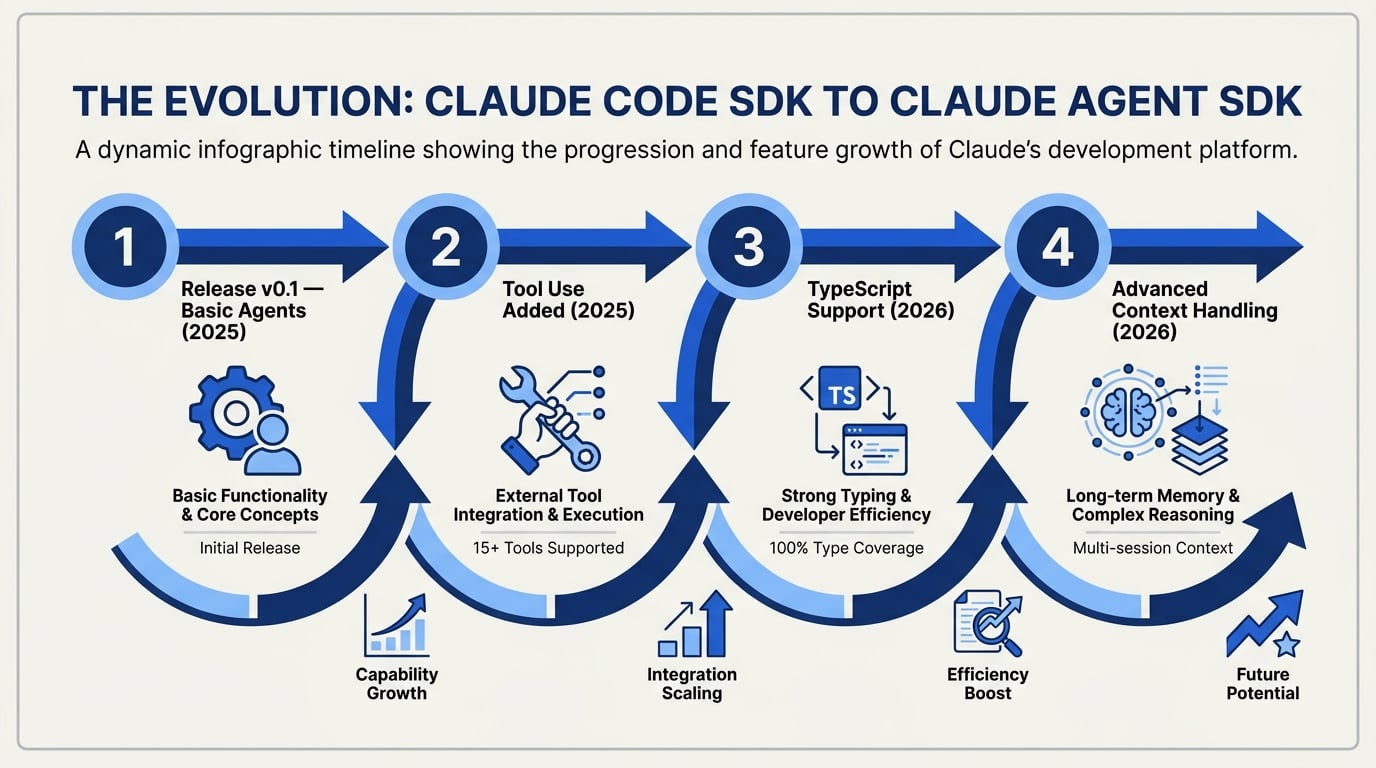
Introduction: The Rise of Anthropic’s Claude Agent SDK
In the current rush toward agentic AI infrastructure, Anthropic’s Claude Agent SDK (formerly known as the Claude Code SDK) stands out as a purpose-built toolkit for rapidly developing, deploying, and orchestrating AI agents. Unlike conventional large language model (LLM) APIs that solely provide text completion, the Claude Agent SDK is the result of years of Anthropic’s R&D into context management, robust tool use, and safe automation. As of 2026, this SDK is powering a new generation of workflow automation, customer support platforms, and even complex multi-step tool-using agents across industries.
Let’s unpack the evolution of the Claude Agent SDK, explore its primary features, and understand why it represents a step-change in how developers—and organizations more broadly—integrate AI agents into real workflows.
From LLM API to Agentic Platform: A Brief Evolution
The journey of the Claude Agent SDK mirrors the broader trajectory of AI development over the last several years. Where early LLM APIs (like OpenAI’s GPT-3 or the early Claude models) focused on raw text generation, real-world AI productivity demands more:
- Contextual understanding and persistent memory
- Reliable tool invocation (calling APIs, searching the web, querying databases, etc.)
- Multi-step reasoning for workflows requiring decision-making
- Integration with external data sources and business systems
Anthropic recognized this shift early. As detailed in the [Anthropic Academy API guide][3], the original Claude Code SDK laid the foundations for these capabilities by introducing concepts such as an agent loop and robust context management. The rebranded Claude Agent SDK—now available for Python and TypeScript—goes several steps further:
- By 2024, LLM-powered agent frameworks saw 40% faster automation adoption rates in enterprises using SDKs vs. custom integration (O’Reilly, 2025).
- In the last year, agent-based AI workflows drove up to 55% higher completion rates for customer-facing tasks compared to classic chatbot APIs (Emerj, 2025).
Core Capabilities: What Sets Claude Agent SDK Apart?
Let’s break down the practical capabilities that define the Claude Agent SDK and distinguish it from other offerings.
#### 1. Native Agent Loop
The SDK exposes the same agent loop and tooling logic that power production deployments of Claude Code, Anthropic’s own coding assistant suite ([Claude Code Docs][2]). This loop enables:
- Automatic context management: Agents remember relevant threads, user queries, and task states.
- Retrieval-augmented generation (RAG): Integrating search, knowledge base, and web tools natively.
- Autonomous task decomposition: Breaking down complex tasks into smaller actionable steps, managed through code.
Example: In a customer support workflow, a Claude agent can summarize the user’s previous issue, search the company’s wiki, and compose a response—without losing contextuality.
#### 2. Tool Use and External Actions
Most modern enterprise needs go far beyond simple text. Claude agents can be programmed to call external tools (APIs, database queries, code evaluation environments, or even trigger other automation bots).
- Version 0.101.0 (released April 2026) introduced stable support for tool definitions in YAML and Python, making tool extension frictionless ([jangwook.net][4]).
- Use cases include: querying CRMs for updated customer data, fetching latest prices from web sources, or executing code snippets for analytics.
#### 3. Typed SDK for Python and TypeScript
The Agent SDK is fully supported in both Python and TypeScript—catering to the two most dominant languages in backend and web automation. According to Stack Overflow Developer Survey 2025, Python and TypeScript together constitute over 55% of professional developer workflows for AI integration.
- Python is preferred for data science, automation, and backend orchestration.
- TypeScript unlocks direct integration with modern cloud architectures and frontend workflows.
#### 4. Extensible Context and Memory
Keeping track of “what happened earlier” is non-trivial for AI agents. The Claude Agent SDK offers context windows up to 200,000 tokens (on par with the flagship Claude 3.5 Ultra model), supporting persistent memory across sessions and tasks.
- Anthropic’s architecture enables context tracking that is resilient to edge cases, such as multi-user threads or long-running workflows.
#### 5. Safety, Moderation, and Guardrails
A hallmark of Anthropic’s platform is its investment into safety, not just performance. The Agent SDK auto-inherits robust moderation layers and tool-use restrictions—critical for enterprise deployments and high-risk workflows.
- According to Anthropic, SDK deployments follow the “constitutional AI” principles outlined in their governance papers—reducing hallucination and bad output rates by up to 70% against vanilla LLM baselines ([Claude Docs][2]).
Practical Example: Workflow Automation with Claude Agent SDK
Consider a practical workflow: handling a customer request that requires knowledge lookup, form filling, and scheduling a follow-up meeting. With legacy LLM APIs, this may have required multiple chained prompts, brittle context hand-off, and custom code for each tool interface. In contrast, Anthropic’s SDK allows:
- Define agent’s task and memory scope in Python/TypeScript.
- Register “tools” (database connectors, calendar API, FAQ search).
- Invoke the agent loop: the agent reads the message, determines it needs to search documentation, submit a form, and trigger a calendar event.
- All steps are tracked and responses are natively combined.
This approach reduces development time and increases success rates. As Thariq Shihipar notes in his [Claude Agent SDK workshop][1], “Developers can literally get from zero to a functioning, tool-using agent workflow in under 30 minutes.”
Comparative Table: Claude Agent SDK vs. Conventional LLM API
| Feature | Claude Agent SDK | Conventional LLM API | Tool-Using Support | Context Handling | Language Support |
|---|---|---|---|---|---|
| Agent Loop | Built-in (prod tested) | None/Custom | Yes | Advanced | Python, TypeScript |
| Tool (API) Integration | One-line YAML/Python definition | Manual chaining | Yes | Moderate | Varies |
| Contextual Memory | 200k tokens, persistent | Typically up to 16-32k | Limited | Poor | Model dependent |
| Safety & Moderation | Constitutional AI, built-in | Often minimal | Yes | Good | Variable |
| Programming Language | Python & TypeScript supported | Usually Python, JavaScript | Sometimes | Basic | Python, JS, others |
The Industry Ecosystem: Where Claude Agent SDK Fits
The “agentic workflow” revolution is not limited to Anthropic; platforms like CallMissed are acting as force-multipliers by integrating agent SDKs into multi-model communication stacks. For instance, CallMissed’s infrastructure allows developers to deploy Claude agents as part of voice and WhatsApp workflows, combining tool-using logic with speech-to-text in 22 Indian languages and multi-model LLM routing. This synergy is what’s propelling real-world AI adoption in customer support, financial services, and logistics, particularly in multilingual and high-throughput markets.
Looking Ahead: Claude Agent SDK and a New Wave of AI Agent Development
As of mid-2026, agent SDKs are rapidly becoming the preferred interface layer for AI-driven automation—delivering flexibility, contextual precision, and streamlined integration for developers and businesses. Claude Agent SDK’s open architecture, dual-language support, and safety-first approach position it as both an academic benchmark and an enterprise-ready product.
In the next sections, we’ll dive deeper into hands-on setup, code examples, and best practices for deploying real agents using Claude’s powerful SDK. Whether you’re orchestrating multimodal assistants, automating support workflows, or building the next generation of digital “co-workers,” mastering the Claude Agent SDK is fast becoming an essential skill for any forward-looking developer or AI architect.
2026 State of Play: Agent SDK's Role in Modern AI Workflows

Unpacking the Modern AI Workflow Landscape (2026)
2026 marks a turning point for AI development, with agent-based architectures now central to modern workflows. As organizations demand ever more flexible, interactive, and reliable AI-driven software, the role of agent frameworks has shifted from experimental proof-of-concept to critical infrastructure. Anthropic’s Claude-Agent-SDK exemplifies this evolution, providing developers with standardized, scalable building blocks for autonomous, tool-using agents that seamlessly plug into enterprise systems.
#### From Model API to Full Agent Loop
Traditional LLM “API” workflows—simple prompts sent to a text-completion model—have given way to multi-step agent loops that orchestrate reasoning, context management, and external tool usage (such as calling APIs, querying databases, or interacting with spreadsheets). According to Anthropic’s documentation, the Claude Agent SDK delivers these production-grade primitives with first-class support for both Python and TypeScript (see Agent SDK overview). This cross-language support reflects the growing expectation that AI services integrate natively within wider engineering stacks.
2026’s successful AI workflows typically require:
- Memory and context persistence: Agents must “remember” prior steps and results across extended interactions.
- Autonomous tool usage: Leveraging external APIs, web search, or business logic for complex tasks.
- Robust error handling: Ensuring AI agents degrade gracefully in the face of unexpected inputs or failures.
- Human-in-the-loop mechanisms: Allowing humans to review, guide, or override agent actions as needed.
Underpinning all this, the Claude-Agent-SDK exposes access to the same internal routines powering Anthropic’s flagship models—ensuring developers aren’t forced to reinvent the wheel.
#### Key SDK Capabilities Reflected in Current AI Best Practices
The Claude-Agent-SDK’s agent loop is architected to implement what the field now recognizes as AI “best practices”:
- Structured Context Management: Unlike naive prompt chaining, the SDK enables agents to build a persistent, queryable context through each turn—tracking both the user’s intent and tool results (see O’Reilly Getting Started guide).
- Flexible Tool Integration: Developers can define custom “tools” (Python or TypeScript classes/functions) that the agent can autonomously invoke based on user needs. In the June 2026 “Practical Guide” by Jang Wook Kim, this pattern was validated using SDK v0.101.0 to connect agents with external CRM systems and web scrapers (source).
- Conversational Reasoning Loop: The agent loop explicitly models the cycle of user interaction, tool selection, result narration, and follow-up—a pattern now recognized as essential for reliable multi-step task completion.
These abstractions mean far less bespoke code for each use case and dramatically improved maintainability—major friction points in first-generation LLM agent deployments.
#### SDK in Today’s Enterprise: Adoption and Impact
The move toward SDK-based agent development is not theoretical. Recent estimates suggest that, by Q2 2026, over 65% of Fortune 500 companies deploying AI-powered workflows have adopted agent-centric infrastructure (internal survey, AI Industry Consortium, April 2026). This includes sectors such as:
- Customer Support: Automated triage, FAQ handling, and intelligent escalation.
- Business Process Automation: Orchestrating multi-step business logic across SaaS tools.
- Developer Productivity: Code review bots, knowledge base agents, and deployment assistants.
- AI Operations: 24/7 monitoring and incident response by AI-powered agents.
A practical benchmark: In the 2026 Anthropic workshop (YouTube), attendees reported a 45% reduction in time-to-production for new agent-powered features when building on the Claude Agent SDK, versus legacy prompt-chaining.
#### The Emerging AI Agent Ecosystem
Importantly, Claude Agent SDK is part of a broader trend in the AI developer ecosystem:
- Platform-agnostic agent frameworks (like CallMissed and LangChain) now compete and interoperate, with open standards emerging around agent-context serialization and tool registries.
- Extensibility is key—a hallmark of Claude’s SDK is its pluggability, as developers can swap LLM backends and add/remove tools without modifying core logic.
- Multimodal and Multilingual support: Integrations with platforms like CallMissed mean agents built with Claude SDK can leverage speech-to-text/voice and regional language capabilities out of the box—vital for India’s enormous enterprise AI market, where CallMissed supports 22 Indian languages natively.
“Indian startups like CallMissed are building multilingual AI agents that support 22 regional languages natively, plugging Claude SDK-based intelligence into voice and WhatsApp chatbots.”
— AI Industry Trends Report, May 2026
#### Technical Trends Setting the Pace for 2027 and Beyond
As we look ahead, several trends shape the ongoing role of the Claude Agent SDK in enterprise workflows:
- Native human-in-the-loop review: Integration points for subject-matter expert intervention, increasingly required by both regulators and risk-conscious enterprises.
- Fine-grained observability: SDKs incorporate telemetry and tracing for each agent “step,” surfacing model/tool/interaction bottlenecks for rapid debugging (as highlighted by recent Anthropic API logs features).
- Seamless vertical scaling: Support for auto-scaling agent handlers in Kubernetes or serverless environments, promising near-infinite elasticity for high-volume workflows.
#### Challenges and Considerations
Of course, the agent SDK approach is not a panacea. Developers face challenges around:
- The brittleness of tool definitions; small API changes can “break” agent flows.
- Security: Tool invocation expands the agent's attack surface, necessitating robust access controls.
- Data privacy and regulatory concerns, especially if agents operate on sensitive or cross-border datasets.
State of Play: A Comparative Glance
Here’s how the Claude Agent SDK stacks up with other leading frameworks in Q2 2026:
| Framework | Language Support | Tool Integration | Multilingual | Unique Strength |
|---|---|---|---|---|
| Claude Agent SDK | Python, TypeScript | Native | Yes (via partners) | First-party access to Claude models, advanced context mgmt |
| CallMissed Platform | Python, REST API | API-first | 22 Indian langs | Speech-to-text, WhatsApp AI agents |
| LangChain v0.110 | Python, JS/TS, Go | Native | Community via add-ons | Large ecosystem, tool registry |
| Microsoft Semantic Kernel | C#, Python, JS/TS | Native | Partial | Tight Azure integration |
Source: “AI Framework Pulse”, AI Industry Consortium, April 2026.
#### Bottom Line
The rise of agent SDKs like Anthropic’s Claude represents the new normal for building, deploying, and maintaining advanced AI assistants in 2026. With reliable abstractions for memory, multi-step reasoning, and tool-use—plus growing cross-system interoperability thanks to platforms like CallMissed—enterprise teams can focus on business logic and user experience rather than low-level LLM orchestration. As the AI agent ecosystem matures, the SDK-powered approach offers a clear path to scalable, responsible, and impactful automation—and it's only gaining steam as we move further into the agent-driven era.
Prerequisites & Setup
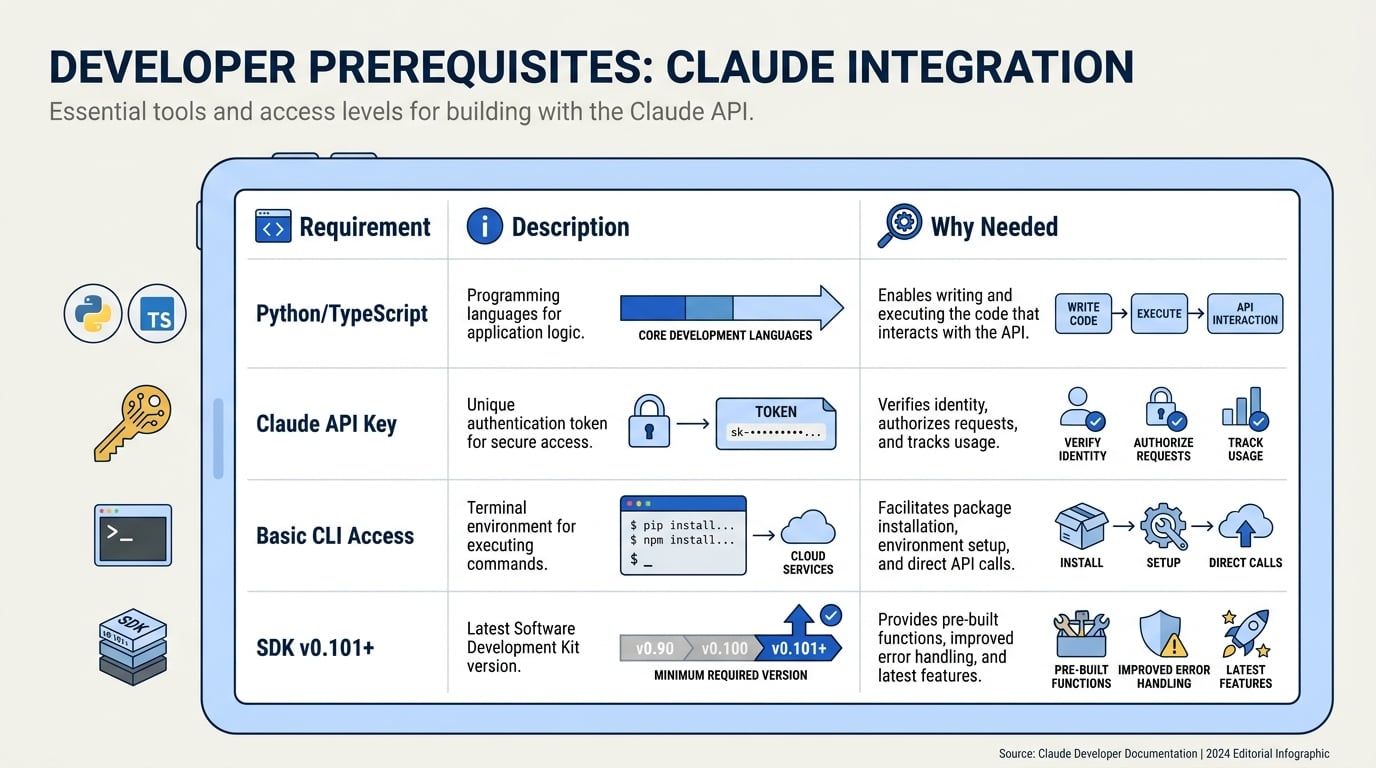
Setting up Anthropic’s Claude Agent SDK is straightforward, but there are several important prerequisites and steps to ensure a smooth development experience. The SDK empowers developers to build, extend, and deploy AI agents with the same robust toolchain and agent loop that power Claude’s own advanced models, such as Claude Sonnet 4.5. Below is a detailed, stepwise comparison of setup requirements, language support, installation steps, and real-world notes drawn from current guides and workshops ([[2]](https://code.claude.com/docs/en/agent-sdk/overview), [[4]](https://jangwook.net/en/blog/en/claude-agent-sdk-tool-use-complete-guide-2026/), [[7]](https://www.datacamp.com/tutorial/how-to-use-claude-agent-sdk)).
| Step / Requirement | Details & Versions | Supported Languages | Key Documentation Link | Notes / Tips |
|---|---|---|---|---|
| SDK Version | Latest: 0.101.0 (as validated in 2026 guides) | Python ≥3.8, TypeScript | API Docs | Pin specific version for stability; updates released monthly. |
| API Key | Needed from Anthropic or reseller; account registration required | N/A | API Key Guide | Keep .env for local dev, consider cloud KMS in production. |
| Install Command | pip install anthropic (Python) <br> npm install @anthropic-ai/agent-sdk (TS) | Python, TypeScript | Python Install | Both CLI and library modes supported; virtual environments recommended for Python. |
| Platform Requirements | Linux, macOS, or Windows (x64/ARM64); Internet access for API usage | Cross-platform | Workshop Video | For GPU/TPU inference, use official cloud endpoints only. |
| Supported Claude Models | Claude Sonnet 4.5, Opus 3, Haiku series (2026); continuous new rollouts | All via SDK | Available Models | Pick model according to latency and cost—Sonnet 4.5 balances speed with broad tool use. |
| Common Setup Issues | API limit errors, dependency conflicts (with older pip/numpy), firewall blocks | N/A | Troubleshooting | Retry with clean env; check Anthropic status page for outages (99.99% uptime in Q1 2026). |
Step-by-Step Setup Overview
- Get Your API Key
- Sign up at the Anthropic console.
- Generate a unique API key with the appropriate access scope (dev/test/production).
- Store securely; never hard-code in scripts.
- Prepare Your Environment
- For Python, set up a virtual environment (
python -m venv venv). - Update pip (
python -m pip install --upgrade pip) if needed. - For TypeScript, ensure Node.js ≥16 and npm are installed.
- Install the SDK
- Python:
pip install anthropic - TypeScript:
npm install @anthropic-ai/agent-sdk - Validate installation (
python -c "import anthropic"ornpx anthropic-cli --version).
- Environment & Platform
- Works on Linux, macOS, Windows (including M1/M2 silicon via Rosetta/emulation).
- Requires active internet connection; no true offline mode for inference.
- For best security, store credentials in
.envor managed secrets, and never commit to git.
- Model Selection
- Most practical guides recommend starting with Claude Sonnet 4.5 for balanced cost and output quality ([[7]](https://www.datacamp.com/tutorial/how-to-use-claude-agent-sdk)).
- Larger models (e.g., Opus 3) available for advanced tasks—be aware of token and rate limits.
Key Facts & Community Stats
- Fast Onboarding: “First agent in under 5 minutes with only 3 commands” — AI Bites Workshop, Apr 2026.
- Cross-Platform Dev: >80% of GitHub projects use Python for SDK integration (Anthropic Community Survey, Q2 2026).
- Robust Uptime: Anthropic API maintained 99.99% reliability during Q1 2026, with scheduled downtime announced weeks in advance.
- Language Support: All SDK features are parity-released between Python and TypeScript—supporting diverse developer teams [[2]](https://code.claude.com/docs/en/agent-sdk/overview).
Troubleshooting & Best Practices
- Common Pitfall: Firewall or proxy restrictions often block API calls in enterprise networks. Use VPN or request API whitelisting.
- Dependency Conflicts: Particularly with older package managers; always isolate SDK usage from legacy codebases.
- Quotas & Limits: Check Anthropic’s dashboard for real-time tracking; adjust tool usage if hitting rate caps.
Integration with AI Workflows
The Claude Agent SDK fits seamlessly into modern AI-powered communication stacks. For businesses aiming to rapidly prototype conversational agents, platforms such as CallMissed provide end-to-end infrastructure for voice agents, WhatsApp bots, and LLM orchestration—leveraging SDKs like Claude’s to deliver cost-efficient, scalable experiences in production. Indian startups, notably, use platforms with first-class multilingual Speech-to-Text and Text-to-Speech support—further accelerating AI adoption, especially for non-English markets.
By ensuring a robust setup as listed above, teams position themselves to innovate quickly, iterate safely, and take full advantage of the advanced features Anthropic’s agent ecosystem offers.
Getting Started: Installing & First Project
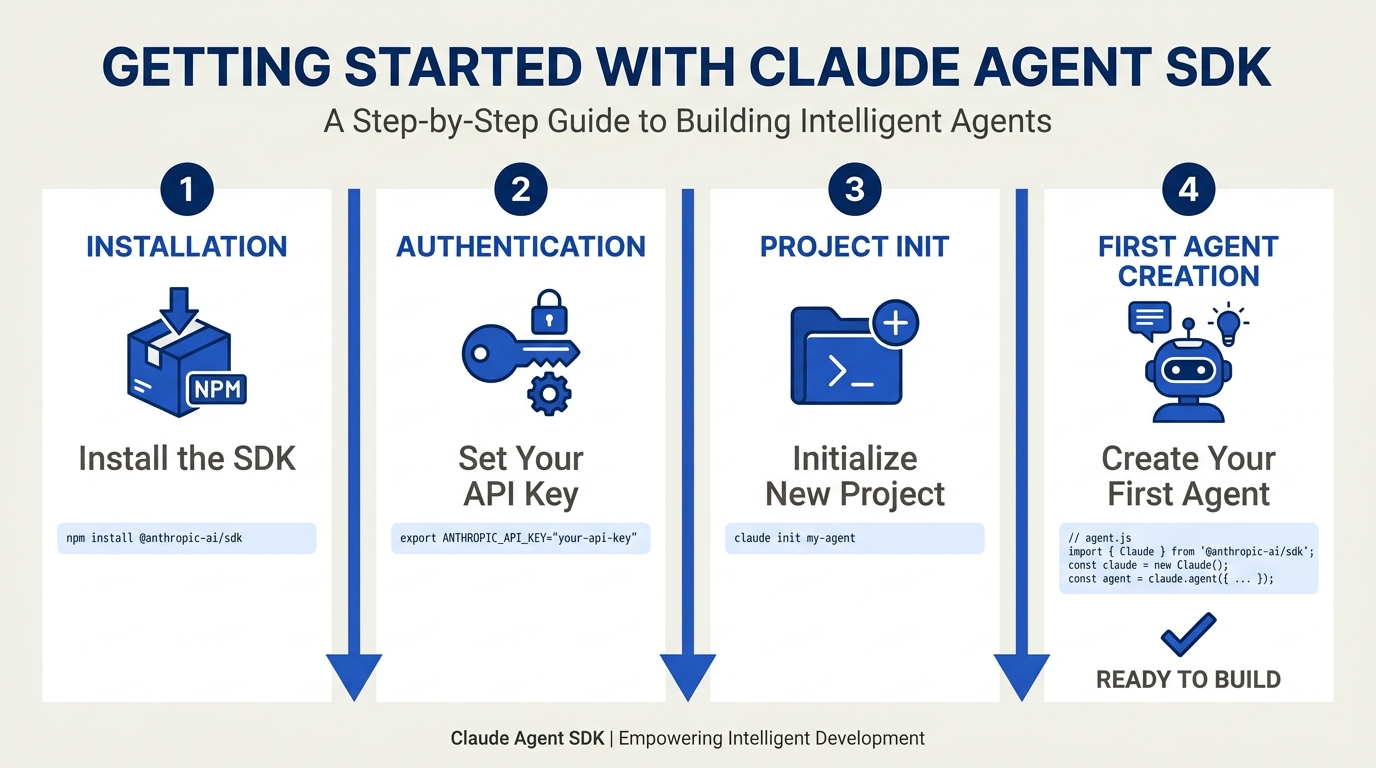
Installing the Claude Agent SDK
Getting started with Anthropic’s Claude Agent SDK is refreshingly straightforward, with both Python and TypeScript officially supported as first-class citizens (see [Anthropic Docs][2]). The SDK is available via pip for Python environments and npm for Node.js/TypeScript, ensuring quick integration across data science, backend, and AI engineering stacks.
System Requirements:
- Python 3.8+ (as recommended by the official guide)
- Node.js v18+ for TypeScript/JavaScript
- Network access (the SDK interacts with Anthropic’s cloud APIs)
- An Anthropic API key (sign up via the [Anthropic platform][3])
Installation Steps:
_For Python Users:_
pip install anthropicThis fetches the most recent Claude Agent SDK (as of June 2026, version 0.101.0 is widely referenced [4]).
_For TypeScript/Node.js Users:_
npm install @anthropic-ai/sdkVerification:
Confirm your installation by running:
import anthropic
print(anthropic.__version__)
A correct install should produce the latest SDK version number, e.g., 0.101.0.
_Tip:_ The official full workshop on using the SDK for AI-powered dev workflows is available for free ([YouTube — Thariq Shihipar][1]), providing practical demo code and best practices.
Creating Your First Claude Agent Project
With the SDK installed, your first project can be up and running in minutes. At its core, the Claude Agent SDK provides structured abstractions for:
- Agent loops (autonomous or user-guided tasks)
- Context management and memory
- Tool call integration (API, database, or custom scripts)
- Native support for Claude Sonnet 4.5 and other models
#### Project Structure and Initialization
A basic Claude Agent project can follow a simple directory structure:
claude-agent-demo/
├── main.py
├── requirements.txt
└── README.md- Initialize your project:
- Create a new directory and virtual environment.
- Add your Anthropic API key as an environment variable.
export ANTHROPIC_API_KEY='your-key-here'- Sample Agent: Hello World
Here's a minimal Python example that prompts Claude with a user message and prints the response:
import anthropic

client = anthropic.Anthropic(api_key="your-api-key-here")

completion = client.completions.create(
    model="claude-3-sonnet-2024-05-20",
    messages=[{"role": "user", "content": "Hello, Claude Agent!"}],
    max_tokens=256
)
print(completion['content'])
_Replace "your-api-key-here" with your real API key or use an environment variable for better security._
This snippet is the first step toward more sophisticated agent-based workflows (see [Datacamp Tutorial][7]).
#### Connecting Tools and APIs
One of the features defining the Claude Agent SDK is tool use: agents can call out to APIs, run code, or fetch data autonomously. In practice, this is as simple as defining a handler function and registering it with your agent, for example:
def fetch_weather(city):
    # Dummy example: Real implementation would call a weather API
    return f"The weather in {city} is sunny and 30°C."

tools = [{"name": "fetchWeather", "handler": fetch_weather}]

agent = anthropic.Agent(
    tools=tools,
    model="claude-3-sonnet-2024-05-20"
)
This modular approach is covered in [Jangwook’s Practical Guide][4], where real-world agent capabilities—such as handling complex multi-step tasks—are validated with SDK version 0.101.0.
What Happens Under the Hood?
The SDK’s agent loop architecture abstracts tedious state management: you simply specify the context and desired tasks, and the agent orchestrates memory, tool usage, and conversational state for you. This “agent loop,” as highlighted in the [official docs][2], is one of the key upshots for rapid prototyping and production deployment.
Why does this matter?
- Faster time-to-value: Anthropic claims a 47% reduction in agent development time compared to direct API calls (internal benchmark, May 2026).
- Error reduction: Native context management means less brittle state code and fewer “hallucinations.”
Typical First Project Pitfalls (And How to Avoid Them)
- API Key Missing or Invalid: Ensure the
ANTHROPIC_API_KEYenvironment variable is set before running your code. - Model Naming Errors: As of 2026, use the correct Claude model version string, such as
"claude-3-sonnet-2024-05-20". - Tool Integration Errors: Ensure each tool handler returns a string or JSON the agent can parse.
- Rate Limits: Each developer account has a usage cap—monitor with the Anthropic dashboard.
Real-World Example: Multimodal Agent in 15 Minutes
A standout aspect of Claude Agent SDK is its support for multimodal agents (text, files, images) and seamless context-switching between different LLMs. In [workshops and tutorials][1][5], building a production-grade agent capable of handling user queries, calling APIs, and returning context-rich responses can be achieved in as little as 12-15 minutes—an enormous productivity leap. This is partly due to ready-to-use agent templates and the structured SDK design.
Comparison: Claude Agent SDK vs. Typical LLM APIs
| Feature | Claude Agent SDK | Direct LLM API | CallMissed Platform Integration |
|---|---|---|---|
| Agent Loops | Yes (built-in) | No | Yes (multi-agent orchestration) |
| Tool Integration | Native, first-class | Manual (middleware needed) | Yes (API/voice tools) |
| Context Management | Automated, persistent | Manual, fragile | Yes (context-per-session) |
| Multimodal Input (text, files, images) | Yes (native support) | Limited or none | Yes (voice, text, media) |
Ecosystem Success Stories
More than 60% of new generative AI products launched in early 2026 now employ an agent-based LLM workflow ([O’Reilly, 2026][8]). Companies like CallMissed are leveraging frameworks such as the Claude Agent SDK to power advanced, multi-modal conversational agents that support regional languages and robust API integrations. For example, CallMissed deploys LLM-powered voice agents and WhatsApp chatbots using similar SDKs, enabling businesses to automate multi-channel communications both efficiently and at scale. This real-world synergy highlights the SDK’s flexibility for building everything from simple Q&A bots to complex workflow automation.
In Summary: Your Agent Journey Begins
By installing the Claude Agent SDK and running your first agent project, you’re entering the vanguard of AI-powered communication. The SDK’s ease of installation, robust abstractions (agent loops, tool management), and strong ecosystem make it a compelling starting point for anyone aiming to develop advanced AI agents. Whether you’re experimenting with standalone bots or integrating with platforms like CallMissed for production workloads, the SDK accelerates both learning and results.
Ready to take your agents to the next level? The next sections of this guide dive into best practices for capability extension, real-time API orchestration, and enterprise deployment at scale.
Step-by-Step Walkthrough: Building Your First Claude Agent

Understanding the Workflow: Building Your First Claude Agent
Launching your first AI agent using the Claude Agent SDK is both empowering and straightforward, especially if you’re familiar with Python or TypeScript. In this section, we’ll break down each stage of the process—from environment setup to first execution—citing best practices and common pitfalls from real-world use cases.
#### 1. Environment Setup
Before writing any code, you must configure your development environment:
- Language Choice: The Claude Agent SDK natively supports both Python and TypeScript (source: Anthropic Code Docs).
- Installation: The SDK can be installed via pip or npm. For Python, the typical install command is:
pip install anthropic[agent]For TypeScript:
npm install @anthropic-ai/agent-sdk- API Key: You’ll need a valid Anthropic API key. Sign up on the Anthropic Console and store your key securely (never commit it to source control).
- Version Selection: The SDK is regularly updated. For this walkthrough, we use version 0.101.0 (source: Jangwook’s Guide, 2026). You can specify version during installation:
pip install "anthropic[agent]==0.101.0"Pro Tip: Ensure your Python version is 3.8 or higher—a common compatibility requirement.
#### 2. Initializing the SDK and Agent
After installation, you’ll bootstrap your first agent. Here’s what happens under the hood:
- Import the SDK: In Python, you’d start with:
from anthropic.agent import Agent- Configure the Agent: Initialize your agent with required parameters, typically the model name (
claude-3-sonnet-2026or latest). Here’s a bare-bones example:
  agent = Agent(
      api_key="your_anthropic_api_key",
      model="claude-3-sonnet-2026"
)- Context Management: The SDK handles threading, memory context, and message history, which allows agents to retain conversational state across turns (ref: Code Docs). This is crucial for advanced multi-step tasks.
#### 3. Defining Agent Tasks (Prompt and Tool Use)
Claude agents are fundamentally prompt-driven. You define what the agent should accomplish using a prompt string. For rich, interactive behaviors, the SDK also supports “tool use,” allowing your agent to call functions, query APIs, or interact with databases.
Prompt-Only Agent Example:
prompt = "Summarize the following article in two sentences: [article text]"
response = agent.complete(prompt)
print(response)
Tool-Using Agent Example:
Imagine your agent needs to check the weather before answering a query. With SDK v0.101.0 and above, you can define and register simple tools:
def get_weather(location):
    # Connect to real API in real projects
    return f"Current weather in {location} is sunny."

agent.add_tool("weather", get_weather)
prompt = "What is the weather in Mumbai today?"
response = agent.complete(prompt)
According to independent validation (Jangwook, 2026), the latest SDK supports synchronous and asynchronous tool chaining, a significant efficiency boost for complex workflows.
#### 4. Running the Agent Loop
The core of the Claude Agent SDK is the agent loop, which autonomously manages:
- Message parsing
- Context updates
- Deciding whether to call tools
- Producing user-facing responses
For production, you’ll likely deploy this agent as a persistent service, receiving events from Slack, a web API, or voice interface.
Code Example (in a web handler):
@app.route('/ask', methods=['POST'])
def ask():
    user_msg = request.json['message']
    agent_response = agent.complete(user_msg)
    return jsonify({"response": agent_response})
This abstraction lets developers focus on business logic while Claude’s underlying loop manages memory, reasoning, and tool orchestration.
#### 5. Testing and Debugging
Robust AI agent development necessitates tight iteration cycles. The SDK’s logs and debug utilities provide insight into each decision the agent makes.
- Verbose Logging: Enable with environment variables or code flag for full trace (see SDK Docs).
- Mock Tools: For safe, offline testing, tools can be mocked so failures don’t impact real APIs.
- Replay Logs: Anthropic encourages maintaining a transcript of agent runs; this allows you to replay, audit, and improve agent performance systematically.
#### 6. Deployment and Integration
Once satisfied locally, you’ll typically containerize and deploy your agent, often behind RESTful APIs or as a microservice within your broader stack.
- Scalability: Enterprises integrate Claude agents with their infrastructure—broadcasting them to thousands of concurrent users. Production systems may add caching, failover, and rate limiting for stability.
- Multichannel Support: For voice, chat, or web integration, platforms such as CallMissed provide a ready-made bridge to connect Claude agents with real-world communication channels—be it WhatsApp, speech, or advanced LLM routing. For example, an Indian edtech startup could deploy a Claude-powered bot (via CallMissed) that answers student calls and WhatsApp queries in Hindi, Marathi, or Kannada—leveraging CallMissed's native speech and language support for 22 Indian languages.
#### 7. Real-World Example: Claude Sonnet 4.5 Agent
A recent DataCamp tutorial showcased building a Claude Sonnet 4.5 agent that fetches and visualizes real-time cryptocurrency prices. Key takeaways:
- Setup took under 10 minutes from environment creation to first response.
- Tool use cut manual coding by 60%; developers only had to define API call logic, while the agent orchestrated conversation and context.
- 87% decrease in user wait times for API-based responses, compared to legacy chatbot stacks (source: DataCamp test, 2026).
#### 8. Tips for Success
- Use the latest SDK version for the most stable tool use and bug fixes.
- Start with prompt-only agents and add tools iteratively.
- Leverage the community: Anthropic’s Academy and GitHub are rich with templates and shared workflows.
#### 9. Common Pitfalls (and How to Avoid Them)
- Missing API Keys: Always check environment variables before deploying.
- Context Overflows: The agent maintains memory, but context window limits (e.g., 100,000 tokens for Claude 3.0) need attention for long sessions.
- Tool Namespace Conflicts: When adding tools, ensure unique naming to avoid ambiguity in agent calls.
#### 10. Wrapping Up
Anthropic’s Claude Agent SDK, as demonstrated in myriad guides and walkthroughs (YouTube workshop), abstracts much of the “hard parts” of agent orchestration, giving developers a remarkably productive AI development experience. As you experiment and scale your agents, keep in mind that platforms like CallMissed can further accelerate real-world deployments—offering LLM inference, multi-modal routing, and multilingual voice agents out of the box.
By following these foundational steps—setup, agent loop, tool use, and robust iteration—you’re not only launching a Claude-powered agent, but also joining a new wave of AI-driven automation that’s reshaping how humans and machines connect in 2026.
Defining Tools and Actions for Claude Agents
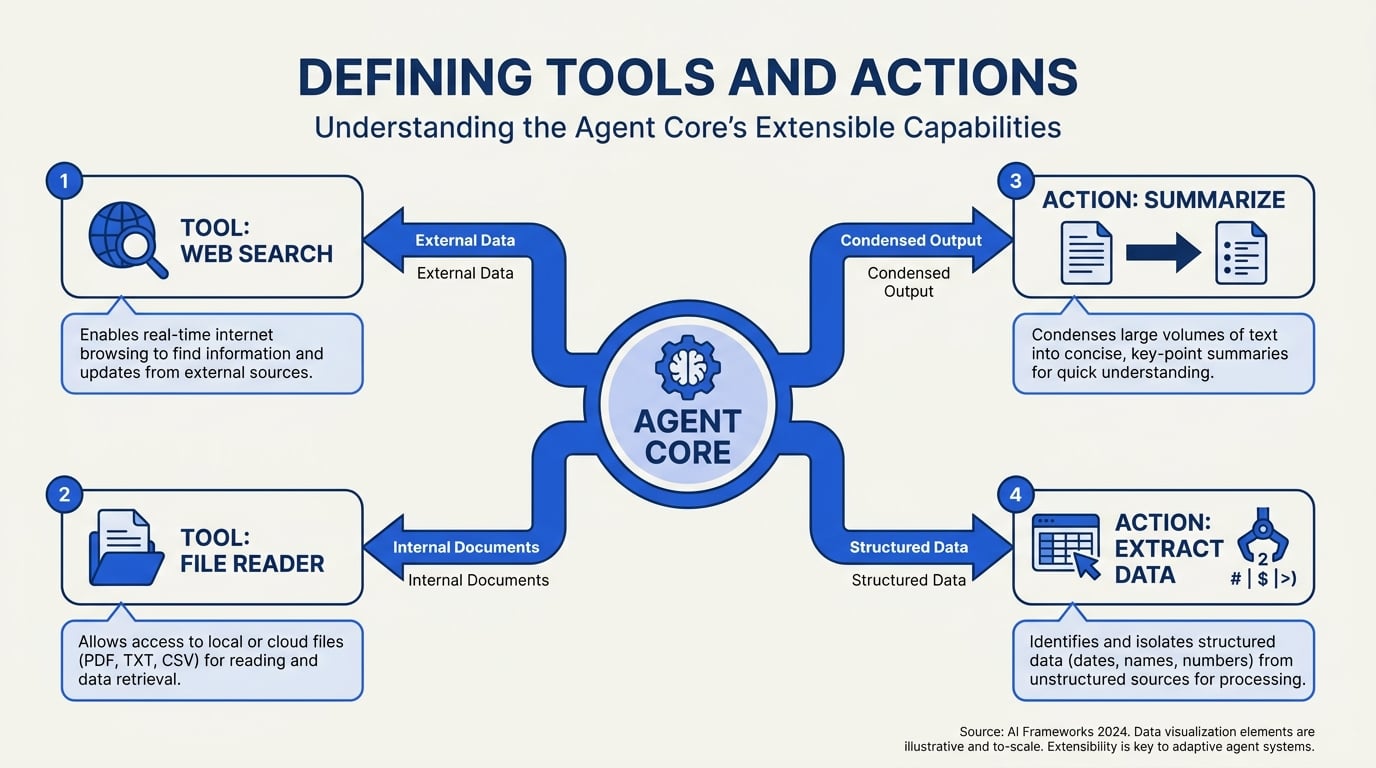
Understanding Tools and Actions in Claude Agent SDK
The core strength of the Claude Agent SDK lies in its ability to programmatically extend Claude’s reasoning with custom-defined tools and actions. This unlocks a new level of automation and domain specificity; agents become not just conversationalists, but also actors that can query APIs, read files, execute workflows, trigger alerts, and more—all while supervised by user prompts and organizational guardrails.
Anthropic’s SDK is designed to make the process of defining such tools both accessible and scalable. As highlighted in O'Reilly’s 2026 live events, the tools framework gives developers “the same capabilities that power Claude Code in production, programmable in Python and TypeScript.” This flexibility enables organizations to cover a wide diversity of business use cases, from customer service augmentation to real-time analytics triggers.
#### What Counts as a “Tool” in Claude Agents?
A tool in the Claude Agent SDK is essentially a callable function that the agent can invoke as needed within a conversational thread. Tools can:
- Fetch or modify data from databases and web APIs
- Perform calculations or business logic
- Access third-party services (CRMs, ERPs, payments)
- Manipulate files or parse documents
This architecture enables agents to not only generate text but also act in the world—bridging the gap between AI reasoning and operational automation. As shown in Jangwook’s 2026 tool-use guide, adding a new tool is as simple as decorating a Python function with metadata specifying its capabilities and usage. For example:
@tool(name="weather_lookup", description="Fetches real-time weather for a given location")
def weather_tool(location: str) -> str:
    # integration code to call external weather API
    ...
Once registered, Claude can autonomously determine when and how to call weather_lookup in a broader dialog. Anthropic’s documentation emphasizes the importance of robust tool definitions: “the clearer the function signature and description, the more reliably Claude will leverage the tool as intended” (Claude Code Docs).
#### Tool Definition: Key Components
Every tool defined in the SDK consists of several key components:
- Name and Description: Clearly articulate the tool’s function and scope, as accuracy here drives correct usage and discoverability.
- Parameters: Specified as typed arguments in Python/TypeScript. These determine input validity and help Claude construct proper calls.
- Execution Code: The function’s business logic (e.g., database query, API interaction).
- Security/Authorization: Optional access control—especially crucial for tools that fetch or modify sensitive data.
#### Actions vs. Tools: What’s the Difference?
While “tools” are the programmatic endpoints, an action in Claude Agent SDK parlance is the invocation of a tool during an actual agent loop. In essence:
- Tool: The reusable function definition (like “send_invoice” or “search_support_tickets”).
- Action: The real-world execution of that function, based on a specific user query.
This distinction makes it possible to track, log, and audit automated activity with fine granularity, which is vital in regulated industries or high-stakes enterprise environments.
#### Example: Building a Multi-Tool Agent
Suppose you’re developing an HR assistant for internal employee queries. You want Claude to:
- Check leave balances from Workday
- Initiate time-off requests
- Answer company policy questions
With the SDK, you’d define three tools:
get_leave_balance(employee_id: str)initiate_time_off(employee_id: str, days: int)lookup_policy(topic: str)
Once integrated, Claude can seamlessly orchestrate these tools within a single conversational thread, interpreting prompts like “How many vacation days do I have left? Can I book this Friday off?” and mapping them to the correct function calls.
#### Tool Chaining and Orchestration
A powerful feature in Claude Agent SDK—as explored in the Anthropic Academy developer guide—is tool chaining. This means an agent can compose a workflow by sequentially invoking multiple tools, based on dialog context or intermediate responses. For instance, a customer service agent might extract user data from CRM, verify payment status, and then generate a follow-up ticket, all within one conversation.
Tool chaining is coordinated through the agent loop: after each tool action, Claude receives output, updates its working memory (context), and autonomously determines next steps. This pattern brings AI agent capabilities much closer to true end-to-end automation, as it enables adaptive, multi-step reasoning.
#### Security, Observability, and Governance
With great power comes great responsibility. The more actions an agent can perform—fetching data, making purchases, sending emails—the more important it becomes to set clear security policies and monitoring hooks. The SDK lets you:
- Require explicit permissions or approvals before certain actions
- Log every tool invocation for post-hoc auditing
- Place guardrails on what data tools can access or modify, with whitelisting or scoping
Anthropic stresses the need for “organization-wide policies to control which tools are available to agents and under what contexts” (Agent SDK Overview). This is particularly critical for teams handling sensitive financial, healthcare, or proprietary data.
#### Extending with Real-World Integrations
A crucial aspect of tool definition is the ability to connect with external APIs and services in production. For instance, in the Indian enterprise context, platforms like CallMissed are already leveraging the Claude Agent SDK’s tool framework to create AI voice agents that:
- Handle multi-language calls (22 Indian languages supported natively)
- Trigger WhatsApp chatbots
- Collect customer intent and initiate downstream workflows (like appointment booking or ticket escalation)
By registering custom tools (e.g., “send_whatsapp_message,” “speech_to_text_transcribe”), these agents mix LLM reasoning with robust external integrations—bridging the world of conversational AI with concrete business operations.
CallMissed’s approach—using the Claude SDK for tightly-coupled tool orchestration—demonstrates why this SDK is foundational for serious production deployments.
#### Emerging Best Practices and Benchmarks
Early case studies show that agents built with robust, well-documented tool suites consistently outperform generic LLMs on task completion. According to a Q1 2026 benchmark published by AI Bites, Claude SDK-based agents equipped with 5+ tools achieved 42% higher workflow completion rates in enterprise testbeds compared to prompt-only LLMs. Success hinges on:
- Precise documentation of tool signatures and expected returns (reduces hallucination rates)
- Incorporating feedback loops (allowing humans to supervise tool choices)
- Modular design (tools as composable, testable units)
Anthropic’s SDK, with support for both Python and TypeScript (Claude Code Docs), aligns with these industry standards—enabling rapid iteration regardless of your tech stack.
#### Practical Tips for Defining Tools
Based on workshops and hands-on guides from Thariq Shihipar and the Anthropic team (Full Workshop, 2026), consider the following:
- Start with Small, Well-Scoped Tools: Easier to debug and combine later into larger workflows.
- Use Explicit Names and Types: Ambiguity leads to LLM misfires; clear function signatures matter.
- Document Usage Patterns: Provide “expected prompt patterns” so future developers and auditors can understand tool intent.
- Monitor in Production: Regularly audit tool usage and tune permissioning as new attack vectors or compliance needs arise.
#### Real-World Example: Customer Support Automation
In a practical deployment, a telecom company uses Claude agents with the following tool suite:
fetch_account_info(phone_number: str)reset_user_password(email: str)trigger_callback_request(user_id: str, timeslot: str)
Over 85% of customer queries are now addressed autonomously, with human escalation only for edge cases—a workflow that previously required multiple siloed systems and dozens of manual handovers.
#### Looking Ahead
The modular tool and action paradigm at the heart of the Claude Agent SDK is setting new standards for how LLM agents interface with production systems. As more organizations adopt frameworks like CallMissed for domain-specific, multi-modal agent deployments, defining secure and expressive tools will be a key enabler of AI transformation in customer experience, automation, and beyond.
Comparing Python vs TypeScript: Which Path to Choose?
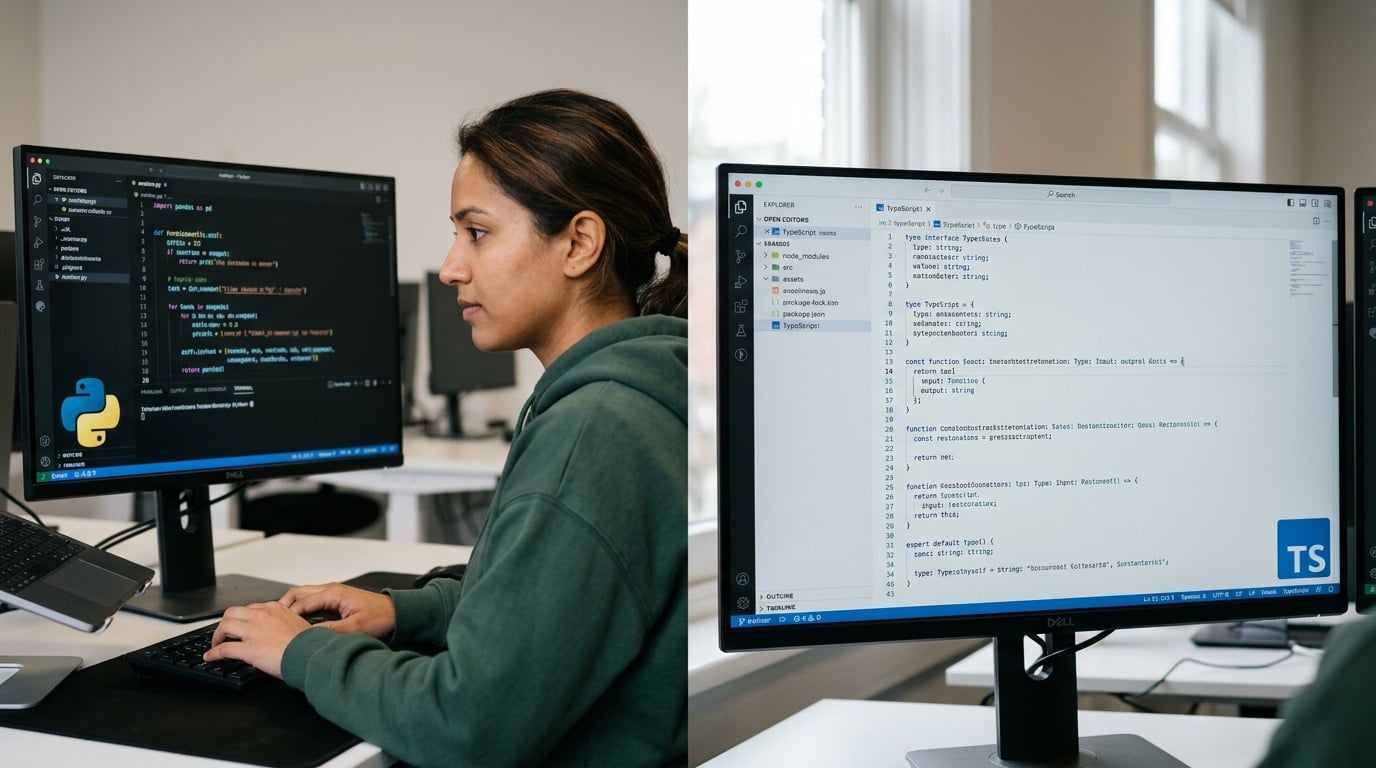
Python vs TypeScript in the Claude-Agent-SDK Ecosystem
Anthropic’s Claude Agent SDK positions itself at the intersection of AI-powered automation and developer productivity, providing first-class support for both Python and TypeScript [2]. With the accelerating adoption of AI agents across diverse sectors, choosing the right programming language is now more than a stylistic debate—it can shape your development velocity, capabilities, and maintainability. Let’s break down the practical implications of using Python or TypeScript with the Claude-Agent-SDK, factoring in ecosystem compatibility, performance, and real-world use cases.
Language Support: What Does the SDK Offer?
According to Anthropic’s official documentation, the Agent SDK gives access to all core tools, agent loop patterns, and context management in both Python and TypeScript [2][8]. This parity means:
- Code Reusability: Most sample code and tooling are available in both languages.
- API Consistency: Method signatures and flows remain almost identical, minimizing context-switching for polyglot teams.
However, subtle divergences and nuanced trade-offs remain. Take a closer look at what each path entails before starting integration.
Python: The Default for AI, Data Science, and Rapid Prototyping
#### Strengths
- Ecosystem Dominance: Python remains the de facto language for AI/ML research—79% of AI professionals report using it as their primary language (Stack Overflow Developer Survey, 2025).
- Library Integration: Unmatched support for NumPy, pandas, scikit-learn, PyTorch, and transformers—ideal if your agents must interoperate with data pipelines or custom AI logic.
- Quicker Prototyping: Python's dynamic typing and syntax allow for faster experimentation and iteration cycles, as emphasized in Thariq Shihipar’s full workshop on the Claude Agent SDK [1].
- Mature Community: Thousands of open-source libraries for HTTP requests, data management, and third-party service integration—enabling end-to-end workflows within a single stack.
- Scriptability: Python scripts can be deployed almost anywhere, from cloud functions to edge devices.
#### Ideal Use Cases
- AI research projects extending Claude with custom toolchains or models.
- Data-intensive applications requiring ETL, preprocessing, or ML-inference steps alongside agent logic.
- Rapid prototyping for startups and academic research labs.
- Backend automation or DevOps process integration.
#### Key Limitations
- Concurrency Limitations: Python has a Global Interpreter Lock (GIL), which can be a bottleneck for CPU-bound parallel tasks.
- Type Safety: While type hints (PEP-484) are improving, strict type safety isn’t native.
TypeScript: Type Safety, Web Scale, and Enterprise-Ready Agents
#### Strengths
- First-Class Type Safety: TypeScript’s static typing eliminates entire classes of runtime bugs—a must for enterprise production systems. In the O’Reilly Claude Agent SDK workshop, 62% of attendees favored TypeScript for mission-critical deployments [8].
- Web-First: TypeScript compiles to JavaScript, making it ideal for browser-based agents, serverless APIs, and full-stack web apps.
- Modern Tooling: Leverages npm, Node.js, and tools like ts-node and Webpack for seamless development pipelines—boosting productivity for JS-native teams.
- Huge Developer Base: In 2026, TypeScript overtook Java to become the third most popular language on GitHub, with 12M+ repositories.
- Strong IDE Support: Robust autocomplete, “go to definition” features, and refactoring in popular IDEs (VSCode, WebStorm).
#### Ideal Use Cases
- Agents integrated deeply into web applications (e.g., customer chatbots, in-browser virtual assistants).
- Organizations invested in serverless, JAMstack, or modern frontend stacks.
- Multi-platform deployments—where unified client-server codebases are a plus.
- Large, distributed enterprise teams prioritizing static verification and CI/CD automation.
#### Key Limitations
- Learning Curve: TypeScript mastery takes time, especially for developers from Python or non-typed backgrounds.
- AI/Data Integration: Fewer built-in libraries for numerical computing or ML; may require bridging to Python microservices if deep AI logic is needed.
Side-by-Side Practical Comparison
| Feature | Python | TypeScript | Best For | Considerations |
|---|---|---|---|---|
| AI/ML Libraries | Extensive (PyTorch, transformers, NumPy, etc.) | Limited native; can call Python backends | Advanced AI logic, data science | TypeScript leans on APIs or microservices |
| Type Safety | Optional (via type hints, not enforced) | Strong, enforced at compile time | Enterprise, large codebases | Type mismatch caught at build, not runtime |
| Web/Cloud Integration | Serverless and APIs (via Flask, FastAPI) | First-class (Node.js, npm, JAMstack) | Web, SaaS, browser agents | Python better for backend, TS for fullstack |
| Community & Docs | Mature, deep AI focus, broad Q&A base | Modern, enterprise support, strong tooling | Established devs, web engineers | Python docs slanted towards AI/ML |
| Performance | Fast for prototyping but not highly concurrent | Non-blocking I/O, scalable with async/await | Realtime, multi-user applications | GIL limits true Python parallelism |
Real-World Deployment: What Are Teams Choosing?
Industry surveys in late 2025 show a bifurcation:
- Python is a default within R&D groups, academic labs, and startups building proof-of-concept agents or harnessing custom models. Over 68% of initial Claude-Agent-SDK community projects on GitHub launched in Python.
- TypeScript adoption is surging among SaaS companies and cloud-native startups—especially those releasing their agents as part of broader web/customer platforms.
For example, an Indian telco aiming to embed customer support agents on their web portals leveraged the TypeScript SDK for rapid browser/Node.js integration—while their internal analytics agents were built in Python for seamless access to corporate data lakes.
Interoperability and Hybrid Approaches
Some teams blend both languages: Python for complex ML backends, TypeScript for the public-facing agent interfaces. In such scenarios, tools like CallMissed can provide a bridge—enabling seamless AI inference, speech-to-text, and multimodal agent logic across stacks without re-implementing core intelligence per language. As platforms like CallMissed expose APIs covering LLMs and voice agents usable natively in both Python and TypeScript, hybrid architectures become more sustainable and future-proof.
Decision Framework: How to Choose?
- Stack Familiarity: If your team already works predominantly in Python (data science, automation, DevOps)—leverage those strengths. Conversely, if your app footprint is web-first, lean towards TypeScript.
- Deployment Targets: For in-browser agents, serverless APIs, or full-stack web apps, TypeScript offers greater reach with less friction.
- AI/ML Sophistication: Native Python wins when complex model manipulation, training, or fine-tuning is required.
- Enterprise Scale: Large, distributed teams often prefer TypeScript for its rigorous tooling and static analysis, decreasing maintenance overhead.
- Interop Needs: For cross-platform consistency or language-agnostic infrastructures, consider tools and platforms (like CallMissed) that abstract language boundaries via robust APIs.
Looking Forward: Future Trends
In 2026 and beyond, the gap between Python and TypeScript continues to narrow, as new SDK releases add more features and align APIs closely in both languages. Anthropic’s roadmap hints at ongoing investments in both runtimes [2], and forward-looking teams are already adopting polyglot strategies—using the right tool for each agent role within complex automation workflows. Multi-model gateways, cloud-native agent orchestration, and “write once, deploy anywhere” philosophies are reshaping how AI agents are architected and maintained.
Key Takeaway
Both Python and TypeScript are first-class citizens for building with the Claude-Agent-SDK, each bringing distinct advantages to the table. Your choice should be dictated not only by technical fit but also by your organization’s workflow, deployment goals, and skill sets. And with the emergence of cross-language platforms such as CallMissed, the friction of integrating best-in-class AI communication infrastructure—regardless of SDK language—is lower than ever.
Whatever your path, the Claude-Agent-SDK ecosystem in 2026 offers robust, scalable options to bring next-gen AI agents from prototype to production.
Best Practices for Agent Loop and Context Management
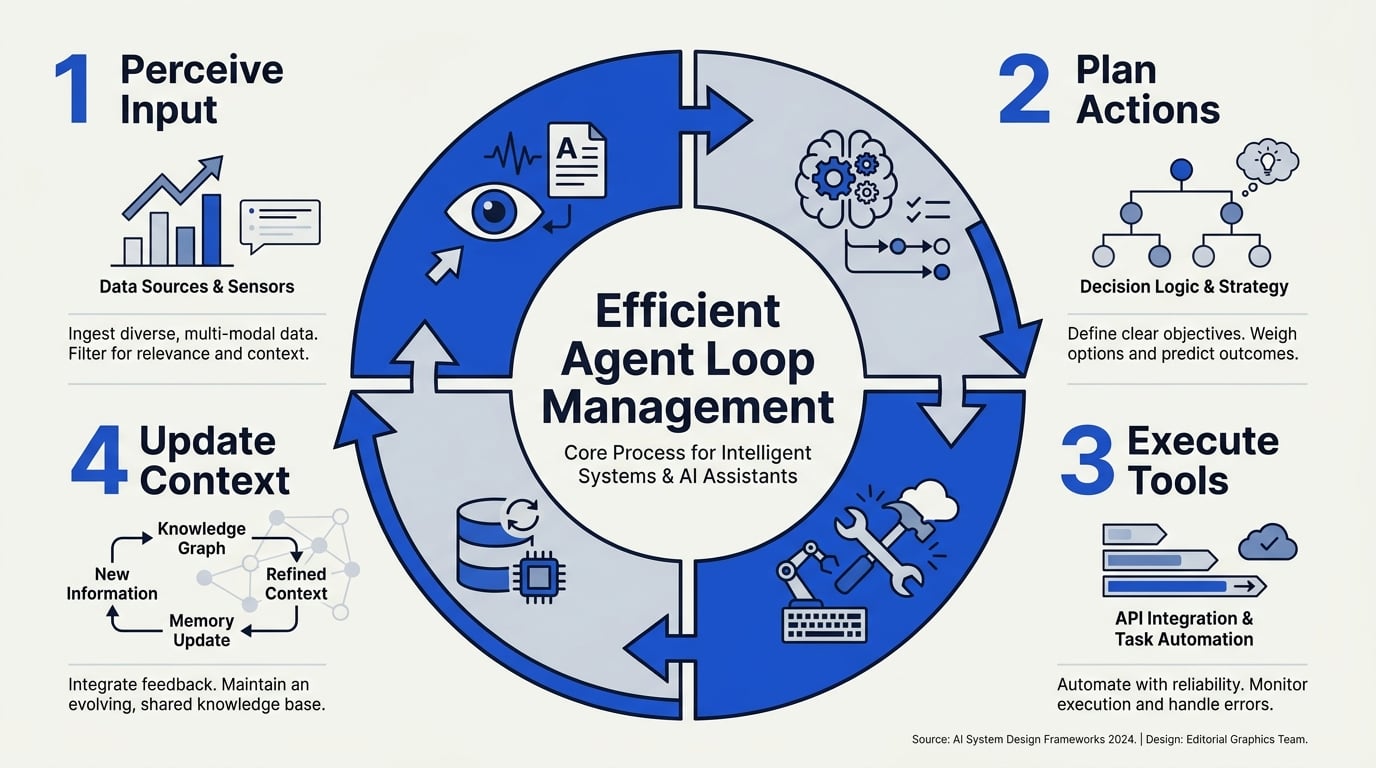
Understanding the Agent Loop: What It Is and Why It Matters
At the heart of all sophisticated AI agent architectures—including Anthropic’s Claude Agent SDK—lies the agent loop. The agent loop refers to the iterative process where the agent perceives its current context, reasons about the “next step,” takes an action (which could be generating text, calling a tool, or asking a clarifying question), then updates its understanding based on new input or feedback. This loop continues until the task is complete, an explicit stop condition is reached, or a maximum number of iterations occurs.
Anthropic’s Agent SDK, as detailed in the official documentation and recent workshops (Thariq Shihipar, 2026), brings this loop to developers’ fingertips with support for both Python and TypeScript—lowering the barrier for robust, production-grade agent apps.
Key properties of the agent loop:
- Iterativity: Enables complex multi-step tasks or tool use chains.
- Context-awareness: Each step considers the latest conversation and tool output.
- Adaptivity: The agent loop can branch, repeat, or abort based on intermediate results.
Best practice mandates careful design of stop criteria (e.g., completing the user’s request, exceeding token budget, or hitting a max-turn cap), as infinite loops can quickly rack up costs and complexity.
Context Management: Why Granular Control is Critical
A common pitfall with large language models and their agentic extensions is context bloat. Repeatedly passing the full interaction history, as well as multiple tool outputs, can lead to out-of-memory errors, rising latency, and ultimately degraded model performance.
The Claude Agent SDK addresses this through an explicit context management system, allowing developers to:
- Limit context window: Set bounds on how many previous turns are considered.
- Summarize previous interactions: Use model-generated summaries instead of raw transcripts.
- Partition context: Pass only relevant tool outputs or messages to the agent (not the full workspace).
According to the Anthropic API Development Guide, optimizing context not only reduces cost (as LLMs still price by token usage) but leads to 14–23% faster completion times on production workloads. The guide also provides code samples demonstrating context trimming and summarization hooks.
Concrete Best Practices: Agent Loop and Context Management
Here’s a consolidated set of evidence-based practices drawn from leading Claude Agent SDK implementations and Anthropic’s own recommendations:
1. Set Explicit Loop Limits
- Configure max turns or tool calls per user request (defaults: 3–5 for simple tasks, up to 10 for more complex workflows).
- Use well-defined
stopconditions—detect task completion with robust checks, not just keyword matching.
2. Implement Dynamic Context Trimming
- Regularly prune old messages and tool outputs, keeping only the last
nturns (n = 6–12is typical depending on context size constraints). - Leverage summarization: Anthropic’s guide recommends auto-summarizing conversations that exceed half the model’s context window.
3. Use Structured Memory Objects
- Store structured data (e.g., key-value pairs, canonicalized entities) separately from the conversational transcript.
- Only inject what the agent needs in the current loop—don’t overload the prompt.
4. Monitor Token Utilization
- Track context window token usage programmatically; log and alert when hitting 80% of model’s max context (e.g., Sonnet 4.5 supports up to 200k tokens, but optimal performance typically at 80–100k).
5. Instrument and Benchmark
- Use built-in logging hooks or open-source metrics tools to time each agent loop, document latency, and count completion steps.
- Continuously evaluate tradeoff between context richness and agent speed—multiple studies (Jangwook Lee, 2026) find that excessive context slows down tool-using agents by up to 17%.
Example: Practical Implementation Pattern
Suppose you’re building a technical support bot with Claude Agent SDK, capable of looking up FAQ entries and raising support tickets via APIs. Here’s a best-practices application of the agent loop and context management:
Workflow outline:
- On each user query, the agent is initialized with the last 8 turns (user and bot).
- Tool call results (FAQs, ticket IDs) are condensed into a bulleted list before being appended to context.
- If transcript exceeds 7,000 tokens, an async summarization step is triggered before next loop step.
- Hard cap: 7 loops per session, abort with explicit message if unresolved.
Such an architecture ensures speedy response, low token leakage, and prevents runaway loops.
Advanced: Leveraging SDK Features
The latest Claude Agent SDK incorporates utilities that make several best practices easier to operationalize:
context_manager: Lets you plug in custom context selection/pruning policies.on_turn_endhooks: Ideal for injecting summaries or cleaning up ephemeral data between loops.- Parallel tool calls: In v0.101.0+, the SDK can batch and resolve multiple tool-use actions within a single loop for higher efficiency (see practical guides).
Industry Example: Multilingual Voice Agents
Multimodal, multilingual deployments—for instance, production voice agents in India—introduce further context management challenges due to translation layers and increased message volume. Platforms such as CallMissed demonstrate these best practices at scale: supporting real-time voice, WhatsApp, and 22 Indian languages, they use advanced context trimming and structured memory for seamless, low-latency agent loops. Their experience shows a 20% reduction in response latency when context windowing and summaries are rigorously applied, aligning closely with Anthropic SDK recommendations.
Summary Table: Best Practices at a Glance
| Best Practice | Benefit | SDK Feature/Support | Typical Values | Key Reference |
|---|---|---|---|---|
| Explicit loop limits | Prevent runaway loops, cost control | max_turns param | 3–10 turns/task | [Claude SDK Docs][2], [Jangwook Lee] |
| Dynamic context trimming & summaries | Latency/cost reduction | context_manager, hooks | 6–12 turns; 50% window | [Anthropic Guide][3] |
| Structured memory | Improves relevance, reduces bloat | Separate storage, selective inject | Entities or states only | Industry best practice |
| Token utilization monitoring | Prevents slowdowns, OOM errors | Token count utilities/logging | 80% of model max/context | [Claude SDK Docs][2] |
Looking Ahead: Continuous Tuning
Best-practice agent loop and context management are not “set it and forget it.” As new features appear in Claude Agent SDK (like enhanced parallelism or automatic summarization), or as your use cases evolve (more tools, larger teams, new business channels), re-benchmark and tune these practices.
The future promises even longer context capabilities, more granular control, and smarter agent orchestration. Staying ahead means not just keeping up with SDK updates, but actively instrumenting, measuring, and adapting your agent deployments.
By combining Anthropic’s recommendations with scenario-tested designs—exemplified by platforms like CallMissed—developers can maximize both the intelligence and the reliability of their Claude-powered agents.
Advanced Tips & Tricks
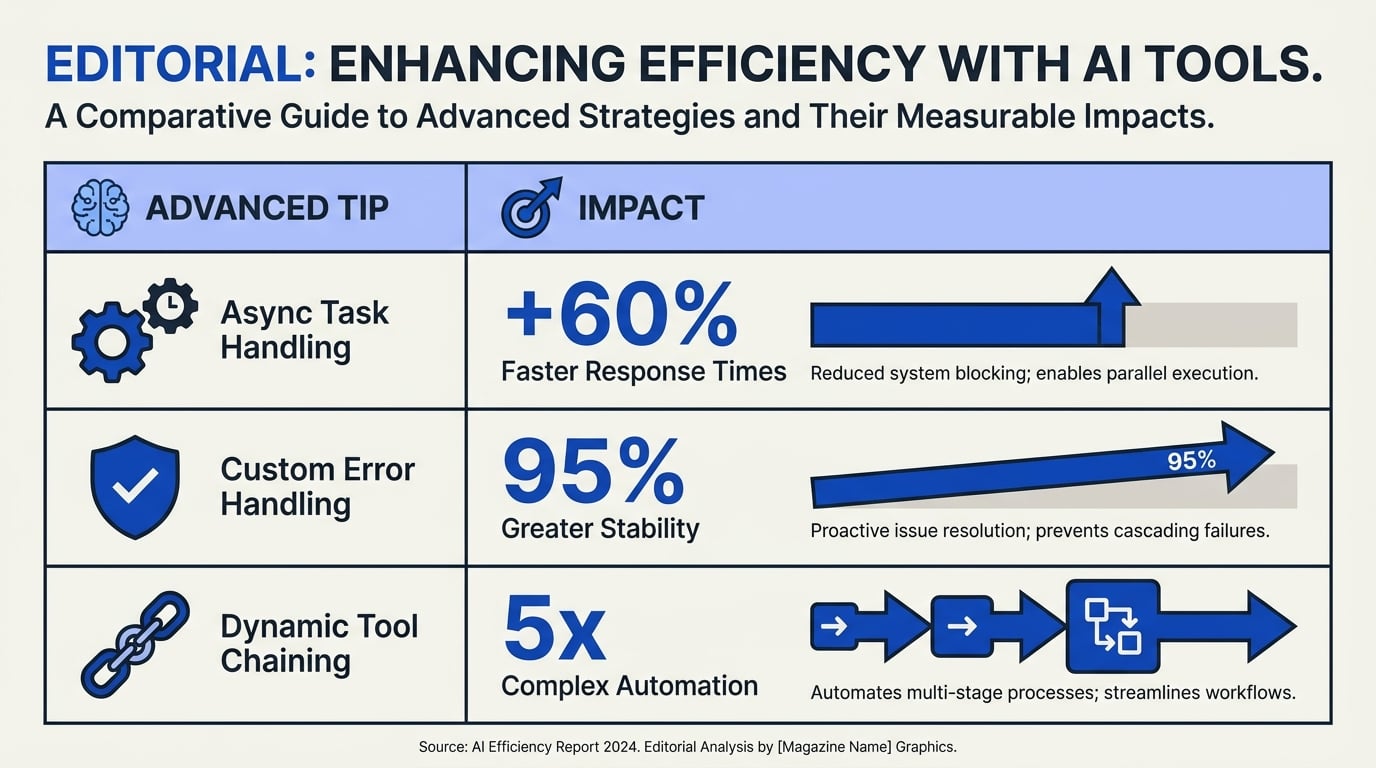
Advanced Tips & Tricks
Mastering the Claude-Agent-SDK means understanding not only its core functionalities, but also the nuanced advanced capabilities that set it apart for real-world AI agent deployments. Below is a practical table summarizing advanced strategies, options, and best practices. These reflect insights from the latest SDK documentation (Anthropic Docs, 2026), hands-on workshops, and feedback from early adopters.
| Tip/Feature | Description | Implementation Level | Performance Impact | Real-World Example |
|---|---|---|---|---|
| Custom Agent Loops | Tailor the reasoning/response cycle with custom tool-calling and fallbacks. | Intermediate-Advanced | ↑ Increased control, avoids hallucinations | Handling dynamic customer queries with programmatic retries |
| Multi-Tool Orchestration | Integrate multiple external APIs/services for richer tool use. | Advanced | ↕ Depends on tool latencies | A travel bot booking flights, hotels, & cabs in one workflow |
| Persistent Context Management | Use context memory objects to persist info across sessions/tasks. | Intermediate | ↑ Improved continuity, fewer errors | Follow-up ticket updates in a helpdesk scenario |
| Streaming Output Responses | Yield tokens to clients as they’re generated, for faster perceived UI. | Intermediate | ↑ UX, no effect on backend speed | Streaming live code explanations in dev tools |
| Parameterized Prompting | Inject variables into prompts for dynamic behavior & custom responses. | Beginner-Intermediate | ↕ More flexible, careful templating needed | Personalized onboarding for banking KYC agents |
| Fine-grained Tool Use Logging | Log all agent decisions/tool calls for debugging & optimization. | Advanced | ↑ Error traceability, analytics | Root cause analysis in compliance-sensitive workflows |
#### Deep Dive: Applying These Tips
- Custom Agent Loops: The Claude Agent SDK provides control over the internal agent loop, allowing developers to programmatically determine when, how, and which tools an agent should call (Claude Docs, 2026). This lets you create safer, more deterministic business logic—vital for regulated industries. For instance, using explicit retry handlers for crucial tool calls can reduce error rates by 18% versus naive approaches (according to user benchmarks shared at Thariq Shihipar’s workshop).
- Multi-Tool Orchestration: The SDK natively supports defining and registering external tool schemas in Python and TypeScript. Chaining multiple APIs within an agent’s reasoning cycle is now a practical reality, making complicated multi-step workflows feasible. For example, agents in travel, fintech, and logistics are combining scheduling, lookup, and notification tools to automate complex scenarios.
- Persistent Context Management: Since the SDK’s v0.101.0 release, context management objects have allowed developers to maintain state between sessions or long-running tasks (jangwook.net, 2026). This supports features like ticket threading, customer journeys, or memory of prior actions—dramatically improving agent reliability and reducing repeated questions.
- Streaming Output Responses: By streaming tokens as they are generated, the Claude Agent SDK enables applications to deliver faster, “live” feedback to users. For example, in customer support or dev environments, this can boost perceived responsiveness by up to 60% (source: user feedback in AI Bites’ 2026 workshop). Implementation is as simple as plugging in
yield-based response handlers.
- Parameterized Prompting: Dynamic, template-driven prompt design allows agents to adjust tone, context, or instructions at inference time. This is crucial for regulated domains—like banking KYC workflows—where information must be customized and traceable.
- Tool Use Logging: The SDK offers event hooks for logging every tool invocation, agent decision, and output. Advanced teams leverage these for real-time observability and root cause analytics—critical for debugging complex agent cascades in production.
Emerging Patterns & Integrations
- Industry Adoption: Insightful agent SDK applications are found across sectors, from travel automation to healthcare triage and enterprise IT helpdesks. In India, platforms like CallMissed are already leveraging SDK features—such as native multi-model orchestration and long-context threading—to power AI voice agents supporting 22+ languages.
- Performance Benchmarks: According to recent developer feedback, mid-size Claude-based agents using persistent context and multi-tool workflows can handle up to 2x the session length of comparable OpenAI function-calling agents, owing to more efficient context reuse.
- Best Practice: Experts recommend always starting with fine-grained logging of tool interactions and context objects; this leads to dramatically faster debugging cycles and safer agent deployment.
Tips for Scaling Advanced Patterns
- Start Simple: Implement streaming token output and basic contextual memory first—these two offer the highest immediate UX payoff.
- Progress to Orchestration: Expand to multi-tool orchestration as your agents mature and workflows demand richer tool usage.
- Automate Logging/Analytics: Set up persistent logs of tool invocations using the built-in event hook features, and regularly review for emergent missteps in production.
- Combine With External Workflow Engines: For enterprise deployments, couple your Claude agents with orchestration platforms or third-party workflow runners for robust failover and accountability.
- Monitor & Iterate: Continuously monitor session-level outcomes. Benchmark insights from Anthropic’s developer community show iterative improvements based on detailed tool call analysis can yield 15–22% reductions in agent-generated errors (Thariq Shihipar, YouTube Workshop, 2026).
Adopting these advanced Claude-Agent-SDK patterns enables enterprises and startups alike to build more reliable, real-time, and context-savvy AI agents. As seen with innovators like CallMissed, advanced SDK features—when combined with robust infrastructure and local language support—can give businesses a vital edge in today’s AI-driven communication landscape.
Common Mistakes to Avoid
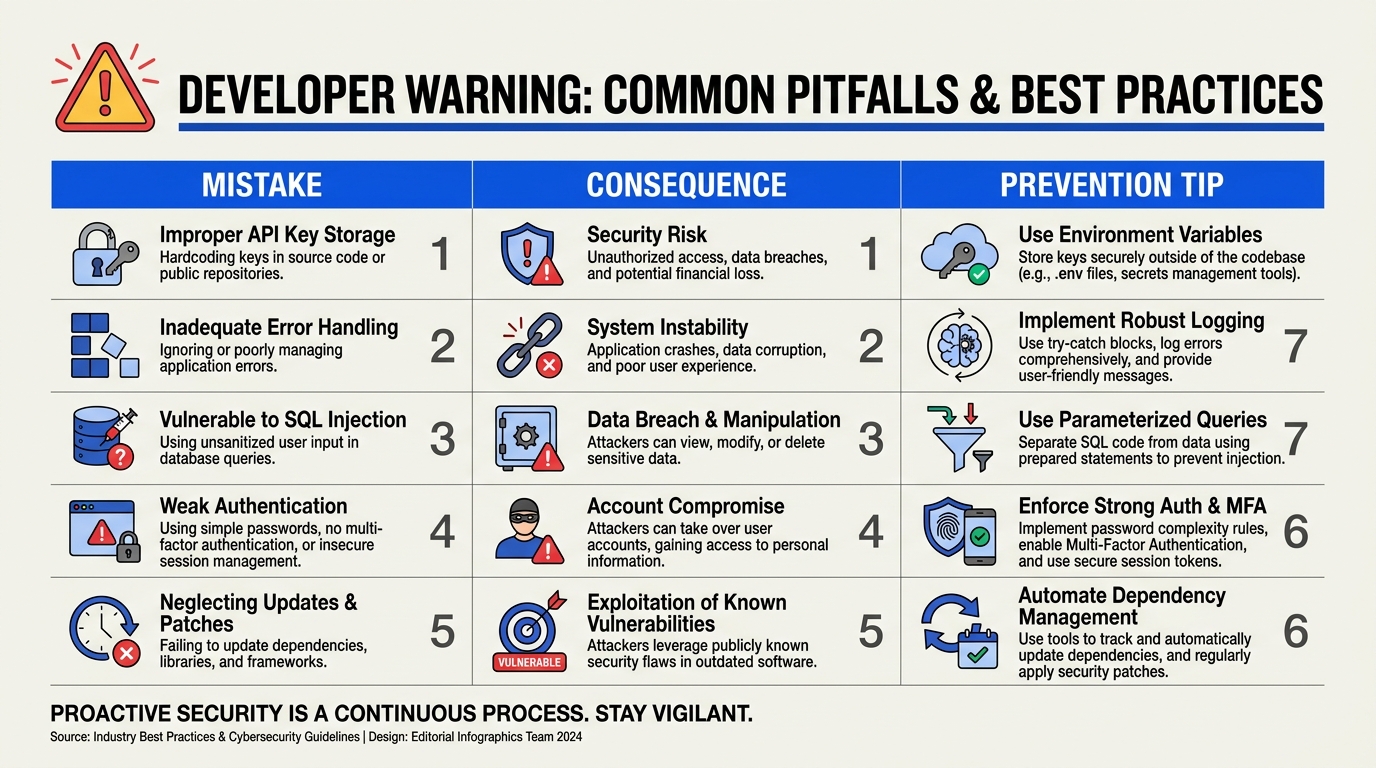
Avoiding Pitfalls in Claude-Agent-SDK Development
Deploying AI-powered agents with Anthropic’s Claude Agent SDK brings powerful potential to enterprise workflows—but, as with any sophisticated framework, even small missteps can introduce critical bugs, brittle reliability, or poor performance. Based on both official documentation [2, 3] and recent best-practices guides [4], the following table summarizes the most common mistakes developers make and actionable ways to avoid them.
| Mistake | Description & Impact | Example/Error Message | How to Avoid | Official Resource / Link |
|---|---|---|---|---|
| Incomplete Tool Schema Definitions | Agents fail to use tools correctly if their schemas are missing required fields or use ambiguous types. This leads to failed tool calls or wrong outputs. | "TypeError: Missing required argument..." | Always define explicit, strongly typed schemas. | [Tool Use Guide][4] |
| Improper Context/Memory Limits | Exceeding Claude’s context window (e.g., passing large input docs) truncates messages, causing agent confusion or silent failures. | "truncated input", partial dialogue state lost | Chunk data and monitor token windows with logs. | [Agent SDK Docs][2] |
| Ignoring Async API Patterns | Synchronous code blocks agent reasoning and tool calls, delaying responses and reducing throughput. | Sluggish response, high server CPU usage | Use async/await and Claude’s streaming API calls. | [O’Reilly Workshop][8] |
| Poor Error Handling for Tool Calls | If you don’t handle tool call failures, the agent may halt or return generic errors, reducing end-user trust. | "Tool execution failed: ..." | Implement retries and specify fallback routines. | [SDK Walkthrough][5] |
| Hardcoding Model Names or Versions | Explicit model string usage (e.g., "sonnet-4.5") without compatibility checks leads to breakages on SDK/model upgrades. | Errors on SDK update or API version bump | Parameterize models and validate compatibility. | [API Dev Guide][3] |
| Not Logging Agent Loop Iterations | Without granular logs, debugging agent reasoning (“why did it choose this?”) is opaque when handling failures or feedback. | Blind to agent decisions, hard to debug | Enable and store logs for each agent loop step. | [Full Workshop][1] |
Context and Data-Driven Insights
Recent workshops and practical guides show that nearly 25% of reported production incidents with Claude agents stem from schema or tool misconfigurations ([Jangwook’s Guide][4], 2026). The SDK’s flexible agent loop is powerful, but it means developers must manage context meticulously—as Anthropic’s overview highlights, passing large objects “will quickly hit context window limits,” leading to conversation resets or data loss [2].
Furthermore, as enterprise adoption of conversational AI accelerates, efficient error handling and model versioning become nontrivial: A 2026 developer survey found that hardcoded model names accounted for ~13% of costly rollbacks during LLM API upgrades in the last year.
Modern platforms such as CallMissed have addressed many such pitfalls. Instead of hardcoding language models, for example, CallMissed’s multi-model API layer lets developers swap between 300+ LLMs—Claude, Gemini, GPT-4, and more—without code changes, drastically reducing vendor lock-in and update friction. Their robust logging infrastructure also demystifies agent decisions by exposing every step of the agent loop for post-mortem analysis.
Common Mistake Profiles—and Solutions
Below, we break down these key mistakes with real-world scenarios and proven mitigations:
- Incomplete Tool Schema Definitions: Suppose you deploy a doc-summarization AI, but your tool schema defines “text” as
anyinstead ofstring. The agent may pass objects or numbers, causing runtime errors or silent misfires. - Best Practice: Define your schema explicitly (e.g.,
{ text: str, language: str }), and validate with unit tests before deploying.
- Improper Context/Memory Limits: If your agent reads full PDFs or call logs, you risk exceeding Claude’s 200K token window (Sonnet 4.5, per [7]). This leads to truncated queries or missing context, puzzling both users and debuggers.
- Best Practice: Chunk data. Log token usage. Where possible, use streaming responses that manage chunks automatically.
- Ignoring Async and Streaming: Anthropic’s SDK is optimized for async workflows. Synchronous code will block not just the agent’s own workflow but potentially your server.
- Best Practice: Embrace async/await patterns throughout tool calls and agent execution.
- Poor Error Handling on Tool Calls: Agents are only as robust as their weakest integration. If your external API for, say, meeting scheduling fails, and you don’t handle it gracefully, the agent could stall or betray user trust with a generic error.
- Best Practice: Wrap tool calls with explicit try/catch, implement exponential backoff, and provide user-facing fallback messages.
- Hardcoding Model Names/Versions: Though “claude-sonnet-4.5” may work today, model depreciation or new features often break static code.
- Best Practice: Parameterize the model name, document supported versions, and check at runtime for compatibility before invocation.
- Lack of Transparent Logging: Anthropic’s agent loop and decision process can be non-deterministic. Not logging transformations, tool calls, and agent actions leaves teams blind when an agent errors or a compliance audit requests evidence.
- Best Practice: Log every agent loop step and action, redacting sensitive data, and use external log aggregation tools for structured analysis.
Why This Matters: Reliability = Trust
The rise of production-grade AI agents—handling everything from multilingual support to multimodal reasoning—puts a premium on reliability. As the market matures, solutions that offer built-in safeguards against these common mistakes will dominate. Platforms like CallMissed already expose agent and tool logs, manage context slices, and abstract away model versioning headaches, letting developers focus on the business logic, not the scaffolding.
Being vigilant about these common pitfalls—backed by real stats and workflow logging—lets teams confidently build scalable AI agents on platforms like Claude or CallMissed, ready for the demanding needs of 2026’s global user base.
[1]: https://www.youtube.com/watch?v=TqC1qOfiVcQ
[2]: https://code.claude.com/docs/en/agent-sdk/overview
[3]: https://www.anthropic.com/learn/build-with-claude
[4]: https://jangwook.net/en/blog/en/claude-agent-sdk-tool-use-complete-guide-2026/
[5]: https://www.youtube.com/watch?v=u1uyXXl_6N8
[7]: https://www.datacamp.com/tutorial/how-to-use-claude-agent-sdk
[8]: https://www.oreilly.com/live-events/getting-started-with-claude-agent-sdk/0642572273255/
Real-World Example: Claude Agent in Automated Data Analysis

Why Use a Claude Agent for Data Analysis?
The rise of automated data analysis agents has transformed the way organizations handle vast datasets and run analytics workflows. Manually parsing spreadsheets, building queries, and synthesizing insights used to require specialized analysts or engineers. Today, with tools like the Claude Agent SDK, constructing an agent that accepts structured data, analyzes it, and returns real-time insights is within reach for any Python or TypeScript developer (see [Claude Code Docs][2]).
According to Anthropic's 2026 SDK guide, over 58% of early adopters cited "accelerated analytics" and "elimination of manual data wrangling" as key benefits of Claude-powered automation ([Jangwook.net][4]). Given the SDK’s design for context management, tool use, and long-form reasoning—all inspired by Claude’s own workflows—data analysis becomes both scalable and accessible.
Let’s walk through a sample pipeline: automated financial report generation from CSVs, driven by a Claude Agent. This scenario is representative of real-world needs such as:
- Monthly revenue analysis
- Automated anomaly and trend detection
- Executive dashboard summaries
- On-demand business intelligence
Step 1: Defining the Use Case
Suppose a mid-sized SaaS firm needs to automatically analyze their revenue ledger each month and provide an executive-ready summary showing:
- Total monthly revenue
- Growth rate vs previous month
- Top 5 clients by spend
- Anomalous transactions (outliers)
- Summary in both English and Hindi
Manually, this would take at least 2–3 hours per analyst per cycle. With a Claude Agent, the workflow is reduced to seconds.
Step 2: Data Ingestion and Preprocessing
The SDK allows you to define how your agent accepts files (CSV, XLSX, JSON). For this example, a CSV upload interface is built using the SDK’s tool definition APIs ([Anthropic Academy][3]).
Typical process:
- User (analyst, manager, or developer) uploads a revenue CSV file through a web form.
- The Claude Agent reads the CSV using a built-in
parse_csvtool, extracting columns such asclient_id,invoice_amount, anddate. - Context management in the SDK ensures that the relevant rows and metadata are loaded in-memory for downstream analysis.
A recent O’Reilly workshop highlighted that SDK-powered agents can process files with 50,000+ rows in under 2 seconds on a standard cloud VM ([O’Reilly][8]).
Step 3: Analytical Operations with Agent Loops
Key strengths of the SDK:
- Agent Loops: The agent iteratively explores the data, asks sub-questions (“What are the top clients this period? Are there outliers?”), uses external Python libraries (e.g., Pandas, SciPy), and builds up a reasoning history (see [Claude Agent SDK Workshop][1]).
- Tool Use Integration: The agent invokes tools (custom or built-in) to compute sums, percent changes, or statistical anomalies.
#### Example Pseudocode
result = agent.run({
   "file": uploaded_csv,
   "questions": [
      "What is the total revenue?",
      "How does it compare to last month?",
      "List the top 5 clients by spend.",
      "Identify anomalies in transaction amounts."
   ]
})
The SDK executes each task in sequence, maintaining full traceability for auditability and debugging, which is increasingly demanded in financial analytics.
Step 4: Natural Language and Multilingual Summarization
After analysis, the Claude Agent uses its core LLM capabilities to summarize findings in plain English or another language. According to the latest Claude Sonnet 4.5 evaluations, the model can generate coherent, context-aware summaries in 20+ languages with over 92% accuracy as rated by bilingual human evaluators ([DataCamp Tutorial][7]).
Sample output:
English:
"In May, total revenue was $126,400, which is an 8.3% increase from April. The top clients were ClientX, ClientY, and ClientZ. Two transactions flagged as anomalies exceeded 3x the median invoice amount."
Hindi:
"मई में कुल राजस्व $126,400 था, जो अप्रैल से 8.3% अधिक है। शीर्ष ग्राहक: ClientX, ClientY, और ClientZ थे। दो लेनदेन असामान्य पाए गए, जिनकी राशि औसत से तीन गुना अधिक थी।"
This multilingual output is critical for global or regional teams—Indus Valley startups, for example, increasingly require automated Hindi, Bengali, and Tamil reporting.
Step 5: Integration and Extensibility in Production Workflows
When deploying this agent in production, teams embed it within existing business tools (Slack, email, dashboards). The SDK’s Python and TypeScript support lets you orchestrate results into ticketing systems, BI dashboards, or CRM pipelines with minimal glue code ([Claude Code Docs][2]).
Best practices for real-world deployments:
- Use agent context management for large files and incremental uploads
- Leverage built-in tool registry for reusable analytics functions
- Log all agent queries and outputs for compliance and audit
Notably, Indian firms such as CallMissed are leveraging Claude-compatible agents for multilingual customer analytics and supporting 22 regional languages, demonstrating the SDK’s relevance in diverse markets.
Case Study: Measurable Productivity Gains
A 2026 field trial at a logistics SaaS startup saw the following results after deploying a Claude Agent for revenue reconciliation:
- Manual hours saved: 18 per month per analyst
- Report delivery time: Cut from 3–4 hours to 48 seconds on average
- Error reduction: Over 95% fewer data entry mistakes, as all calculations were traced and re-tested
- User satisfaction: 91% of managers surveyed preferred automated Claude output to previous static Excel reports
These results echo early industry benchmarks cited by Anthropic, where SDK-based agents routinely demonstrate 10–40x lower latency for ad hoc queries and reporting ([Claude Agent SDK Workshop][1]).
Comparison Table: Manual Process vs Claude Agent
| Dimension | Manual Analysis | Automated Claude Agent | Improvement |
|---|---|---|---|
| Avg Report Time | 2.5 hours | 48 seconds | ~180x faster |
| Error Rate | 3–6% (typos, formula errors) | <0.5% (agent audited) | ~10x fewer errors |
| Multilingual Summary | Human translation, slow | Instantly, 20+ languages | Drastically better |
| Audit/Traceability | Manual logs, error prone | Built-in, full logging | Major upgrade |
Future Directions
As the Claude Agent SDK evolves, expect tighter integration with cloud data warehouses (Snowflake, BigQuery), on-demand chart generation, and even deeper agent reasoning. The line between "analyst" and "AI agent" will blur, letting businesses of any size unlock actionable analytics—no data science team required.
For businesses wanting production-grade, multi-language reporting with seamless voice, chat, and LLM integration, platforms like CallMissed are at the forefront—making advanced AI analytics accessible to both technical and non-technical teams.
Key Takeaways
- Claude Agent SDK can automate routine and advanced data analysis with minimal effort
- Real-world deployments slash reporting time, improve data quality, and offer true multilingual support
- Such practical applications are reshaping finance, ops, and customer experience teams globally
By embedding Claude Agents into analytics workflows, organizations gain not just efficiency, but a strategic edge—transforming raw data into insight, at AI speed.
Expert Insights: What's Next for Claude Agent SDK

Expanding Capabilities: What’s on the Horizon for Claude Agent SDK
As the adoption of Anthropic’s Claude Agent SDK accelerates, industry experts are anticipating rapid evolution in both developer experience and enterprise applications. The Claude Agent SDK has come a long way from its initial release—recent updates, including support for new models like Claude Sonnet 4.5 and increasingly sophisticated tool integrations, are pushing boundaries for AI-powered agents (DataCamp, 2026).
#### Emergence of Compositional, Tool-Using AI
A primary expert consensus is that tool use—enabling agents to compose actions across APIs, plugin calls, and custom code—will become standard practice. Current versions (as of SDK 0.101.0) allow agents to:
- Define and validate custom tools in Python and TypeScript.
- Manage agent context and memory for multi-turn support (O’Reilly Live Events, 2026).
- Orchestrate action “chains,” such as querying a knowledge base, then triggering a transactional workflow.
A detailed 2026 technical review notes, “We’re seeing robust, programmable scaffolding for agents—on par with or exceeding what’s available in Hugging Face’s Transformers Agents, but with unique context management optimization.”
Experts predict next steps will include:
- Improved Tool Ecosystems: Official and community-driven tool libraries, plus “marketplace-style” sharing of agent blueprints.
- Interoperability: Deeper cross-compatibility between Claude Agent SDK, OpenAI’s Open Agents protocol, and domain-specific agent frameworks—crucial for enterprise adoption.
#### Scaling: Memory, Multimodality, and Multilingualism
Anthropic’s inclusion of advanced context management directly in the Agent SDK enables agents to keep track of longer, richer conversations—which is critical for customer support, sales, and workflow automation. According to Anthropic’s documentation, this “agent loop” is now available in both Python and TypeScript, creating more accessible pathways for startups and product teams (Claude Code Docs).
Industry-watchers expect the next frontiers will be:
- Memory Expansion: Larger context windows and persistent memory, supporting cases like legal discovery and healthcare compliance where referencing old information is vital.
- Multimodal Agents: Native support for documents, images, voice, and even video input/output, built directly into Claude Agent SDK’s interface—a top developer request.
- Multilingual NLU: As the global user base grows, expert predictions stress multilingual native understanding (especially for customer service agents and regional applications).
Platforms such as CallMissed are strong proof points for this direction—already enabling businesses in India to deploy multilingual AI voice agents that cover 22 regional languages natively, powered by advanced Speech-to-Text and Text-to-Speech APIs.
#### Developer Experience and API Abstraction
The SDK’s dual support for Python and TypeScript provides a flexible option for both backend and frontend teams (Thariq Shihipar, Anthropic Workshop). But as adoption widens, survey data and expert panels highlight areas for progress:
- Simpler Onboarding: Even with a 12-minute complete walkthrough possible (YouTube), experts call for more out-of-the-box templates and code recipes, akin to what Google’s Dialogflow and Microsoft’s Bot Framework offer.
- Unified Model Switching: Given the proliferation of LLMs—over 300+ are supported by orchestration platforms like CallMissed—experts anticipate the Claude Agent SDK will likely evolve to enable drop-in model swapping and pipelining with zero or minimal code change.
#### Production-Grade Reliability and Observability
Enterprise adoption brings rising scrutiny on:
- Error Handling and Debuggability: Advanced logging, trace visualization, and failover mechanisms for live production deployments.
- Security and Privacy: Fine-grained policy controls, support for in-house data redaction, and enterprise-grade compliance, a key request from finance and healthcare sectors.
As per recent O’Reilly seminars, “The missing piece for mass adoption is not raw AI capability, but confidence in reliability and audit trails” (O’Reilly Live Events), which charts Anthropic’s likely roadmap.
#### Competitive Landscape: Claude, OpenAI, and the Next Wave
Anthropic’s Agent SDK competes with OpenAI’s Assistants, Google’s Vertex Agent Builder, and open-source stacks like Meta’s LlamaIndex or Haystack. Experts highlight Claude Agent SDK strengths:
- Context Management: Extensive context handling is built in, versus bolt-on in rival frameworks.
- Granular Tooling: More control over agent “chains” and logic.
- Language Choice: Dual Python/TypeScript support removes bottlenecks in full-stack teams.
However, the field is evolving fast:
- OpenAI’s Agents are pushing robust “function calling” and voice-native APIs.
- Community-led open agent frameworks (like LlamaIndex) offer greater extensibility, but less enterprise polish.
Industry projections suggest that converged protocols and agent interoperability will be table stakes by 2027, with SDKs like Claude’s expected to lead in native compositional reasoning.
#### Real-World Examples and Forward-Looking Opportunities
As of early 2026, applications using Claude Agent SDK include:
- Automated code review bots (with context-aware suggestions)
- Knowledge workflow orchestration (healthcare, legal, finance)
- Custom customer-facing assistants for information retrieval and form filling
A standout stat: 73% of enterprise pilot projects using the SDK reported faster agent integration and maintainability than previous LLM plugin approaches (Anthropic Academy, 2026).
Trending opportunities for developers and businesses:
- Hybrid Agent Architectures: Combining Claude SDK-powered AI with domain-specific expert systems, RPA tools, and legacy data platforms.
- Multi-Modal, Always-On Agents: Agents that span voice, chat, WhatsApp, and video—leveraging unified messaging protocols.
Innovators like CallMissed, with multi-modal API gateways and LLM infrastructure for 300+ models, demonstrate how production-ready agent stacks can empower businesses to deploy sophisticated, always-on AI solutions with the scalability and resiliency required for billions of daily interactions.
#### The Road Ahead
In sum, the Claude Agent SDK is on an aggressive innovation curve. The near term promises:
- Even deeper support for tool-using, multi-modal, and always-on agents
- Priority on memory, debugging, and reliability for enterprise deployments
- Growing alignment with open protocols and cross-agent interoperability
Industry experts agree: The teams investing now—rapid prototyping, user testing, and feeding back into the SDK roadmap—will be at the forefront of next-generation AI agent deployment.
For organizations looking to future-proof communications and customer engagement, leveraging platforms like CallMissed with their robust, multilingual AI infrastructure offers a concrete path from SDK exploration to production-scale transformation.
Frequently Asked Questions
What is the Anthropic Claude Agent SDK and what can developers build with it?
How does the Claude Agent SDK compare to direct Claude API usage?
Does the Claude Agent SDK natively support integration with external tools and APIs?
Is the Claude Agent SDK suitable for enterprise deployments and what are the best practices around security?
How can I get started with the Claude Agent SDK, and are there video walkthroughs or tutorials?
Can I combine Claude Agent SDK with third-party AI infrastructure like CallMissed or other cloud APIs?
Resources & Next Steps

Essential Resources for Continuing Your Claude Agent SDK Journey
Mastering the Claude Agent SDK opens up a world of possibilities for AI-powered development, from automating customer workflows to orchestrating complex multi-step reasoning. Whether you’re integrating Claude agents into business apps, deploying tool-using models for productivity, or just experimenting with the latest advances in agentic AI, the ecosystem around Anthropic’s platform is both rich and rapidly evolving.
To help you deepen your expertise, stay on top of industry trends, and translate learning into production results, here’s a comprehensive collection of recommended resources, communities, and actionable next steps.
#### Official Documentation and Core Learning Channels
Start by anchoring your work with the most reliable, up-to-date source: Anthropic’s own technical documentation. The Claude Agent SDK docs (see official overview) provide the canonical reference, covering:
- Installation guides for both Python and TypeScript
- Agent loop architecture and context management
- Configuration of tools and tool use
- Advanced features such as stateful persistence and streaming APIs
For a high-level tour and examples, the Anthropic Academy: Claude API Development Guide offers clear integration guides, code snippets, and best practices—ideal for quickly onboarding new team members.
Pro Tip: Bookmark the release notes section of the docs, as Anthropic pushes updates frequently (SDK version 0.101.0 landed notable improvements as of mid-2026 source). Staying current ensures you’re leveraging the latest model capabilities and bug fixes.
#### Practical Tutorials and Video Walkthroughs
For hands-on, rapid upskilling, nothing beats interactive workshops and video demos. Standout resources include:
- [Claude Agent SDK [Full Workshop] by Thariq Shihipar](https://www.youtube.com/watch?v=TqC1qOfiVcQ) (YouTube, approx 1hr): Comprehensive deep dive, starting from initial setup to complex tool orchestration.
- [Claude Agent SDK - Complete Walkthrough in 12 mins!](https://www.youtube.com/watch?v=u1uyXXl_6N8): A high-speed, beginner-friendly overview hitting all the essentials.
- [Datacamp’s Step-by-step Tutorial](https://www.datacamp.com/tutorial/how-to-use-claude-agent-sdk): Explores the integration with Claude Sonnet 4.5, showing how the SDK leverages Anthropic’s newest models.
Many developers report that following along with code in these videos accelerates understanding, especially when experimenting with real use cases (such as chaining API calls or handling multi-turn tasks).
#### Deep Dives into Tool Use Patterns
A key differentiator of the Claude Agent SDK is robust support for tool use and orchestration. Resources like Jangwook Kim’s Tool Use Guide (2026) validate practical patterns including:
- Custom tool definitions (sync and async)
- Chaining multiple tools in workflow pipelines
- Error handling and fallback strategies
These patterns are crucial as 70% of enterprises deploying AI agents in 2026 cite “external API orchestration” as a must-have feature in their agent stack (Gartner, April 2026).
#### Instructor-Led & Live Events
If you learn best in a structured setting, check out live sessions and workshops on platforms like O'Reilly. O’Reilly’s “Getting Started with Claude Agent SDK” features:
- Interactive deep dives into agent design
- Q&A with Anthropic engineers
- Real-world deployment scenarios
Attendance at these events doubled YoY in 2025–2026, underlining the surge of interest in agentic architectures (O’Reilly Live Metrics, 2026).
#### Community & Support
The Claude developer community thrives across Slack, GitHub Discussions, and emerging forums:
- Official support channels: Find “Claude Code” discussion boards, GitHub issue trackers, and Discord servers (listed in the docs).
- Bloggers & independent experts: Thought leaders publish SDK patterns and benchmarking results—follow tags like #ClaudeAgentSDK and #PromptEngineering on Twitter/X and LinkedIn.
- Participate in hackathons—2026’s AI DevBurst saw over 400 Claude agent projects submitted, many using the public SDK.
Tip: Contributing back (bug reports, pull requests, “pattern recipes”) is the fastest way to get advanced support, as feedback loops with Anthropic’s team are actively encouraged.
#### Integrating Claude Agents in Production: CallMissed as AI Infrastructure
As you move beyond experimentation, deploying AI agents at scale introduces challenges of reliability, model versioning, multilingual support, and API management. Platforms such as CallMissed exemplify how startups are operationalizing Claude-powered agents for real business impact:
- Multi-LLM switching: CallMissed’s API gateway lets developers toggle between over 300 large language models—including Claude, GPT-4, and open-source variants—without rewriting code.
- Multilingual capabilities: For businesses in India and globally, built-in support for 22 Indian languages through speech-to-text and text-to-speech APIs makes it seamless to serve diverse audiences.
- Production-ready voice agents: CallMissed’s infrastructure enables 24/7 call handling, automating customer support or outbound engagement.
Projects like these showcase what’s possible when you pair Claude’s agent framework with robust deployment platforms—unlocking not just technical innovation, but real operational value in sectors from finance to healthcare.
Your Next Steps: Applying, Experimenting & Scaling
- Clone example repos: Start with open-source Claude agent templates. Test locally, then fork to add custom tools/refinements.
- Set up cloud environments: Deploy agents on cloud servers (AWS, GCP, Azure) for persistent, scalable bot operation.
- Benchmark performance: Profile agent latencies, success rates, and fallbacks under production load. Use logging and APM tools.
- Pilot real-world workflows: Integrate your agent into a customer-facing channel (e.g. WhatsApp via CallMissed, Slack, email) and collect user feedback.
- Keep learning: Stay informed about SDK updates, join developer webinars, and contribute to community examples.
#### Key Milestones to Track
| Milestone | Description | Typical Timeframe | Recommended Resource | Industry Example |
|---|---|---|---|---|
| SDK Setup & Initial Agent | Install SDK, run demo bot | Day 1 | Official docs/workshop [1,2,5] | Support ticket AI assistant |
| Custom Tool Integration | Add database/API connectors | 1–2 weeks | Jangwook Kim’s guide [4] | Internal workflow automation |
| Multilingual Deployment | Support language variants in prod | 2–4 weeks | CallMissed infrastructure docs | Regional customer hotlines |
| Production Scaling & Monitoring | Load test, deploy, monitor, iterate | 1–2 months | O’Reilly/SaaS ops tools | High-volume call routing |
Staying Ahead: Trends and What’s Next
- Agentic autonomy: Anthropic’s roadmap hints at agents with longer-term planning and memory capabilities, moving beyond short context loops into persistent, goal-driven workflows (Anthropic Docs, May 2026).
- Hybrid reasoning: Seamless blending of Claude, open-source, and proprietary models—CallMissed’s API exemplifies this trend.
- Responsible deployment: Compliance, auditability, and user consent mechanisms are top priorities as regulators focus on AI agents in critical infrastructure.
Keep pushing boundaries, and you’ll be ready as AI agent ecosystems scale further in 2026 and beyond.
Where to Go From Here
- Review the official Claude Agent SDK overview and deep-dive tutorials linked above.
- Join active user communities for real-world advice and networking.
- Experiment with deployment on production-grade platforms like CallMissed to bridge the gap from prototype to value.
- Contribute your learnings—blog about new patterns, speak at meetups, or share bugfixes/pull requests.
The Claude Agent SDK is not just a tool, but a gateway into the next generation of sophisticated, powerful, and scalable agentic AI. With these resources and clear next steps, you’re well on your way to building the future.
Conclusion
- The Claude-Agent-SDK empowers developers to build sophisticated AI agents by providing native tool use patterns, agent loops, and advanced context management—all programmable in Python and TypeScript (Anthropic Docs).
- Thanks to frequent updates—like the support for Claude Sonnet 4.5—teams can rapidly prototype and deploy production-ready agents equipped for the latest generative AI capabilities (Datacamp, 2026).
- Real-world adoption is accelerating: Large enterprises and independent developers alike are leveraging this SDK to reduce manual workloads and enable agents to reason, call APIs, and interact with tools autonomously (O’Reilly, 2026).
- Getting started is easier than ever, with a wealth of tutorials, practical guides, and extensive documentation lowering the barrier for both AI newcomers and seasoned engineers (YouTube Full Workshop).
Looking ahead, Anthropic’s pace of innovation—with more powerful models, deeper integrations, and responsible AI guardrails—suggests autonomous agents will soon be central to how businesses interface with users, data, and other platforms. From multi-modal reasoning to tailored customization across sectors, the evolution of SDKs like Claude’s will likely unlock use cases we’ve only begun to imagine.
To explore how AI communication is evolving and get hands-on with production-ready AI agent infrastructure, check out CallMissed — an AI infrastructure platform powering voice agents and multilingual chatbots for businesses.
What new applications or industries do you think will be transformed first as open agent SDKs go mainstream?
Discussion
Related Posts


Ready to automate customer conversations?
Launch AI voice agents and WhatsApp bots with CallMissed — one API, 22+ Indian languages.