

CallMissed for Small Business: Build a 24/7 AI Communication Workflow


Learn how to use CallMissed for small business to connect phone, voice AI, WhatsApp, email, and shared customer context in one workflow.
CallMissed for Small Business: Build a 24/7 AI Communication Workflow
What if every customer who called after closing time received an immediate, informed response—without asking a small team to work around the clock? CallMissed for small business makes that workflow practical by bringing an AI-enabled phone number, voice agent, WhatsApp engagement, email tooling, and shared customer context into one communication platform.
The timing matters because customers increasingly move between channels rather than treating phone, messaging, and email as separate conversations. Meta reported in April 2025 that WhatsApp had surpassed 3 billion monthly active users, making the platform a critical customer-engagement channel for businesses in India and worldwide. At the same time, Microsoft and LinkedIn’s 2024 Work Trend Index found that 75% of knowledge workers were already using AI at work, illustrating how quickly AI-assisted operations have moved into everyday business processes.
For a small business, however, adding more channels can create a new problem: a phone enquiry lives in one system, a WhatsApp message appears somewhere else, and an email reaches an inbox with no record of the earlier conversation. Staff must repeatedly ask customers for the same information, while after-hours calls and messages may remain unanswered until the next working day.
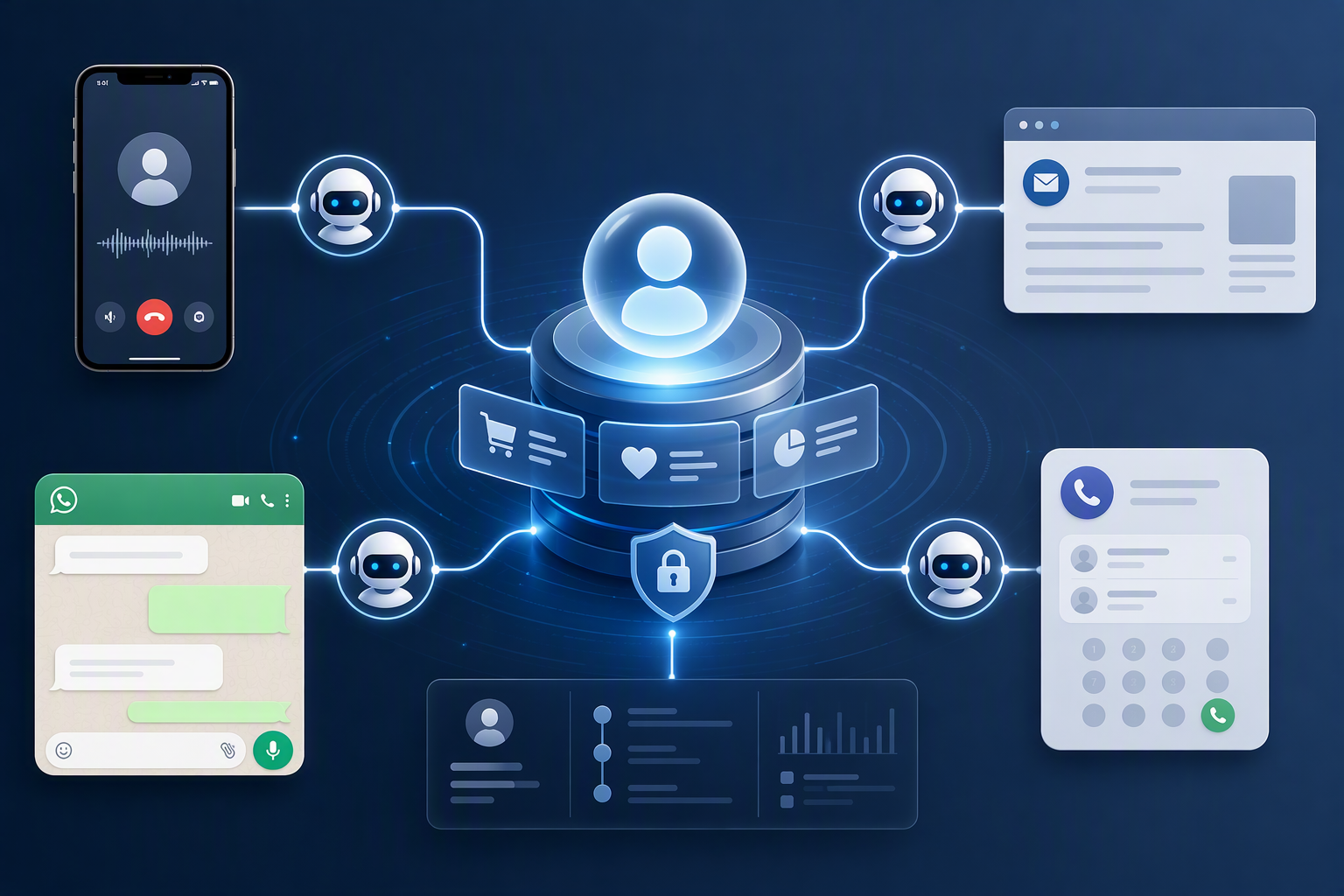
A 24/7 AI communication workflow addresses this fragmentation. Instead of deploying an unrelated tool for each channel, the business can design one connected journey:
- A customer calls a business number purchased through CallMissed.
- A business phone AI agent answers, identifies the customer’s intent, and handles approved tasks or captures the required details.
- The customer can continue through a CallMissed WhatsApp chat agent when messaging is more convenient.
- An email workflow or agent can send, receive, or support follow-up communication.
- CallMissed’s omnichannel inbox and CRM can help the team maintain customer context across voice, WhatsApp, email, and web interactions.
This guide walks through that setup step by step without assuming a particular subscription, interface layout, number inventory, or feature availability. You will learn how to plan the workflow, purchase an available phone number through CallMissed, configure and connect a voice agent, add WhatsApp chat and email engagement, build a useful knowledge base, and organize cross-channel context for human follow-up.
You will also see where operational safeguards belong—including business-hour rules, escalation paths, consent, testing, and clear boundaries on what an AI agent may say or do. The goal is not to remove people from customer service. It is to give a small team a dependable first-response layer that remains available outside office hours while preserving a coherent conversation for the humans who take over.
How do you build a complete 24/7 AI communication workflow with CallMissed?
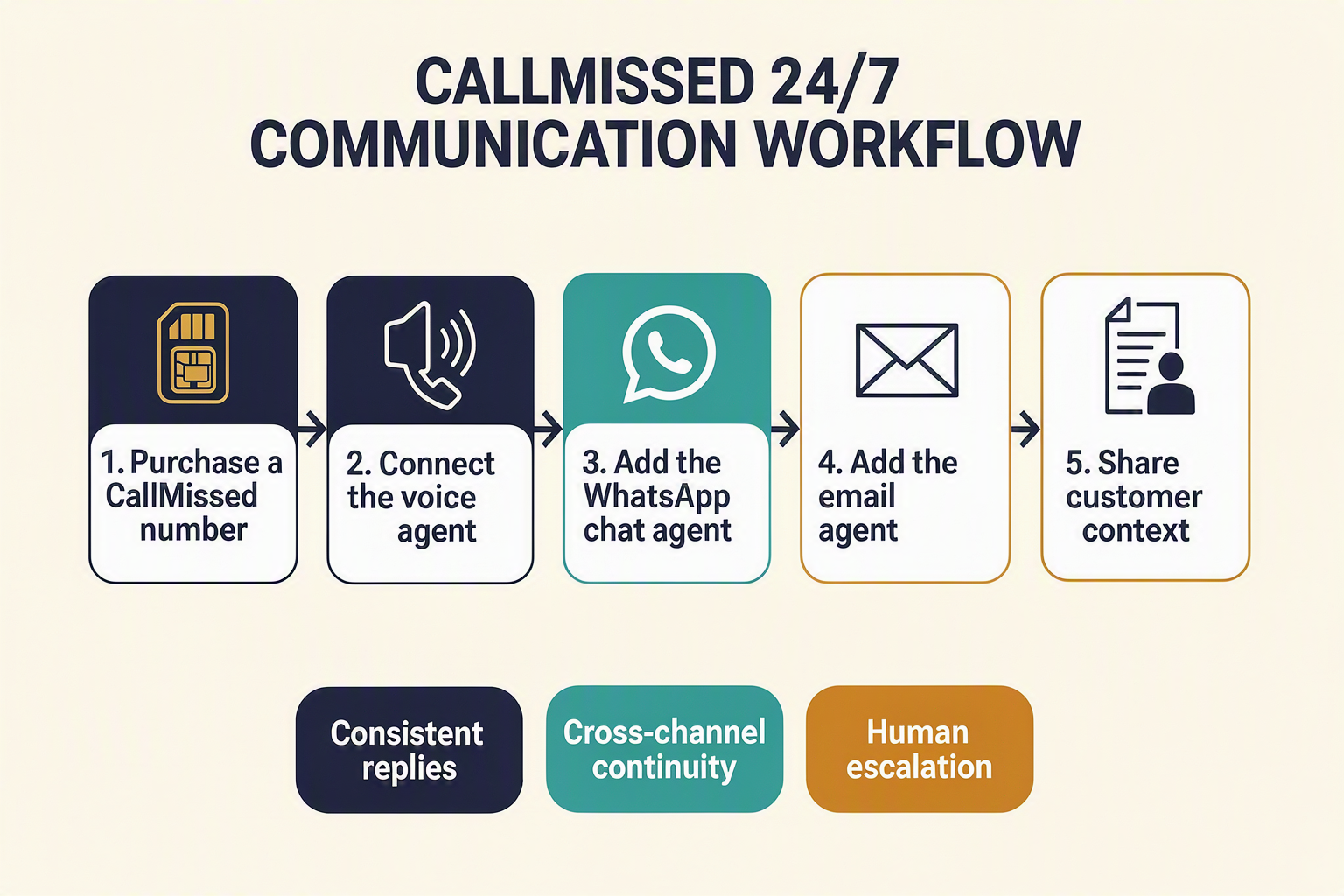
Build CallMissed for small business as one connected workflow: a business phone number receives the call, a voice agent responds, WhatsApp and email agents continue the conversation, and shared cross-channel memory keeps the customer context available for follow-up.
1. Map what AI should handle
List the common enquiries the workflow may answer, capture, or escalate, such as:
- Frequently asked questions
- Lead and contact-detail collection
- Appointment requests
- Service or product enquiries
- WhatsApp and email follow-ups
- Complaints, emergencies, refunds, or complex cases requiring staff
Set clear limits. The agents should not invent prices, promise unavailable services, approve refunds, or make regulated decisions without reliable data and appropriate controls.
2. Set up the CallMissed phone number
Choose an available CallMissed business number, subject to geographic coverage, inventory, documentation, and regulatory requirements. Configure its time zone, business hours, greeting, consent or recording notices, and fallback route.
Connect the number to a suitable employee or queue for urgent handoffs. Before advertising it, test inbound routing, audio quality, after-hours behaviour, and escalation.
3. Connect a focused voice agent
Create a CallMissed voice agent with a specific role, such as an after-hours appointment assistant or first-line enquiry agent. Give it approved information about opening hours, locations, services, policies, and escalation rules, then attach it to the business number.
CallMissed supports speech-to-text and text-to-speech across 22 Indian languages. Enable only the languages your customers need, and test names, addresses, code-switching, accents, and industry terms. The multilingual AI voice agent guide provides a broader testing framework.
4. Add WhatsApp and email agents
Use a WhatsApp agent to continue suitable conversations after the call—for example, to share directions, collect requested details, or confirm an appointment request. Use an email agent for longer summaries, confirmations, and internal notifications.
For CallMissed for small business, these agents turn a missed or incomplete call into a trackable follow-up rather than a disconnected interaction. Obtain the required consent for business-initiated messages and use approved WhatsApp templates where applicable.
5. Share context and test the complete loop
Use the CallMissed inbox and CRM to connect voice, WhatsApp, email, and supported web conversations with the appropriate customer record. This shared cross-channel memory helps each agent continue from earlier interactions instead of asking the customer to repeat the same information.
Match records using verified identifiers such as phone numbers and email addresses. Send uncertain matches to a person for review, and limit access to customer data according to your privacy and retention requirements.
Test CallMissed for small business from start to finish:
- Call the business number as a new and returning customer.
- Ask supported and unsupported questions.
- Switch languages where enabled.
- Trigger WhatsApp and email follow-ups.
- Simulate delivery failures and after-hours calls.
- Confirm that human handoff includes the relevant conversation context.
- Verify who owns the next action.
Launch gradually and review transcripts, routing, follow-up outcomes, and escalations. Keep the knowledge base, hours, policies, and staff contacts current so CallMissed for small business remains useful around the clock without removing human control.
What should you verify in CallMissed before configuring channels and automations?
Before configuring any channel, verify that the CallMissed workspace, business information, operating rules, and escalation resources are ready. This preflight check prevents an always-available agent from giving incomplete answers, contacting the wrong person, or promising an action your team cannot fulfil.
1. Confirm workspace access and administrative ownership
Sign in to the correct CallMissed business workspace and identify who can approve account-level changes. Interface labels and available options may vary, so confirm capabilities inside your account rather than relying on screenshots from another version.
Verify that:
- The business owner or designated administrator controls the account.
- Relevant staff have appropriate access without sharing one login.
- The account has an active billing method or sufficient credits for planned usage.
- Team members know who may purchase numbers, connect agents, or change channel settings.
- The business has a secure process for storing credentials and recovering account access.
CallMissed uses transparent credit pricing in which one credit equals ₹1, but actual consumption depends on the services, models, and communication volume selected. Review the current account information before estimating operating costs.
2. Define the first workflow and its boundaries
Do not begin by automating every customer interaction. For an initial CallMissed for small business deployment, select one measurable journey, such as after-hours lead capture, appointment enquiries, order-status questions, or service-request triage.
Write down:
- Trigger: What starts the workflow—a call, WhatsApp message, or email?
- Allowed actions: What may the AI answer, record, schedule, or route?
- Restricted actions: What requires human approval?
- Completion condition: What constitutes a successfully handled enquiry?
- Failure path: What happens when intent, identity, or information is unclear?
These boundaries are especially important for a business phone AI agent, because callers may treat a spoken answer as an immediate business commitment.
3. Validate business facts and escalation coverage
Prepare one approved source of truth before building prompts or a knowledge base. At minimum, verify:
- Legal and customer-facing business names
- Locations, service areas, and business hours
- Products, services, prices, and eligibility rules
- Cancellation, refund, delivery, and appointment policies
- Emergency wording and prohibited advice
- Human escalation contacts and their coverage hours
For India-focused deployments, also identify the languages customers actually use. CallMissed supports Speech-to-Text and Text-to-Speech across 22 Indian languages, but language support does not replace testing with regional accents, mixed-language speech, names, addresses, and industry terminology.
4. Check channel prerequisites without assuming availability
Before purchasing or connecting anything, confirm the prerequisites shown in your CallMissed account:
- Phone: Required geography, number type, identity documents, inbound or outbound needs, and current number inventory
- WhatsApp: Business ownership, approved messaging practices, customer opt-in records, and the intended chat or calling use case
- Email: Authorized sending identity, monitored reply address, and ownership of the relevant domain or mailbox
Phone-number inventory, WhatsApp eligibility, and individual features can vary by account, region, provider, and regulatory requirements. Treat availability as something to verify—not a guarantee.
5. Establish privacy, handoff, and testing rules
A dependable 24/7 AI communication workflow needs clear disclosure, consent, data-retention, and human-handoff policies. Decide what customer data may be collected, who may access transcripts, how corrections are handled, and when the agent must stop automation.
Finally, create test cases for routine questions, silence, background noise, unsupported requests, angry customers, sensitive information, and failed handoffs. Proceed to channel setup only after every test has an expected response and an accountable human owner.
Which CallMissed components power each stage of the customer journey? (TABLE)
Each customer-journey stage should have a defined CallMissed component, trigger, output, and human handoff. This mapping turns CallMissed for small business from a collection of channels into a coordinated 24/7 AI communication workflow.
Component-to-journey map
| Customer-journey stage | Customer trigger | CallMissed component | Expected output | Human-control point |
|---|---|---|---|---|
| 1. Phone entry | Customer calls the business | Phone number purchased through CallMissed | The call enters the configured business workflow | Confirm number availability, routing rules, operating regions, and applicable calling requirements |
| 2. Voice assistance | Call connects or arrives after hours | Business phone AI agent | The agent greets the caller, identifies intent, answers approved questions, or captures details | Define prohibited topics, escalation conditions, transfer destinations, and fallback messages |
| 3. Knowledge retrieval | Customer asks a product, policy, or service question | CallMissed knowledge base with retrieval-augmented generation (RAG) | The voice or chat agent retrieves an answer from business-approved information | Review source documents, remove obsolete content, and test answers before launch |
| 4. Messaging continuation | Customer prefers text or needs links and written details | CallMissed WhatsApp chat agent and WhatsApp Business communication | The conversation continues through WhatsApp without forcing another phone call | Apply consent rules, approved templates where required, response boundaries, and opt-out handling |
| 5. Email follow-up | Enquiry requires a quotation, summary, document, or longer response | CallMissed email agent or email campaign tooling | A follow-up email is sent or prepared using captured customer context | Require review for sensitive, contractual, financial, or high-value communications |
| 6. Team resolution | AI reaches a limit or the customer requests a person | CallMissed omnichannel inbox and CRM | Staff receive the interaction history and can continue across voice, WhatsApp, email, or web | Assign ownership, response targets, access permissions, and closure status |
How the components should work together
The phone number is the entry point, but it should not operate as an isolated line. Connect it to the voice agent, then give that agent access only to the knowledge and actions necessary for the intended use case. For example, a clinic might permit appointment-request capture while preventing the agent from offering medical diagnoses.
CallMissed supports speech workflows across 22 Indian languages, making language selection an operational design decision rather than a cosmetic setting. A business serving several regions should test greetings, names, addresses, mixed-language speech, and escalation phrases with representative callers before enabling broad automation.
WhatsApp and email should then serve different continuation needs:
- Use WhatsApp for conversational updates, links, confirmations, and convenient customer replies.
- Use email for detailed summaries, quotations, attachments, or communications that benefit from a longer format.
- Use the omnichannel inbox and CRM to preserve context and prevent staff from asking customers to repeat information.
Recommended connection order
Implement the journey in a controlled sequence:
- Activate and validate the purchased number, including inbound-call testing and fallback routing.
- Connect the voice agent and knowledge base, then test common questions, unclear speech, silence, interruptions, and escalation requests.
- Add WhatsApp and email continuation, ensuring that customer identity and conversation context are recorded consistently.
- Configure human ownership, including which employee receives urgent, failed, or sensitive interactions.
- Review transcripts and outcomes regularly, updating knowledge sources and guardrails when recurring gaps appear.
The result is not simply an always-on bot. It is a structured journey in which each CallMissed component performs a specific role while human staff retain control over exceptions and consequential decisions.
How do you purchase an available phone number through CallMissed and prepare it for use?
Purchase the number from the phone-number or telephony area of your CallMissed account, choosing from the inventory currently displayed for your intended market. Before connecting automation, verify the number’s voice capabilities, complete any requested business documentation, and define how calls should be answered, escalated, and logged.
1. Define the number’s purpose before searching
Decide what the new number will handle so that you can evaluate available options accurately. A small business might use it for:
- General enquiries and after-hours support
- Appointment requests or lead qualification
- Order-status questions
- A specific branch, region, or campaign
- Inbound calls that may later continue on WhatsApp or email
Also determine whether the number will replace an existing contact line or operate alongside it. If customers already know another number, plan how you will update your website, Google Business Profile, advertising, invoices, and call-forwarding rules after testing.
2. Search the available CallMissed inventory
Sign in to CallMissed and open the area for acquiring or managing phone numbers; exact navigation labels may change as the product evolves. Search the inventory using the location, number type, or other filters presented in your account.
Evaluate each option against four practical criteria:
- Customer familiarity: Select a number appropriate for the audience and geography you serve.
- Inbound voice support: Confirm that the listed capabilities match your planned calling workflow.
- Regulatory eligibility: Some countries or number types may require business identity, address, or other documentation.
- Current commercial terms: Review the price, billing interval, taxes, and usage terms shown before confirming the order.
Number stock, coverage, features, and pricing can change, so treat the information displayed in CallMissed at checkout as authoritative rather than assuming that a particular area code or number type will always be available.
3. Complete the purchase and required verification
Select the number, review its details, and complete the purchase using the prompts shown in your account. Provide accurate business and authorized-contact information whenever verification is requested.
After ordering, confirm that the number appears as active or ready in CallMissed before publishing it. If activation remains pending, wait for the required review or contact CallMissed support rather than building a customer-facing promise around an unverified number.
4. Prepare the number for the voice agent
Purchasing a number does not by itself create a business phone AI agent. Record the operational decisions that the next configuration step will need:
- Business name, opening hours, time zone, and holiday schedule
- Supported caller intents and prohibited actions
- Human-transfer destination and after-hours escalation method
- Voicemail or fallback behaviour if the agent cannot proceed
- Languages the agent should recognize and speak
- Whether calls may be recorded, plus the required notice and consent process
- Customer fields to capture, such as name, phone number, enquiry type, and preferred follow-up channel
CallMissed supports speech workflows across 22 Indian languages, which is particularly relevant when configuring CallMissed for small business teams serving regional audiences. Choose only the languages your knowledge base and human escalation team can support consistently.
5. Run a readiness check before connection
Place controlled test calls only after the number is active. Check inbound reachability, caller-ID presentation where applicable, audio quality, transfer destinations, and call records. Do not advertise the line until failures have a safe fallback.
This preparation turns the purchased number into a dependable entry point for the broader 24/7 AI communication workflow. The next step is to create the CallMissed voice agent, apply its instructions and knowledge, and explicitly connect it to this verified number.
How do you connect and test a CallMissed business phone AI agent?
Connect the phone number purchased through CallMissed to a configured voice agent, define when the agent should answer, and then test complete customer journeys before publishing the number. A reliable business phone AI agent must handle routine requests accurately, capture structured details, and transfer or flag conversations it cannot safely complete.
1. Prepare the voice agent before connecting the number
In CallMissed, create or select the voice agent that will answer the business line. Dashboard labels and available controls may vary, so follow the current in-product guidance or contact CallMissed support rather than assuming a particular menu path.
Define the agent’s operating instructions:
- Identity: Business name, role, and a clear statement that the caller is speaking with an AI assistant.
- Purpose: Approved tasks such as answering FAQs, collecting lead details, checking appointment requirements, or recording service requests.
- Boundaries: Topics the agent must not answer, commitments it cannot make, and situations requiring human review.
- Required information: For example, the caller’s name, telephone number, location, preferred appointment time, and reason for calling.
- Escalation: The team, telephone destination, or follow-up queue that should receive urgent or unresolved enquiries.
Keep instructions specific. “Help customers” is ambiguous; “collect the appliance type, postcode, issue, and preferred visit window without confirming a final price” is testable.
2. Configure language, knowledge, and voice behaviour
Select the languages and speech configuration appropriate for your customers. CallMissed supports Speech-to-Text and Text-to-Speech across 22 Indian languages, allowing regional-language support to be designed into the workflow rather than added as an afterthought.
Connect the approved knowledge source or knowledge-base content that the agent may use. Include current opening hours, service areas, product details, policies, and escalation rules. Do not place passwords, payment credentials, or unnecessary personal data in agent instructions.
Also define conversational behaviour:
- Use short spoken responses and ask one question at a time.
- Confirm important details such as dates, names, and phone numbers.
- Never invent availability, prices, policies, or booking confirmations.
- Tell callers what will happen next and when a human response is required.
3. Connect the CallMissed number and set routing
Associate the purchased business number with the prepared CallMissed voice agent using the connection options currently available in the account. Decide whether the agent answers every call or follows a schedule—for example, after hours, during overflow, or when staff do not answer.
For CallMissed for small business, a practical initial rule is to automate first response while preserving a human path for emergencies, complaints, sensitive requests, and high-value sales enquiries. Confirm any recording, transcription, consent, and retention settings against applicable Indian telecommunications, privacy, and sector-specific requirements.
4. Run controlled end-to-end tests
Call the number from an external phone rather than relying only on an internal preview. Test at least these scenarios:
- A common FAQ with an exact knowledge-base answer.
- A new lead providing several contact details.
- An unclear request requiring clarification.
- A question outside the approved knowledge.
- A caller requesting a human.
- Silence, background noise, interruption, and disconnection.
- Each supported language and mixed-language pattern relevant to customers.
- Calls inside and outside configured business hours.
Verify the transcript or interaction record, captured fields, escalation outcome, and customer context—not merely audio quality. Remove test records where appropriate, correct the instructions or knowledge source, and repeat failed cases.
Publish the number only after critical scenarios pass consistently. Continue sampling real interactions after launch, because dependable 24/7 AI communication requires ongoing review as business hours, policies, and customer questions change.
How do you add CallMissed WhatsApp and email agents while sharing customer context?
Add the WhatsApp chat agent and email automation to the same CallMissed workspace, then use a consistent customer identifier, CRM record, and structured interaction summary to preserve context. This lets a WhatsApp or email conversation continue from the earlier call instead of starting again.
1. Connect the WhatsApp business channel
Begin with the WhatsApp business identity that the company is authorised to use. Complete the applicable Meta onboarding, business verification, phone-number registration, and consent requirements presented during setup; exact requirements can vary by account and region.
Then define what the CallMissed WhatsApp agent should handle:
- Answer frequently asked questions from the approved knowledge base.
- Collect lead, appointment, order, or support details.
- Retrieve permitted context from the customer record.
- Escalate sensitive, unusual, or low-confidence requests.
- Hand the conversation to a person through the omnichannel inbox.
Keep WhatsApp chat consent separate from permission to make business-initiated calls or send marketing messages. For outbound conversations, use the applicable approved templates and honour opt-out requests.
CallMissed can also bridge WhatsApp Business calling to an AI voice agent, covering inbound and business-initiated calling where the relevant account capabilities and permissions are available. Teams implementing this pattern can consult the related WhatsApp AI voice agent production guide.
2. Configure the email agent or workflow
Connect an authorised business mailbox using the options available in the account, and give the email workflow a narrower scope than a human employee. A safe initial configuration might allow it to:
- Classify incoming messages by intent and urgency.
- Draft or send approved responses for routine enquiries.
- Attach the interaction to an existing customer record.
- Request missing information without exposing internal data.
- Route complaints, refunds, legal notices, and ambiguous requests to staff.
Use a recognisable sender identity and include a human-monitored reply path. If a dedicated email-agent function is not enabled for the account, the same design can be implemented with CallMissed’s supported email and campaign tooling, subject to the available configuration.
3. Establish one cross-channel customer record
The core of 24/7 AI communication is not simply keeping three agents online; it is ensuring that each channel receives the minimum relevant context. Configure the workflow to match interactions using verified identifiers such as:
- E.164-format phone number for calls and WhatsApp.
- Normalised email address for email conversations.
- CRM contact, lead, order, ticket, or appointment ID.
- A verified secondary identifier when two customers share contact details.
After each interaction, store a concise structured summary: customer intent, information collected, action completed, unresolved issue, promised follow-up, consent status, and escalation priority. Avoid passing complete transcripts when a short summary is sufficient.
4. Test continuity before enabling automation
Create a test customer and run one journey across all three channels:
- Call the business phone AI agent and request information.
- Continue the enquiry through WhatsApp without repeating the original request.
- Reply by email and verify that the same contact history is visible.
- Trigger a human handoff and confirm that staff can see the summary and source channel.
- Test duplicate contacts, changed phone numbers, opt-outs, and failed identity matches.
For CallMissed for small business, this shared-context design reduces repetitive questioning while keeping humans responsible for exceptions. CallMissed’s product capabilities also cover speech across 22 Indian languages, making consistent identity, summaries, and language preferences especially important when customers move between regional-language voice conversations and written follow-ups.
What operational impact should a small business measure after launch?
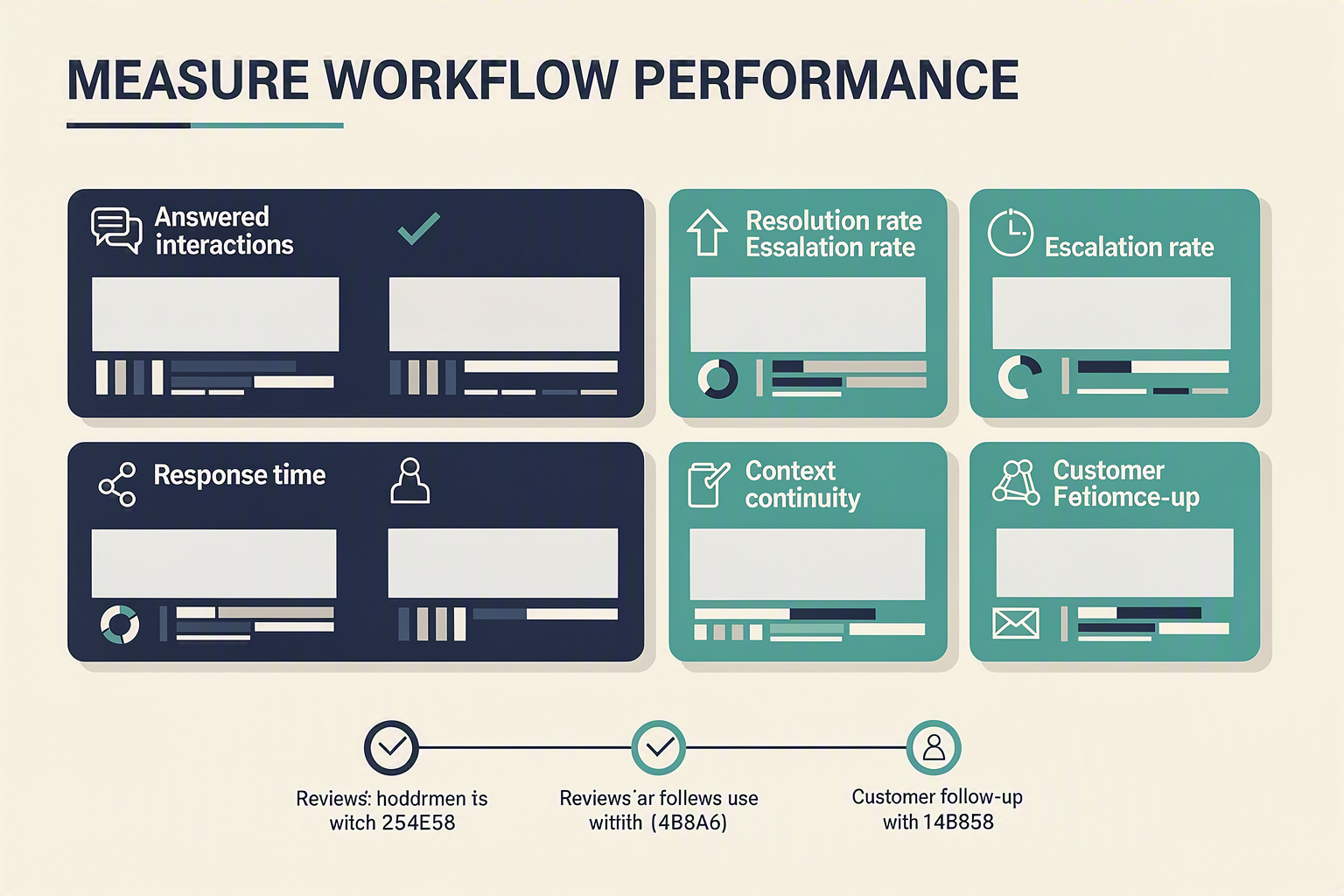
Measure whether the workflow responds faster, resolves more enquiries, preserves context across channels, and reduces staff workload without lowering customer satisfaction. For CallMissed for small business, the most useful comparison is against the company’s own pre-launch baseline—not an unsupported industry benchmark.
1. Establish a baseline before comparing results
Record at least two to four weeks of pre-launch performance, then compare it with equivalent periods after launch. Account for weekends, holidays, promotions, and seasonal demand so that a temporary traffic spike does not look like an automation improvement.
Capture baseline figures for:
- Total inbound calls, WhatsApp messages, and emails
- Calls missed during and outside business hours
- Median first-response time by channel
- Enquiries resolved without a second interaction
- Appointments, qualified leads, or orders generated
- Staff hours spent answering repetitive questions
- Customer complaints, opt-outs, and escalation requests
2. Track availability and response speed
A 24/7 AI communication workflow should first improve access. Measure the percentage of eligible interactions that receive an immediate automated response, but separate technical availability from successful customer outcomes.
Use these calculations:
- Answer rate: answered inbound calls ÷ total inbound calls × 100
- After-hours coverage: after-hours enquiries receiving a response ÷ total after-hours enquiries × 100
- Median first-response time: the middle response time, which is less distorted by extreme delays than an average
- Abandonment rate: callers who disconnect before meaningful engagement ÷ total inbound callers × 100
Review failed calls and delayed messages individually. A high answer rate is not sufficient if customers encounter silence, incorrect routing, or repeated prompts.
3. Measure resolution and escalation quality
Evaluate what the business phone AI agent accomplishes after answering. Classify each interaction as resolved, escalated appropriately, abandoned, or unresolved.
Monitor:
- Containment rate: enquiries completed without human intervention
- First-contact resolution: issues solved during the initial interaction
- Escalation accuracy: escalations sent to the correct person or queue with sufficient context
- Repeat-contact rate: customers returning about the same issue within 24 hours, seven days, or another relevant window
- Knowledge failure rate: interactions where the agent lacks an approved answer or retrieves unsuitable information
Do not maximize containment blindly. For payments, complaints, emergencies, regulated advice, or uncertain answers, a correct human handoff is often the better result.
4. Audit cross-channel continuity
CallMissed’s shared customer context should reduce repetition as customers move among phone, WhatsApp, email, and web. Sample conversations weekly and check whether the record contains:
- Customer identity or matching contact details
- Original intent and interaction summary
- Actions already completed
- Promises, deadlines, or consent status
- A clear owner and next step
Track the context-complete handoff rate: escalated interactions containing all required fields divided by total escalations. Also count duplicate records and cases where customers must restate information.
5. Connect service metrics to business outcomes
Create a simple 7-day operational review and a deeper 30-day review. Compare automation metrics with outcomes such as appointments booked, leads qualified, enquiries converted, response-related cancellations, staff hours saved, and cost per resolved interaction.
Pair quantitative results with conversation reviews and customer feedback. A practical scorecard should identify one issue, assign an owner, set a correction date, and retest the affected voice, WhatsApp, or email journey. This continuous review turns CallMissed from an always-on response layer into a measurable operating system for customer communication.
What do implementation experts recommend for testing, consent, escalation, and human review?
Implementation experts recommend treating an AI workflow like a new frontline employee: test it in controlled stages, disclose automation and recording clearly, define immediate human-escalation triggers, and review real conversations regularly. For CallMissed for small business, these controls should cover the complete journey across phone, WhatsApp, email, and the shared customer record—not merely whether each channel works independently.
1. Test the complete customer journey
Start with internal test contacts and a limited set of low-risk enquiries before directing all traffic to the workflow.
- Create a test matrix: Include business-hours and after-hours calls, known and unknown customers, interrupted calls, silence, background noise, regional accents, mixed-language speech, and unsupported requests.
- Verify approved answers: Ask questions whose answers exist in the CallMissed knowledge base, then introduce ambiguous or missing information. The agent should avoid inventing an answer and offer escalation instead.
- Test channel handoffs: Confirm that a caller can continue through the CallMissed WhatsApp chat agent or email workflow without repeatedly supplying the same details.
- Inspect shared context: Check that transcripts, summaries, contact details, intent, promised actions, and escalation status remain understandable to staff in the omnichannel inbox or CRM.
- Run failure scenarios: Test unavailable staff, unanswered transfers, duplicate messages, malformed email addresses, and customer requests to stop communication.
A business phone AI agent should not enter full production solely because it answered a scripted demonstration correctly. Use a pilot, document failures, revise instructions and knowledge sources, and retest before expanding traffic.
2. Build consent and disclosure into each channel
Tell customers when they are interacting with AI and explain any data collection relevant to the conversation. If calls are recorded or transcribed, provide an appropriate notice before recording begins and offer an alternative where required.
India’s Digital Personal Data Protection Act, 2023 received presidential assent on August 11, 2023, establishing principles including lawful purpose, notice, consent requirements, and data-principal rights. The Telecom Regulatory Authority of India’s Telecom Commercial Communications Customer Preference Regulations, 2018 also govern unsolicited commercial communications and customer preferences.
Practical safeguards include:
- Collect only information required for the stated task.
- Separate service communication from promotional consent.
- Record the source, purpose, scope, and time of consent where applicable.
- Honour opt-outs across WhatsApp, voice campaigns, and email.
- Restrict sensitive data from transcripts and summaries unless operationally necessary.
- Establish retention and deletion rules with qualified legal advice.
3. Define non-negotiable escalation triggers
Configure the 24/7 AI communication workflow to escalate when the customer:
- Requests a person or repeatedly rejects the agent’s answer.
- Reports an emergency, safety issue, threat, fraud, or account compromise.
- Disputes a payment, cancellation, legal term, or contractual commitment.
- Requires an exception, refund approval, identity verification, or other restricted action.
- Shows strong distress or when the agent’s confidence is insufficient.
Every escalation should capture why it occurred, what the customer needs, what has already been attempted, and the preferred callback channel. After hours, set an honest response expectation rather than implying that an unavailable employee will respond immediately.
4. Keep humans accountable after launch
Review a risk-based sample of successful and failed interactions every week initially. Track escalation accuracy, unresolved intents, incorrect answers, repeat contacts, opt-out compliance, handoff completion, and knowledge-base gaps.
Use those findings to update CallMissed agent instructions and approved content, then rerun regression tests. Human review is not a temporary launch task; it is the control loop that keeps automated communication accurate, lawful, and aligned with changing business policies.
What does the CallMissed rollout plan mean for your team? (TABLE)
The rollout plan turns CallMissed for small business from a collection of channels into an owned operating process. Each phase needs a responsible team member, a measurable acceptance gate, and a documented fallback before the business moves from internal testing to live 24/7 AI communication.
Team responsibilities by rollout phase
| Phase | Primary owner | Team actions | Acceptance gate | Fallback |
|---|---|---|---|---|
| 1. Define the journey | Business owner | Select priority intents, service hours, escalation rules, consent language, and prohibited actions | One approved workflow covers phone, WhatsApp, email, and human handoff | Route uncertain requests to staff |
| 2. Activate the number | Operations lead | Purchase an available number through CallMissed, confirm its intended use, and run inbound-call checks | Test calls connect reliably and appear in the expected workflow | Publish an existing staffed number temporarily |
| 3. Connect voice AI | Support lead | Configure the business phone AI agent, approved greeting, knowledge scope, data capture, and escalation triggers | The agent handles test scenarios without inventing policies or commitments | Transfer, record a callback request, or end safely |
| 4. Add messaging | Marketing or support lead | Connect the CallMissed WhatsApp chat agent and define when callers should continue by message | Approved test contacts can move between voice and WhatsApp with usable context | Keep the interaction on the original channel |
| 5. Add email follow-up | Operations or sales lead | Configure approved email use cases, templates, ownership, and response boundaries | Test follow-ups contain correct details and reach the monitored mailbox | Create a manual follow-up task |
| 6. Launch and improve | Business owner | Review conversations, escalations, unresolved intents, consent handling, and knowledge gaps | The team signs off on monitoring, incident ownership, and rollback procedures | Pause affected automation while preserving human support |
These phases are operational recommendations, not guaranteed implementation times or interface-specific instructions. Phone-number inventory, channel activation, and account requirements can vary, so the owner should confirm current availability inside CallMissed before announcing a launch date.
Assign accountability before automation
Small teams do not need a separate employee for every row, but they do need named ownership. One person may hold several roles, provided that the team answers three questions:
- Who reviews escalations? Set a monitored destination and define what happens overnight, on weekends, or when nobody responds immediately.
- Who may change agent instructions? Limit publishing authority so unreviewed policies, prices, or promises do not enter production.
- Who checks shared context? Confirm that customer identity, intent, conversation summaries, and follow-up status remain understandable across phone, WhatsApp, email, and the omnichannel inbox.
CallMissed supports Speech-to-Text and Text-to-Speech across 22 Indian languages, but multilingual deployment still requires native-speaker testing of names, code-switching, local terminology, and escalation wording. Language support should therefore be treated as a capability to validate for each audience—not as automatic proof of accuracy in every acoustic environment.
Use launch gates, not a single “go live” switch
A controlled rollout should begin with staff calls and approved test contacts, followed by limited live traffic and then after-hours coverage. Track:
- Containment: requests completed without human intervention.
- Escalation quality: handoffs containing enough context for staff to continue.
- Knowledge failures: unanswered, outdated, or conflicting questions.
- Channel continuity: whether voice, WhatsApp, and email records remain coherent.
- Safety exceptions: incorrect commitments, consent issues, or sensitive-data exposure.
The practical outcome is not a people-free operation. It is a clearly governed first-response layer in which CallMissed handles approved interactions continuously while employees retain authority over exceptions, policy changes, and customer-sensitive decisions.
Frequently asked questions about CallMissed setup, channel handoffs, testing, and shared customer context
How do I set up CallMissed for small business phone support?
How should I test a business phone AI agent before sending it live?
How can a 24/7 AI communication workflow hand customers from phone to WhatsApp or email?
How does CallMissed preserve shared customer context across voice, WhatsApp, email, and web?
What happens when a CallMissed AI agent cannot answer a customer’s question after business hours?
What should I verify before launching CallMissed voice, WhatsApp, and email agents?
Conclusion
A dependable 24/7 workflow connects every customer touchpoint instead of automating each channel in isolation. CallMissed for small business brings phone numbers, voice, WhatsApp, email, and human follow-up into one coordinated approach. With CallMissed for small business, conversations can continue with shared context rather than starting over at every handoff.
Key takeaways:
- Start with the journey: Use CallMissed for small business after defining common enquiries, business-hour rules, consent requirements, approved actions, and escalation paths.
- Set up the phone channel: CallMissed for small business begins with purchasing an available number and attaching a business phone AI agent.
- Connect written channels: Add WhatsApp chat and email engagement through CallMissed for small business so customers can continue conversations beyond voice.
- Build shared memory: Keep accurate business knowledge and interaction context available in CallMissed for small business across voice, WhatsApp, email, and web activity.
- Plan human escalation: Configure CallMissed for small business to collect details and transfer interactions when an agent reaches its boundaries.
- Test regularly: Review conversations and escalations in CallMissed for small business, then update knowledge, rules, and workflows as customer needs evolve.
CallMissed for small business should be treated as an evolving workflow, not a one-time deployment. Explore CallMissed, then decide which missed enquiry CallMissed for small business should help your team recover first.
Related Reading
Related Posts

التواصل مع العملاء عبر القنوات المختلفة: كيف يحافظ CallMissed على السياق بين البريد الإلكتروني وواتساب والمكالمات الصوتية
خدمة الرد خارج أوقات الدوام: إعداد وكيل صوتي بالذكاء الاصطناعي في عام 2026
وكلاء الذكاء الاصطناعي متعددو القنوات من CallMissed: كيف تربط ذاكرة العملاء المشتركة بين جميع القنوات
Ready to automate customer conversations?
Launch AI voice agents and WhatsApp bots with CallMissed — one API, 22+ Indian languages.