

How Do I Build a ChatGPT App With Supabase Edge Functions? Step-by-Step Guide


Learn how to build a ChatGPT app with Supabase Edge Functions using secure API keys, authentication, persistence, streaming, deployment, and troubleshooting.
How Do I Build a ChatGPT App With Supabase Edge Functions? Step-by-Step Guide
What if your browser never needed to know your OpenAI API key to power a ChatGPT-style app? How do I build a ChatGPT app with Supabase Edge Functions? The secure minimum architecture is straightforward: the browser sends a prompt to a Supabase Edge Function, the function reads a server-side provider key, sends the prompt to an OpenAI-compatible model, and returns the assistant’s response. Supabase Auth, database persistence, rate limiting, and streaming can then be added as production requirements grow.
This approach matters because it separates the user interface from the model provider. A frontend-only integration can accidentally expose a secret in JavaScript, browser storage, or network requests; an Edge Function keeps that credential on the server while giving you a controlled place to validate input, authenticate users, enforce quotas, and handle upstream failures. Supabase’s official documentation describes Edge Functions as server-side TypeScript functions designed to run close to users, making them a practical backend layer for AI requests without deploying a separate application server.
In this guide, you will build the smallest working version first and expand it safely:
- Create a Supabase project and Edge Function.
- Configure the model-provider API key as a server-side secret.
- Add CORS handling, JSON parsing, payload validation, and upstream error handling.
- Invoke the function from browser JavaScript or TypeScript without exposing credentials.
- Add Supabase Auth and validate the user’s access token instead of trusting a client-supplied user ID.
- Store conversations and messages with ownership checks and Row Level Security.
- Add optional streaming, rate limiting, abuse controls, and structured observability.
- Deploy the function and troubleshoot common 401, 403, CORS, malformed-request, timeout, and model-provider errors.
The guide will also distinguish stable concepts from version-sensitive commands and APIs, so deployment instructions should be checked against the current Supabase and OpenAI documentation before production use. A compact reference table will identify verified limits or status codes rather than presenting guessed quotas or stale model pricing as fact.
The same server-side pattern extends beyond text chat. Platforms such as CallMissed apply this kind of AI infrastructure to broader customer engagement, including WhatsApp, voice, email, and Indic-language experiences across 22 Indian languages. For a focused ChatGPT app, however, Supabase Edge Functions provide a clear foundation: protect the secret, validate every request, authenticate every user, and make persistence and scaling deliberate rather than accidental.
How do I build a ChatGPT app with Supabase Edge Functions? Use a browser-to-Edge-Function-to-model flow, keep the provider key server-side, and add Auth, persistence, and rate limits for production.
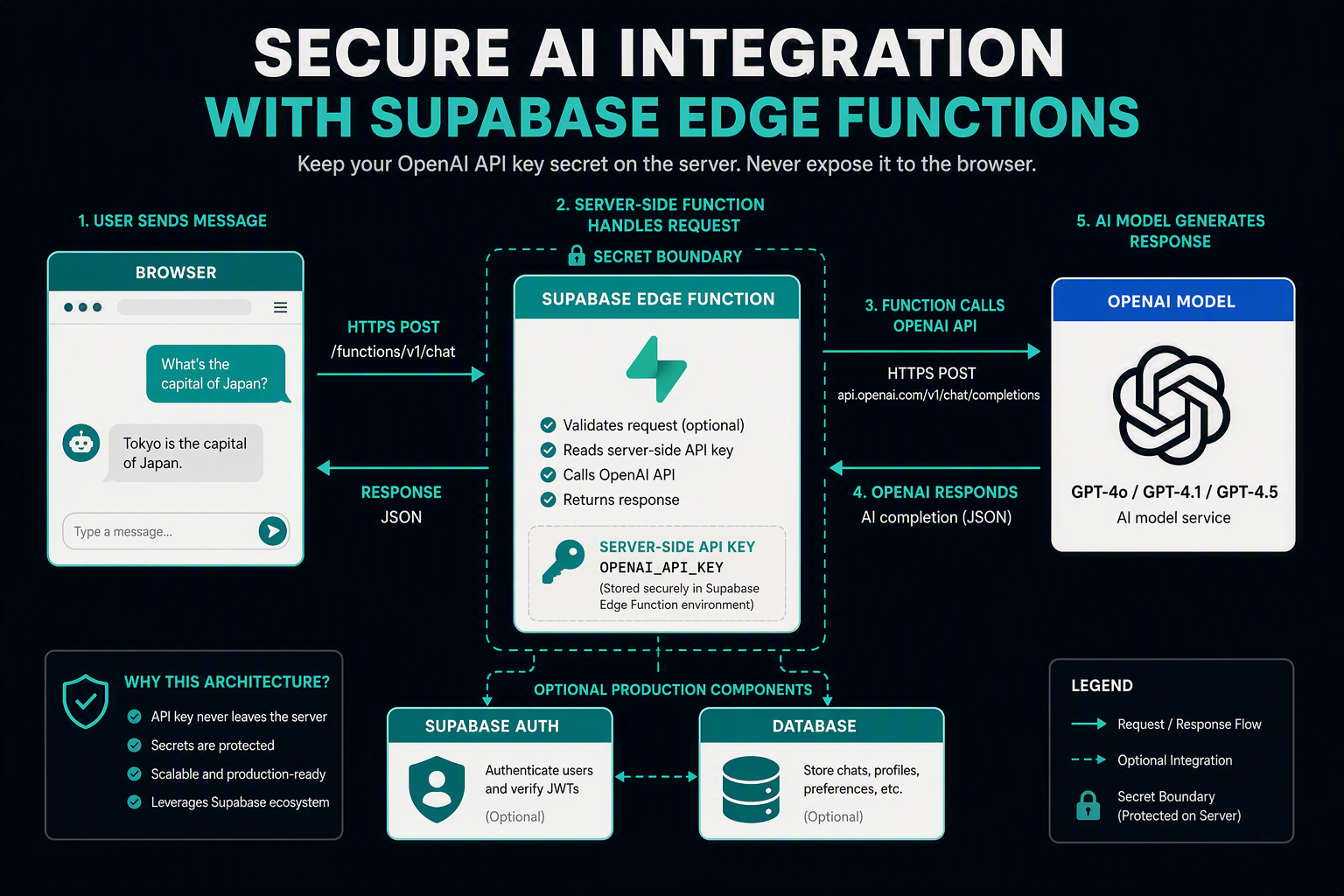
The secure way to build a ChatGPT app with Supabase Edge Functions is to send prompts from the browser to an Edge Function, read the model-provider key inside that server-side function, call the model, and return the response. Start with this unauthenticated flow for local testing, then add Supabase Auth, database persistence, rate limits, and restricted CORS before production.
What should the project architecture look like?
Use this request path:
- The browser sends
{ "prompt": "..." }tochat. - The Supabase Edge Function validates the request.
- The function reads
OPENAI_API_KEYfrom server-side secrets. - The function calls an OpenAI-compatible chat-completions endpoint.
- The browser receives only the assistant response—not the provider key.
Supabase documents Edge Functions as server-side TypeScript functions that run close to users. The following commands are version-sensitive; confirm the current Supabase CLI syntax before deployment.
npx supabase login
npx supabase init
npx supabase functions new chat
npx supabase functions serve chat --env-file .env.local
npx supabase secrets set OPENAI_API_KEY="your-key"
npx supabase functions deploy chat
Create .env.local locally, add it to .gitignore, and never place the key in frontend code, browser storage, or a public environment variable.
How do I write the first Edge Function?
Replace supabase/functions/chat/index.ts with this minimal unauthenticated starter:
const cors = {
  "Access-Control-Allow-Origin": "http://localhost:5173",
  "Access-Control-Allow-Headers": "authorization, x-client-info, apikey, content-type",
  "Content-Type": "application/json",
};

Deno.serve(async (req) => {
  if (req.method === "OPTIONS") return new Response("ok", { headers: cors });
  if (req.method !== "POST")
    return new Response(JSON.stringify({ error: "POST required" }),
      { status: 405, headers: cors });

  try {
    const body = await req.json();
    const prompt = body?.prompt;

    if (typeof prompt !== "string" || prompt.trim().length === 0 ||
        prompt.length > 4000) {
      return new Response(JSON.stringify({ error: "Invalid prompt" }),
        { status: 400, headers: cors });
    }

    const upstream = await fetch("https://api.openai.com/v1/chat/completions", {
      method: "POST",
      headers: {
        "Content-Type": "application/json",
        "Authorization": `Bearer ${Deno.env.get("OPENAI_API_KEY")}`,
      },
      body: JSON.stringify({
        model: "gpt-4o-mini",
        messages: [{ role: "user", content: prompt.trim() }],
      }),
    });

    if (!upstream.ok) {
      return new Response(JSON.stringify({ error: "Model request failed" }),
        { status: 502, headers: cors });
    }

    const data = await upstream.json();
    return new Response(JSON.stringify({
      response: data.choices?.[0]?.message?.content ?? "",
    }), { headers: cors });
  } catch {
    return new Response(JSON.stringify({ error: "Malformed JSON or server error" }),
      { status: 400, headers: cors });
  }
});
For another OpenAI-compatible provider—or a gateway such as CallMissed’s multi-model API—change the endpoint, key, and model while preserving the server-side boundary.
How does the browser call the function?
const { data, error } = await supabase.functions.invoke("chat", {
  body: { prompt: inputValue },
});

if (error) throw new Error(error.message);
output.textContent = data.response;
The function returns 400 for invalid input, 405 for an unsupported method, and 502 when the upstream model request fails. These meanings align with HTTP semantics defined by the Internet Engineering Task Force’s RFC 9110.
| Status | Meaning | Typical cause | Source |
|---|---|---|---|
| 200 | Successful request | Model response returned | IETF RFC 9110 |
| 400 | Bad request | Invalid JSON or prompt | IETF RFC 9110 |
| 405 | Method not allowed | GET sent instead of POST | IETF RFC 9110 |
| 502 | Bad gateway | Upstream model failure | IETF RFC 9110 |
This starter intentionally has no user identity. The production version should validate a Supabase Auth access token inside the function, enforce ownership in database queries, and apply per-user rate limits before accepting model requests.
What do I need before building the app, and which setup values should I verify? (TABLE)
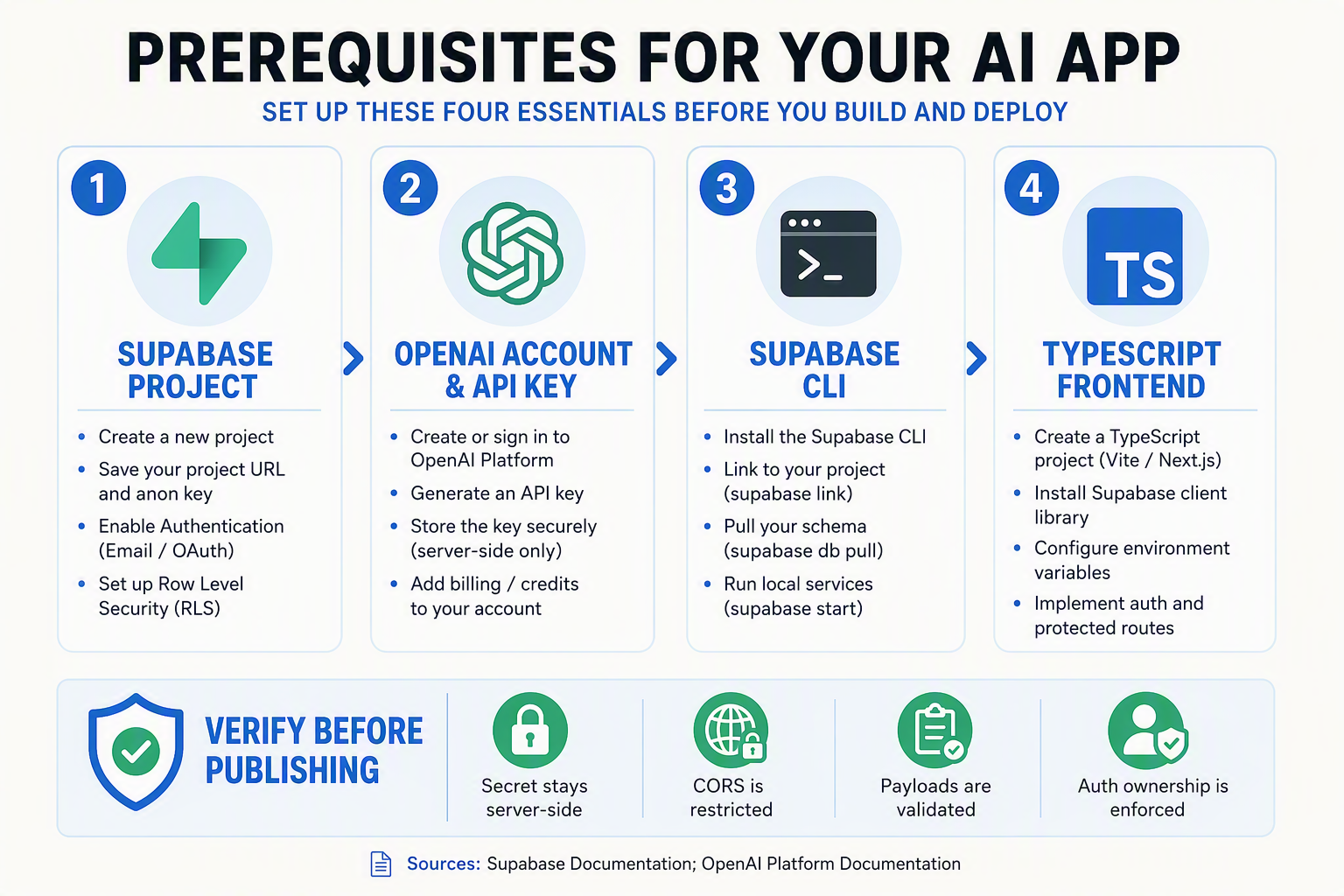
Before writing code, verify your Supabase project, local CLI, function name, environment variables, and model endpoint. The browser should receive only the Supabase URL and public client key; the model-provider key must remain an Edge Function secret.
Which setup values should I verify first?
Use one consistent naming scheme so the frontend, Edge Function, and deployment environment do not drift apart. The following values are practical defaults; confirm version-sensitive commands against the current Supabase documentation before running them.
| Setup item | Example value | Where it belongs | What to verify |
|---|---|---|---|
| Supabase project URL | https://project-ref.supabase.co | Browser and function | It matches the target project and environment |
| Public Supabase key | sb_publishable_... or current anon key | Browser | It is intended for client use; never substitute a service-role key |
| Provider API key | sk-... | Edge Function secret only | It is active, scoped appropriately, and absent from frontend code |
| Function name | chat | CLI, deployment, frontend | The invoke path uses the exact deployed name |
| Model identifier | Provider-supported model name | Edge Function | The model is available to the selected provider endpoint |
| Allowed origin | http://localhost:5173 | CORS logic | Production uses the real HTTPS frontend origin, not * |
Supabase documents Edge Functions as server-side TypeScript functions, so the provider API key belongs in Supabase’s secret store, not in .env files committed to Git. A local .env file can be used for development, but add it to .gitignore and use the current Supabase CLI secret command for deployment.
What do I need to install and create?
Prepare the following:
- A Supabase account and project.
- Node.js and the current Supabase CLI.
- A frontend application, such as Vite, Next.js, or plain browser JavaScript.
- An API key from the model provider.
- Git with a private repository or appropriate secret scanning.
- Optional: Supabase Auth if each conversation must belong to a signed-in user.
Initialize the project and create the function with commands similar to these:
supabase login
supabase init
supabase link --project-ref YOUR_PROJECT_REF
supabase functions new chat
supabase functions serve chat --env-file .env.local
These CLI commands are version-sensitive. If the installed CLI reports an unknown option, check the current Supabase CLI reference rather than copying an outdated command from a blog post.
Create a local environment file outside source control:
OPENAI_API_KEY=replace-with-a-local-development-key
MODEL_NAME=replace-with-a-supported-model
ALLOWED_ORIGIN=http://localhost:5173
For production, set equivalent values as hosted Edge Function secrets, then deploy:
supabase secrets set OPENAI_API_KEY=... MODEL_NAME=... ALLOWED_ORIGIN=https://app.example.com
supabase functions deploy chat
Do not expose OPENAI_API_KEY through Vite’s VITE_ prefix, React environment imports, browser storage, or client-side network payloads. The browser should send only the user’s message—and, when authentication is enabled, its Supabase access token—to the chat function. For teams using an OpenAI-compatible gateway such as CallMissed, verify both the gateway base URL and model identifier before deployment; one endpoint can simplify provider switching without moving secrets into the client.
How do I create the Supabase project, install the CLI, configure secrets, and start local development?
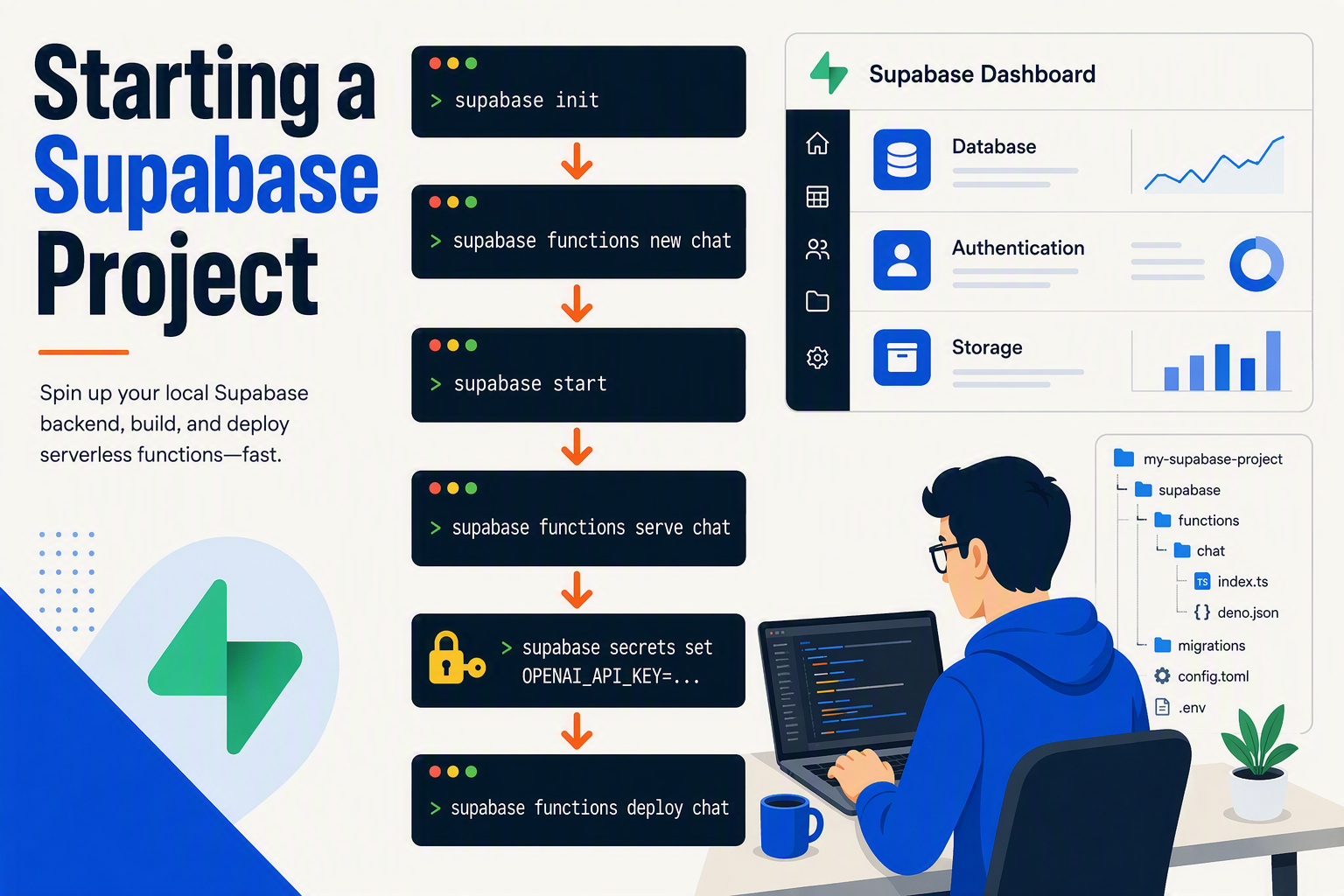
Create a Supabase project, install and link the Supabase CLI, generate an Edge Function, and store the model-provider key as a server-side secret. During local development, the browser will eventually call the function, while the function reads OPENAI_API_KEY through Deno.env.get(); the key must never appear in frontend code, localStorage, or a public .env file.
How do I create and link a Supabase project?
- Open the Supabase Dashboard, select New project, choose an organization, set a strong database password, and select a region near your users.
- Install the Supabase CLI using the package manager for your operating system. Installation commands can change between releases, so verify the current command in the Supabase CLI documentation.
- Authenticate and initialize the local project:
supabase login
supabase init
supabase link --project-ref YOUR_PROJECT_REF
YOUR_PROJECT_REF is the project identifier shown in the Supabase Dashboard URL or project settings. The supabase init command creates the local supabase/ directory for configuration, migrations, and Edge Functions.
How do I create an Edge Function for the ChatGPT app?
Generate a function named chat:
supabase functions new chatThe TypeScript entry point is usually:
supabase/functions/chat/index.tsSupabase describes Edge Functions as server-side TypeScript functions that run close to users. In this architecture, the function is the security boundary between the browser and an OpenAI-compatible model provider. Gateways such as CallMissed can provide access to multiple models through one OpenAI-compatible endpoint, so the function can keep provider-specific details on the server.
Read the secret inside the function:
const openaiApiKey = Deno.env.get("OPENAI_API_KEY");

if (!openaiApiKey) {
  throw new Error("OPENAI_API_KEY is not configured");
}
The function should fail clearly when the secret is missing instead of sending an unauthenticated upstream request.
How do I configure API secrets safely?
Create a local file outside source control:
OPENAI_API_KEY=your_server_side_provider_keyServe the function with that file:
supabase functions serve chat --env-file .env.localFor a linked project, set the production secret using the current syntax documented in Supabase Edge Functions secrets documentation. The commonly used command is:
supabase secrets set OPENAI_API_KEY=your_server_side_provider_keyProtect local files with .gitignore:
.env*
!.env.example
An .env.example should contain only the variable name:
OPENAI_API_KEY=What should I verify with a local smoke test?
Start the local stack when your application needs database or authentication services:
supabase start
supabase functions serve chat --env-file .env.local
Then test the function directly:
curl -i -X POST http://127.0.0.1:54321/functions/v1/chat \
  -H "Content-Type: application/json" \
  -d '{"prompt":"Hello"}'
Use prompt, not message, because the minimal function contract expects a prompt field. A successful response verifies that the function starts, reads its configured secret, parses the JSON body, sends the prompt to the upstream model, and returns a response. It does not verify frontend rendering or browser CORS behavior.
| Status | Meaning | Source |
|---|---|---|
| 200 | Request completed successfully | MDN HTTP documentation |
| 400 | Request was invalid | MDN HTTP documentation |
| 401 | Authentication is required or invalid | MDN HTTP documentation |
| 500 | Server-side failure | MDN HTTP documentation |
If the test returns 500, first confirm that .env.local contains the expected variable name and that the function was restarted after changing the file.
How do I write the minimal secure Edge Function and call it from the frontend?
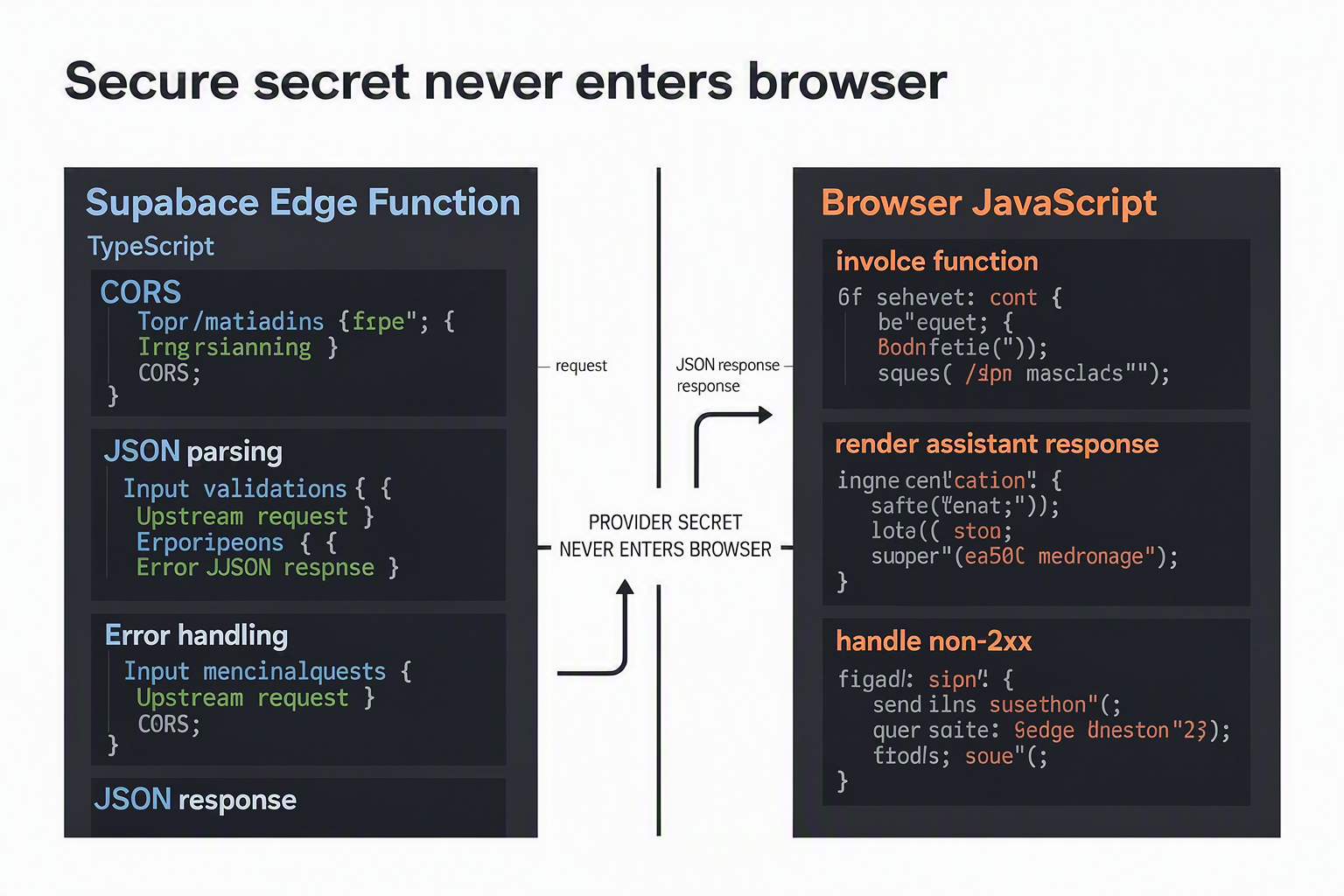
The minimal secure architecture is browser → Supabase Edge Function → OpenAI-compatible model: the browser sends a prompt, the Edge Function reads the provider key from server-side secrets, calls the model, and returns JSON. Supabase Auth, database persistence, and rate limiting can be added later without exposing the provider key to the browser.
How do I create and configure the Edge Function?
Supabase CLI commands can change between releases, so verify the current syntax in Supabase’s documentation before production deployment:
supabase login
supabase link --project-ref YOUR_PROJECT_REF
supabase functions new chat
supabase secrets set OPENAI_API_KEY="sk-your-server-side-key"
supabase secrets set OPENAI_MODEL="gpt-4o-mini"
supabase functions serve chat --env-file .env.local
supabase functions deploy chat
Never place OPENAI_API_KEY in frontend environment variables, committed files, browser storage, or HTML. Platforms such as CallMissed also provide an OpenAI-compatible gateway, allowing the upstream endpoint and model configuration to be changed without rewriting the browser integration.
What is the minimal secure Edge Function?
This example intentionally permits unauthenticated requests for local or initial testing only. Before launch, require a Supabase access token, validate it server-side, and add per-user rate limits.
// supabase/functions/chat/index.ts
const origin = Deno.env.get("ALLOWED_ORIGIN") ?? "http://localhost:5173";
const apiKey = Deno.env.get("OPENAI_API_KEY");
const model = Deno.env.get("OPENAI_MODEL") ?? "gpt-4o-mini";

const cors = {
  "Access-Control-Allow-Origin": origin,
  "Access-Control-Allow-Methods": "POST, OPTIONS",
  "Access-Control-Allow-Headers":
    "authorization, x-client-info, apikey, content-type",
  "Content-Type": "application/json",
};

const reply = (body: unknown, status = 200) =>
  new Response(JSON.stringify(body), { status, headers: cors });

Deno.serve(async (req) => {
  try {
    if (req.method === "OPTIONS") return new Response("ok", { headers: cors });
    if (req.method !== "POST") return reply({ error: "Method not allowed" }, 405);
    if (!apiKey) return reply({ error: "Server key is not configured" }, 500);

    let body: { prompt?: unknown };
    try {
      body = await req.json();
    } catch {
      return reply({ error: "Request body must be valid JSON" }, 400);
    }

    if (
      typeof body.prompt !== "string" ||
      body.prompt.trim().length === 0 ||
      body.prompt.length > 8_000
    ) {
      return reply({ error: "prompt must be 1–8,000 characters" }, 400);
    }

    let upstream: Response;
    try {
      upstream = await fetch("https://api.openai.com/v1/chat/completions", {
        method: "POST",
        headers: {
          Authorization: `Bearer ${apiKey}`,
          "Content-Type": "application/json",
        },
        body: JSON.stringify({
          model,
          messages: [{ role: "user", content: body.prompt.trim() }],
        }),
      });
    } catch (error) {
      console.error("Upstream network failure:", error);
      return reply({ error: "Model service is temporarily unavailable" }, 502);
    }

    if (!upstream.ok) {
      console.error("Model provider status:", upstream.status);
      return reply({ error: "Model request failed" }, 502);
    }

    let result: any;
    try {
      result = await upstream.json();
    } catch {
      return reply({ error: "Model returned invalid JSON" }, 502);
    }

    const content = result.choices?.[0]?.message?.content;
    return typeof content === "string"
      ? reply({ message: content })
      : reply({ error: "Model returned an unexpected response" }, 502);
  } catch (error) {
    console.error("Unhandled function error:", error);
    return reply({ error: "Internal server error" }, 500);
  }
});
The 8,000-character threshold is an application validation choice, not a claimed provider limit. In production, set ALLOWED_ORIGIN to the exact frontend domain, validate payload size and message roles, and never log prompts, tokens, or secrets.
How does the frontend call the function?
<input id="prompt" />
<button id="send">Send</button>
<pre id="answer"></pre>

<script type="module">
  const promptInput = document.querySelector("#prompt");
  const answer = document.querySelector("#answer");

  document.querySelector("#send").addEventListener("click", async () => {
    answer.textContent = "Loading...";

    const response = await fetch(
      "https://YOUR_PROJECT_REF.supabase.co/functions/v1/chat",
      {
        method: "POST",
        headers: { "Content-Type": "application/json" },
        body: JSON.stringify({ prompt: promptInput.value }),
      }
    );

    const data = await response.json().catch(() => ({}));

    if (!response.ok) {
      throw new Error(data.error ?? `Request failed: ${response.status}`);
    }

    answer.textContent = data.message;
  });
</script>
For an authenticated app, add Authorization: Bearer ${session.access_token} and validate that token inside the function rather than trusting a client-supplied user ID.
How do I add authentication, persistence, streaming, rate limiting, and observability for production? (TABLE)
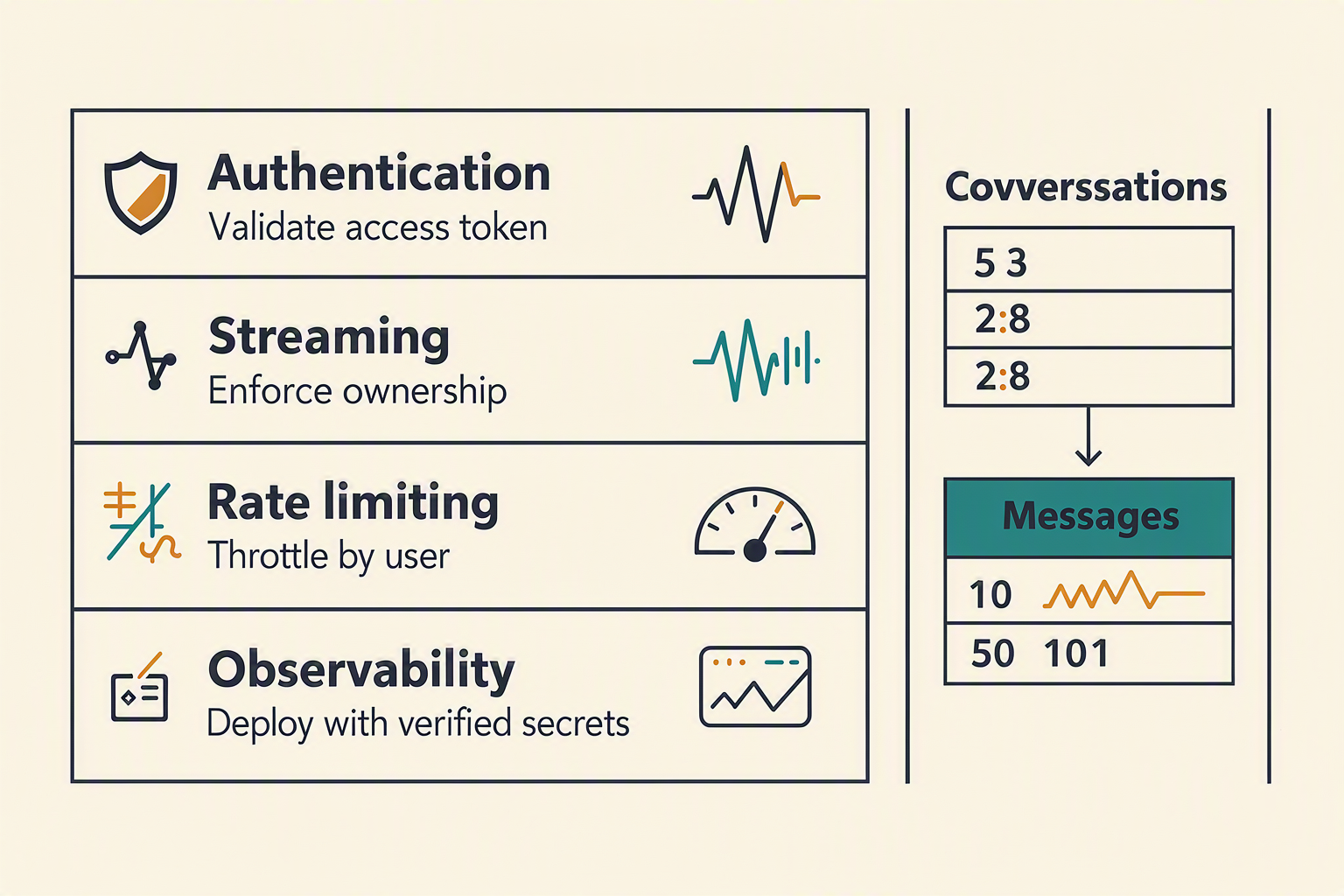
Add production controls in this order: authenticate the caller, persist data under Row Level Security (RLS), optionally stream model output, enforce server-side quotas, and emit redacted telemetry. The Edge Function should validate the Supabase access token, derive ownership from the validated user ID, call the model provider with a server-side secret, and never trust a browser-supplied user_id.
What should I add before deploying?
| Concern | Edge Function action | Database/client action | Failure response |
|---|---|---|---|
| Authentication | Validate Authorization: Bearer <token> with Supabase Auth. | Derive every owner ID from user.id. | 401 for missing, expired, or invalid credentials. |
| Persistence | Validate roles, IDs, and ownership before inserts or queries. | Enable RLS on both tables and add ownership policies. | 403 when authenticated access is not permitted. |
| Streaming | Proxy the provider’s ReadableStream without buffering. | Parse the documented event format incrementally. | Handle disconnects, incomplete output, and timeouts. |
| Rate limiting | Key quotas by authenticated user ID; use IP controls for unauthenticated traffic. | Use a transactional counter or external rate-limit service. | 429 Too Many Requests with Retry-After. |
| Observability | Record request ID, user ID, model alias, latency, status, and usage metadata. | Apply retention and access controls to logs. | Redact tokens, keys, prompts, and responses. |
RFC 6585 defines HTTP 429, while RFC 9110 defines the general HTTP semantics for statuses such as 400, 401, and 403. Return 400 for malformed input, 401 for invalid authentication, and 403 for authenticated but unauthorized access.
How do I create an RLS-protected chat schema?
Run this SQL in Supabase SQL Editor. The messages policy checks ownership through its parent conversation:
create table public.conversations (
  id uuid primary key default gen_random_uuid(),
  owner_id uuid not null references auth.users(id) on delete cascade,
  title text,
  created_at timestamptz not null default now()
);

create table public.messages (
  id bigint generated always as identity primary key,
  conversation_id uuid not null references public.conversations(id) on delete cascade,
  role text not null check (role in ('system', 'user', 'assistant')),
  content text not null,
  created_at timestamptz not null default now()
);

alter table public.conversations enable row level security;
alter table public.messages enable row level security;

create policy "owners manage conversations"
on public.conversations for all
using (owner_id = auth.uid())
with check (owner_id = auth.uid());

create policy "owners manage messages"
on public.messages for all
using (exists (
  select 1 from public.conversations c
  where c.id = conversation_id and c.owner_id = auth.uid()
))
with check (exists (
  select 1 from public.conversations c
  where c.id = conversation_id and c.owner_id = auth.uid()
));
How do I validate identity and persist messages?
Initialize the Supabase client rather than relying on an undefined global. This pattern uses the caller’s JWT, so Postgres RLS applies:
import { createClient } from "npm:@supabase/supabase-js@2";

const authHeader = req.headers.get("Authorization");
if (!authHeader?.startsWith("Bearer ")) {
  return Response.json({ error: "Authentication required" }, { status: 401 });
}

const supabase = createClient(
  Deno.env.get("SUPABASE_URL")!,
  Deno.env.get("SUPABASE_ANON_KEY")!,
  { global: { headers: { Authorization: authHeader } } }
);

const { data: { user }, error } = await supabase.auth.getUser();
if (error || !user) {
  return Response.json({ error: "Invalid access token" }, { status: 401 });
}

const { data: conversation, error: insertError } =
  await supabase.from("conversations")
    .insert({ owner_id: user.id, title: "New chat" })
    .select("id").single();

await supabase.from("messages").insert({
  conversation_id: conversation.id,
  role: "user",
  content: validatedMessage
});
Supabase Auth documentation recommends validating tokens through the Auth service. A helper such as checkQuota must be implemented with a transactional store or external service; treat it as pseudocode unless its setup is shown. For streaming, return the provider’s stream with its documented Content-Type, add a correlation ID, and log timing and status without recording full prompts or secrets.
Which common mistakes cause security bugs, CORS failures, authentication errors, or unreliable ChatGPT responses? (TABLE)
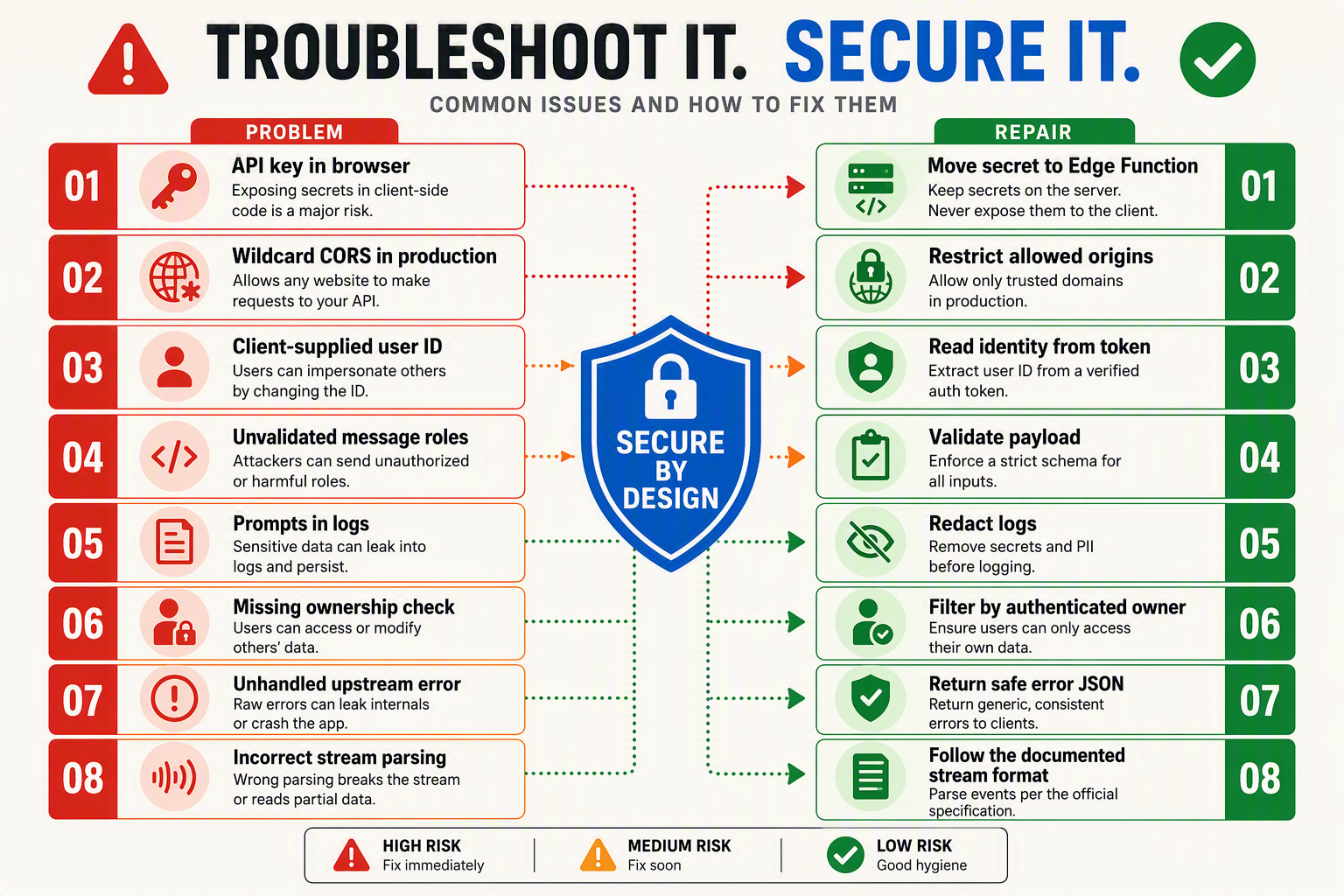
Treat every browser request to a Supabase Edge Function as untrusted: never expose the model-provider key, never trust a client-supplied user ID, and never assume a successful HTTP request contains a valid model response. Most failures come from a small set of preventable mistakes involving secrets, CORS, authentication, payload validation, and upstream error handling.
Which mistakes should you check before deployment?
| Common mistake | Typical symptom | Safer implementation | Relevant status |
|---|---|---|---|
| Putting the OpenAI or model-provider key in frontend code | The key appears in JavaScript, browser storage, or DevTools network requests | Store the key as an Edge Function secret and read it only on the server | 401 from the provider often indicates missing or invalid credentials |
Returning no CORS headers, or handling only POST | Browser reports “blocked by CORS policy,” often before your function logic runs | Respond to OPTIONS with the required headers and include them on success and error responses | CORS is enforced by browsers; MDN documents Access-Control-Allow-Origin and preflight behavior |
Trusting user_id from the request body | A user can alter an ID and access or write another user’s records | Validate the Supabase access token server-side and derive the user ID from the authenticated session | 401 Unauthorized means authentication is missing or invalid; 403 Forbidden means access is understood but refused, as defined by RFC 9110 |
| Sending malformed, oversized, or uncontrolled messages | JSON parse failures, high costs, prompt injection exposure, or model errors | Check Content-Type, parse JSON safely, cap message count and text length, and allow only expected roles such as user and assistant | 400 Bad Request is the standard response for invalid request syntax or content under RFC 9110 |
| Assuming every upstream response is valid JSON | The function crashes when the provider returns HTML, a timeout, or an error-shaped payload | Check response.ok, preserve the upstream status where appropriate, and parse defensively before returning a stable app error | 502 Bad Gateway is appropriate when your function cannot obtain a valid upstream response |
| Logging prompts, tokens, or provider responses indiscriminately | Sensitive customer data or credentials appears in logs; debugging becomes expensive | Log request IDs, latency, status, and safe error categories—not secrets or full conversation content | 429 Too Many Requests, defined by RFC 9110, should trigger controlled retry or quota messaging |
How do you diagnose these failures systematically?
Use the browser’s Network panel and Supabase Edge Function logs together:
- If the browser fails before receiving a response, inspect the
OPTIONSpreflight request, allowed origin, allowed headers, and whether the function returns CORS headers on errors as well as successes. - If the response is 401, confirm that the frontend sends
Authorization: Bearer <access_token>and that the function validates the token instead of merely checking whether the header exists. - If the response is 403, inspect database ownership rules, Row Level Security policies, and any server-side authorization check for the conversation.
- If the response is 400, print only safe validation details during development and verify that the client sends valid JSON with the expected
messagesstructure. - If the response is 429, 500, 502, or 504, distinguish your function’s failure from the model provider’s failure using a request ID and an upstream status field.
The MDN Web Docs guidance on CORS and the IETF RFC 9110 definitions for HTTP status codes provide the standards baseline; Supabase’s current Edge Functions and Auth documentation should be checked for runtime-specific behavior before deployment. A reliable ChatGPT app does not hide these failures—it converts them into predictable, minimal responses without leaking secrets or user data.
How do I fix CORS, 401, malformed JSON, upstream errors, timeouts, and streaming parser problems?
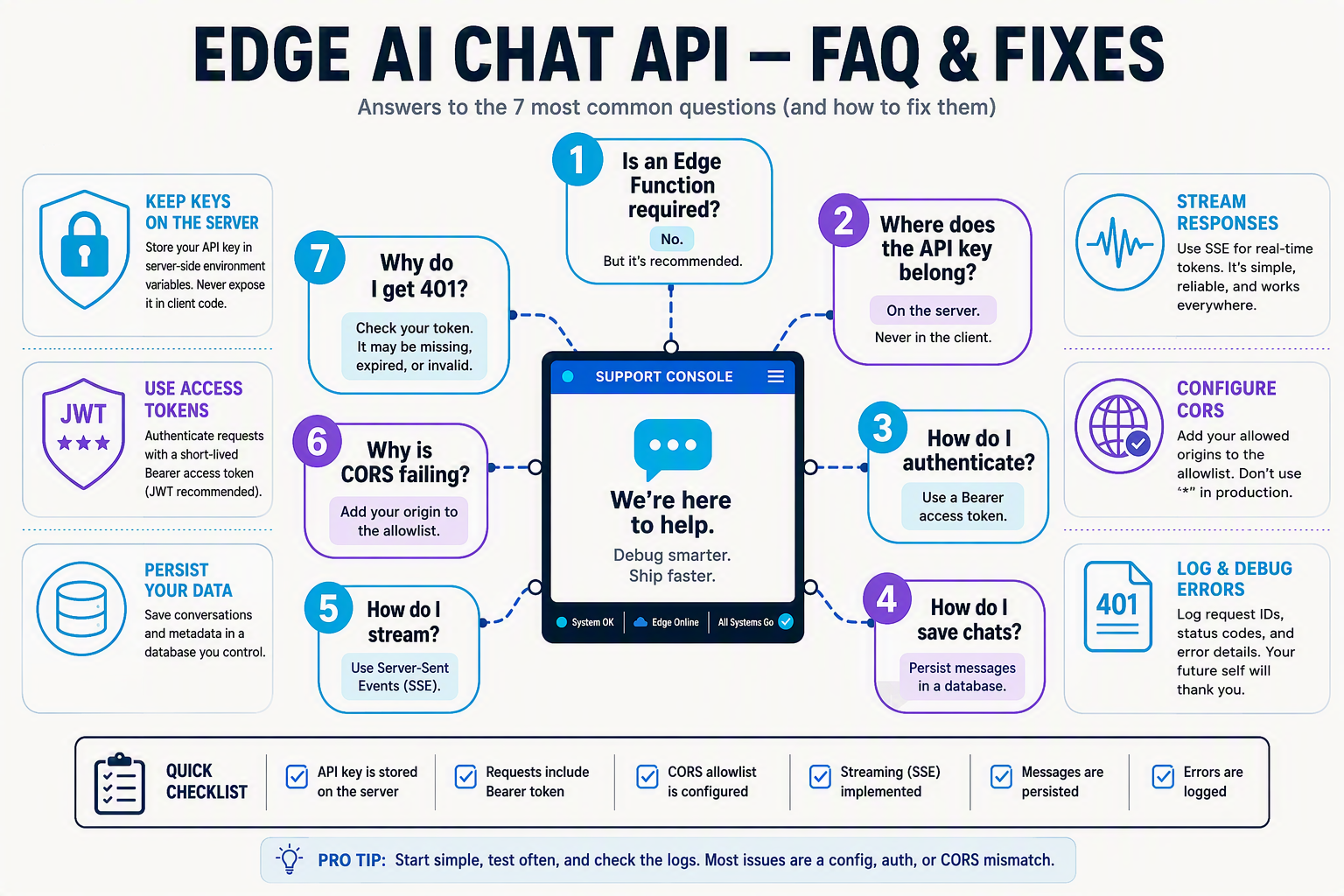
Common troubleshooting questions
How do I fix CORS errors in a ChatGPT app with Supabase Edge Functions?
OPTIONS preflight requests before authentication or JSON parsing, and return Access-Control-Allow-Origin, Access-Control-Allow-Headers, and Access-Control-Allow-Methods headers on both successful and error responses. During development, use the exact frontend origin; in production, replace a wildcard with an allowlist because Supabase Edge Functions are server-side TypeScript endpoints, as documented by Supabase.Why does my ChatGPT app with Supabase Edge Functions return a 401 Unauthorized error?
401 usually means the browser did not send a valid Supabase Auth access token, the token has expired, or the function is incorrectly expecting a provider API key from the client. Send Authorization: Bearer <supabase-access-token>, then validate that token inside the function with Supabase Auth instead of trusting a client-supplied user ID; never expose the model-provider key in frontend code.How do I fix malformed JSON or “Unexpected end of JSON input” errors?
Content-Type: application/json and a valid serialized body, such as JSON.stringify({ messages }), and verify that the function calls await request.json() only once. Check for empty request bodies, trailing commas, incorrect property names, and non-JSON error responses; log a request ID and validation result rather than logging secrets or complete user prompts.How do I troubleshoot upstream OpenAI or model-provider errors from a Supabase Edge Function?
{ "error": "upstream_model_error", "requestId": "..." } to the browser instead of forwarding credentials or opaque HTML. A 401 or 403 from the provider generally indicates a missing, invalid, or unauthorized server secret, while 429 indicates throttling; verify the configured secret, model name, account permissions, and provider documentation before changing application code.Why does my Supabase Edge Function time out while generating a ChatGPT response?
AbortController timeout shorter than the platform request limit, avoid unbounded retries, and return a clear retryable error; confirm current Edge Function limits in Supabase’s documentation because runtime quotas are version- and plan-sensitive.How do I fix streaming parser problems in a ChatGPT app with Supabase Edge Functions?
Content-Type: text/event-stream, while newline-delimited JSON uses one complete JSON object per line. The client must buffer partial network chunks, split only at complete delimiters, remove an SSE data: prefix when applicable, handle the provider’s terminal event, and fall back to a normal JSON response when streaming is disabled; test disconnects and malformed chunks before production.What should I verify before deployment, and where can I go next with a Supabase ChatGPT app?
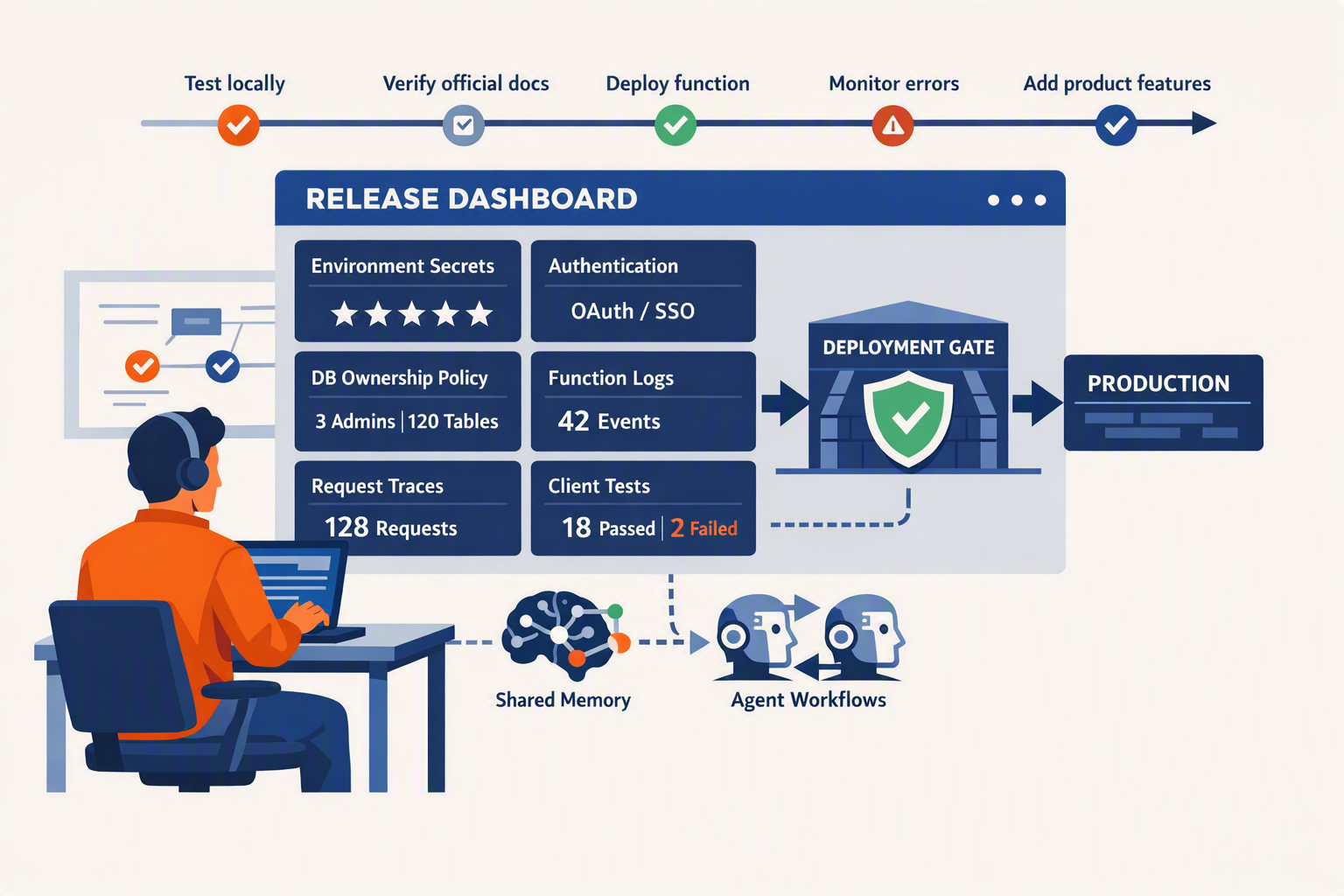
Before deployment, verify secret management, authentication, input validation, database ownership, CORS, error handling, observability, and current provider API behavior in a production-like environment. After the first release, you can extend the Supabase ChatGPT app with streaming, persistent conversation history, retrieval-augmented generation, tool calling, analytics, and multichannel interfaces.
What should I verify before deploying my Supabase ChatGPT app?
Use this release checklist:
- Protect credentials: Confirm that the OpenAI or compatible-provider key exists only in Supabase server-side secrets. Search the frontend bundle, Git history, logs, and network requests for leaked keys. Supabase documentation describes project secrets as runtime environment variables available to Edge Functions; do not place provider credentials in browser-exposed
.envvariables. - Authenticate users: Require a Supabase Auth access token for private features. The Edge Function should validate the token with Supabase Auth and derive the user identity from the verified token, rather than trusting a
user_idsent in JSON. - Validate requests: Enforce a maximum body size, require a non-empty prompt, validate message roles, reject unexpected fields, and handle malformed JSON with a controlled 400 response.
- Check database isolation: Enable Row Level Security on conversation and message tables. Test with two separate users to confirm that User A cannot select, update, or delete User B’s records.
- Restrict browser access: Replace wildcard CORS with your production origin where possible. Confirm that both preflight
OPTIONSrequests and authenticated requests succeed. - Test failures: Simulate missing secrets, expired tokens, provider 401 or 429 responses, timeouts, empty model output, and invalid streaming chunks.
- Review logs: Supabase Edge Functions logs should record request IDs, latency, status, and safe error categories—not API keys, access tokens, full prompts, or personal data.
Supabase’s Edge Functions documentation, Supabase Auth documentation, and the OpenAI API documentation should be checked immediately before release because CLI commands, runtime behavior, model names, limits, and response formats can change.
Which improvements should I build next?
Prioritize improvements according to user value and operational risk:
- Streaming responses: Return the provider’s supported event stream from the Edge Function and consume chunks incrementally in the browser. Verify the current streaming format in the model provider’s official documentation; do not assume that every OpenAI-compatible provider uses identical event names or termination markers.
- Conversation history: Store conversations and messages with a foreign key to the authenticated user, then load only records permitted by Row Level Security.
- Rate limiting and budgets: Apply per-user and per-IP request limits, maximum prompt lengths, concurrency controls, and daily spending alerts. Provider-side limits and pricing are version-sensitive, so configure them from current billing documentation rather than copied examples.
- Grounded answers: Add document ingestion, embeddings, retrieval, and citations so the assistant answers from your approved knowledge base.
- Tool calling: Let the server invoke carefully allow-listed functions such as order lookup or appointment booking. Validate every tool argument and require authorization before any state-changing action.
- Multichannel delivery: The same authenticated, server-side orchestration pattern can support web chat, WhatsApp, email, and voice. Platforms such as CallMissed extend AI communication across WhatsApp Business calling and voice and chat experiences in 22 Indian languages, illustrating how a focused chat backend can evolve into broader customer engagement.
A reliable deployment is not the finish line: it is the boundary between a working demo and a maintainable AI product. Keep the Edge Function thin, keep secrets server-side, verify every user and request, and re-check official Supabase and model-provider documentation whenever you upgrade the runtime or API.
Conclusion
A secure ChatGPT app with Supabase Edge Functions starts with one principle: the browser sends prompts to an Edge Function, while the function keeps the model-provider API key server-side and returns the response. From that minimal flow, you can build a production-ready foundation by adding authentication, persistence, validation, rate limiting, streaming, and observability deliberately.
The key takeaways are:
- Protect credentials: Never expose an OpenAI or compatible model API key in browser code, storage, or network requests; store it as a server-side secret.
- Validate every request: Handle CORS, JSON parsing, payload size, message roles, upstream failures, and non-2xx responses before they become production incidents.
- Authenticate and isolate data: Use Supabase Auth to validate access tokens, then enforce conversation ownership with server-side checks and Row Level Security.
- Scale carefully: Add streaming, quotas, abuse controls, structured logging, and deployment checks only after verifying current Supabase and model-provider documentation.
The next stage of this architecture will be shaped by more capable models, lower-latency inference, evolving streaming APIs, and stronger requirements for privacy and cost control. Platforms such as CallMissed show how the same AI-infrastructure pattern is expanding into voice agents and multilingual chatbots across 22 Indian languages.
With your secrets protected and your data boundaries explicit, what AI experience will you build on this foundation next?
Related Reading
Related Posts

كيف يمكنني ربط بوابة واجهة برمجة تطبيقات لنموذج لغوي كبير بوكلاء الصوت وواتساب؟ دليل للمطورين

موظف استقبال بالذكاء الاصطناعي للشركات الصغيرة: توقّف عن خسارة العملاء المحتملين بسبب المكالمات الفائتة

غروك 4.20 مقابل جيميني 3.1 برو في مهام الاستدلال: ما الذي يمكن التحقق منه؟
Ready to automate customer conversations?
Launch AI voice agents and WhatsApp bots with CallMissed — one API, 22+ Indian languages.