
Tutorial: Stream LLM Responses from a FastAPI Backend



A 2026 production-grade FastAPI streaming tutorial — SSE, async, post-stream usage tracking, client-disconnect handling, and observability.
Streaming LLM responses from a FastAPI backend looks easy in tutorials and gets messy in production — client disconnects, post-stream cleanup, error propagation, usage tracking, and observability all surface only when traffic ramps. This tutorial covers the production-shape pattern: SSE (Server-Sent Events), async, robust disconnect handling, and post-stream usage tracking that survives cancellation.
Why SSE for LLM streaming
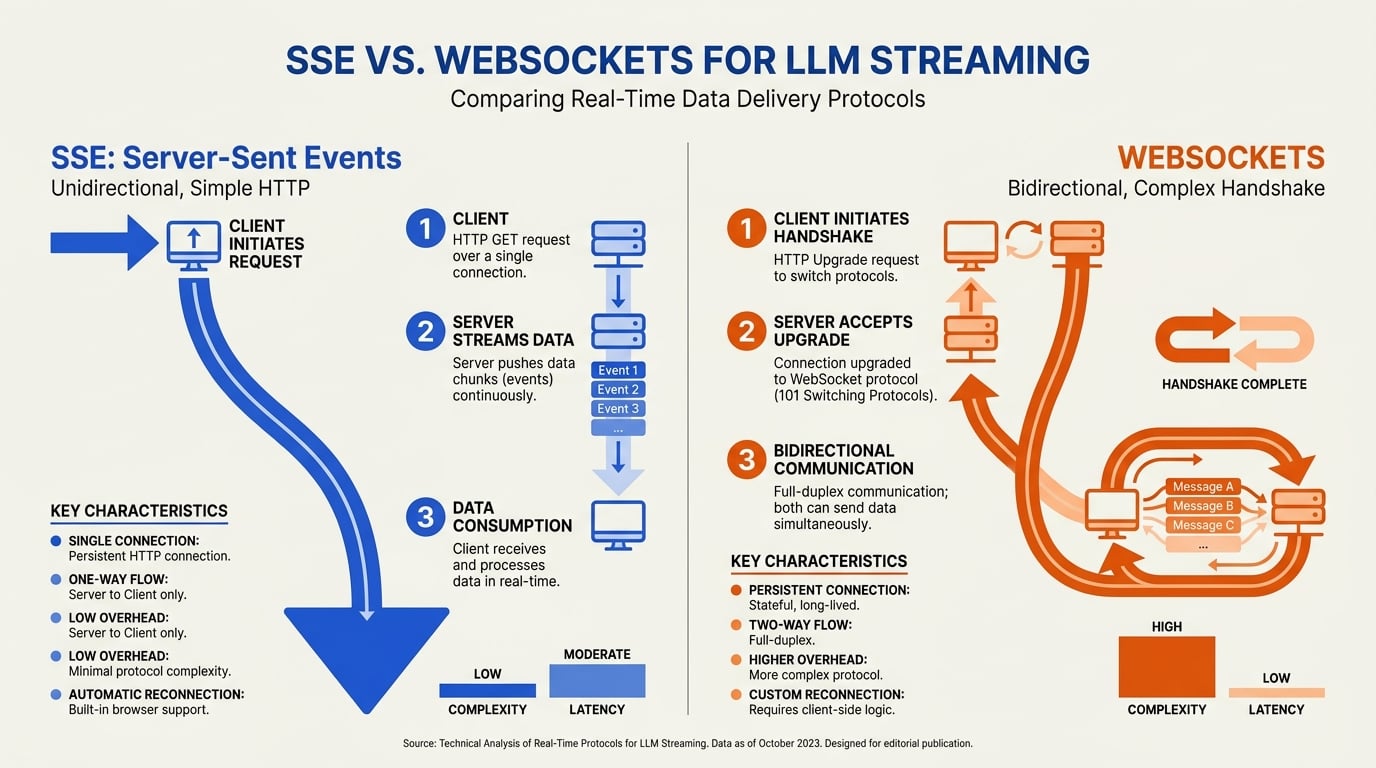
Server-Sent Events are the standard 2026 protocol for LLM streaming. SSE is unidirectional (server → client), simpler than WebSockets (no handshake, plain HTTP), and works through most proxies and load balancers, per multiple production guides. The OpenAI API itself uses SSE.
The key alternative — WebSockets — is the right choice for bidirectional realtime use cases (voice, multiplayer agents). For chat-style token streaming, SSE wins on simplicity.
The naive version
from fastapi import FastAPI
from fastapi.responses import StreamingResponse
from openai import AsyncOpenAI

app = FastAPI()
client = AsyncOpenAI()

@app.post("/chat")
async def chat(req: dict):
    async def gen():
        stream = await client.chat.completions.create(
            model="gpt-4o-mini",
            messages=req["messages"],
            stream=True,
        )
        async for chunk in stream:
            delta = chunk.choices[0].delta.content
            if delta:
                yield f"data: {delta}\n\n"
        yield "data: [DONE]\n\n"

    return StreamingResponse(gen(), media_type="text/event-stream")
This works for the happy path. It does not handle:
- Client disconnects mid-stream (resources leak)
- Errors from the upstream model (silently truncates)
- Usage tracking (token counts, cost) — the stream object only carries them at the end
- Observability (logs, traces)
- Cancellation safety on shutdown
Production needs all five.
The production version
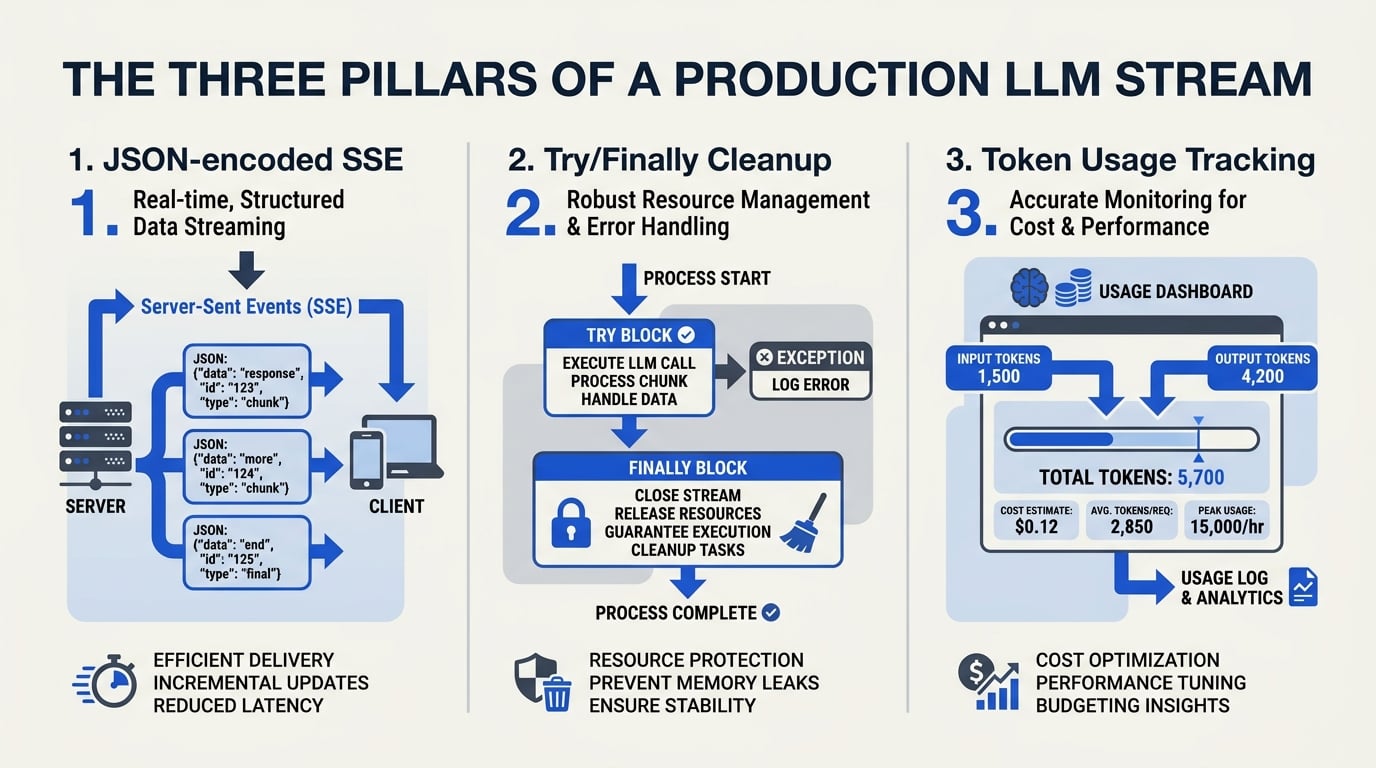
1. JSON-encoded SSE for safety
Plain text deltas break on newlines and quotes. Always JSON-encode:
import json

def sse_format(payload: dict) -> str:
    return f"data: {json.dumps(payload)}\n\n"
2. Try/finally with explicit cleanup
from contextlib import asynccontextmanager
import logging

log = logging.getLogger(__name__)

async def stream_chat(messages: list[dict]):
    stream = None
    completion_text = ""
    usage = None
    try:
        stream = await client.chat.completions.create(
            model="gpt-4o-mini",
            messages=messages,
            stream=True,
            stream_options={"include_usage": True},
        )
        async for chunk in stream:
            if chunk.choices and chunk.choices[0].delta.content:
                delta = chunk.choices[0].delta.content
                completion_text += delta
                yield sse_format({"type": "delta", "text": delta})
            if chunk.usage:
                usage = chunk.usage
        yield sse_format({"type": "done"})
    except Exception as exc:
        log.exception("upstream error during stream")
        yield sse_format({"type": "error", "message": str(exc)})
        raise
    finally:
        # Post-stream cleanup runs even on cancellation
        if stream is not None:
            try:
                await stream.close()
            except Exception:
                pass
        # Schedule post-stream usage write outside the request lifecycle
        if usage:
            asyncio.create_task(record_usage(messages, completion_text, usage))
The finally: block runs on normal completion AND on asyncio.CancelledError raised when the client disconnects. This is where you put cleanup that must always run.
3. Post-stream writes that survive cancellation
The single most-common production bug: writing to your database in finally: using the request-scoped session, then having the client disconnect cancel the task between the database flush and commit. The connection is left "idle in transaction," holding row locks until your DB connection pool exhausts.
The pattern that handles it:
import asyncio
from your_app.db import async_session_factory

async def record_usage(messages, completion_text, usage):
    """Record usage in a fresh DB session, isolated from request cancellation."""
    try:
        await asyncio.shield(_do_record_usage(messages, completion_text, usage))
    except asyncio.CancelledError:
        # Task was cancelled; log but don't suppress
        log.warning("usage recording was cancelled")
        raise
    except Exception:
        log.exception("usage recording failed")

async def _do_record_usage(messages, completion_text, usage):
    async with async_session_factory() as db:
        try:
            db.add(UsageRecord(
                prompt_tokens=usage.prompt_tokens,
                completion_tokens=usage.completion_tokens,
                model="gpt-4o-mini",
                # other fields...
            ))
            await db.commit()
        except BaseException:
            await db.rollback()
            raise
Two principles:
- Fresh session. Don't reuse the session attached to the request — that session is cancelled when the request is cancelled.
asyncio.shield. Protects the post-stream task from being cancelled by the parent's cancellation propagating.
4. Wire it up in FastAPI
from fastapi import FastAPI, Request
from fastapi.responses import StreamingResponse

app = FastAPI()

@app.post("/chat")
async def chat(req: dict, request: Request):
    async def event_stream():
        async for event in stream_chat(req["messages"]):
            if await request.is_disconnected():
                log.info("client disconnected; ending stream")
                break
            yield event

    return StreamingResponse(
        event_stream(),
        media_type="text/event-stream",
        headers={
            "Cache-Control": "no-cache",
            "X-Accel-Buffering": "no",  # disable nginx buffering
        },
    )
The X-Accel-Buffering: no header is critical if you front your service with nginx — without it, nginx buffers your stream and clients see batches, not tokens.
5. Client-side consumption
For completeness, JavaScript consuming the stream:
const resp = await fetch("/chat", {
  method: "POST",
  headers: { "Content-Type": "application/json" },
  body: JSON.stringify({ messages: [...] }),
});
const reader = resp.body.getReader();
const decoder = new TextDecoder();
let buf = "";
while (true) {
  const { done, value } = await reader.read();
  if (done) break;
  buf += decoder.decode(value, { stream: true });
  let lines = buf.split("\n\n");
  buf = lines.pop();
  for (const line of lines) {
    if (line.startsWith("data: ")) {
      const event = JSON.parse(line.slice(6));
      if (event.type === "delta") appendToUI(event.text);
      if (event.type === "done") finalize();
      if (event.type === "error") showError(event.message);
    }
  }
}
Patterns to avoid
A few common bugs:
- Yielding plain text deltas. Breaks on newlines, quotes, and unicode edge cases. Always JSON-encode.
- Doing slow work between the stream start and the first yield. Adds time to first byte and erodes the perceived-fast UX. Push instrumentation into the
finally:block. - Reusing the request-scoped DB session for post-stream writes. Causes idle-in-transaction leaks on disconnect. Use a fresh session.
- No
request.is_disconnected()check. Leaks upstream-LLM cost when the user closes the tab. Detect and abort. - No error event in the SSE protocol. Clients have no way to surface upstream failures. Always reserve an error event type.
Observability

For production, log per-stream:
- Time to first token
- Total stream duration
- Tokens streamed
- Whether the client disconnected mid-stream
- Errors from upstream
These metrics surface degradations that aggregate dashboards miss — for example, a steady increase in mid-stream client disconnects often indicates network issues or model latency regressions.
Putting it together
The production-shape FastAPI streaming server in 2026:
- SSE protocol, JSON-encoded events
- Async upstream client (e.g.,
AsyncOpenAIor equivalent for your provider) - Try/finally with explicit stream cleanup
- Fresh DB session for post-stream writes, with
asyncio.shield - Disconnect detection via
request.is_disconnected() - nginx buffering disabled
- Per-request observability
This pattern handles every failure mode we have hit in production. Use it as a starting template; adapt to your provider, your DB, and your observability stack.
Frequently Asked Questions
Why use Server-Sent Events instead of WebSockets for LLM streaming?
What goes wrong if I use the request-scoped DB session in the `finally:` block?
asyncio.shield.How do I handle errors mid-stream so the client knows what happened?
Discussion
Related Posts



Ready to automate customer conversations?
Launch AI voice agents and WhatsApp bots with CallMissed — one API, 22+ Indian languages.