
Tutorial: Fine-Tune Llama 4 Scout for Your Domain



A 2026 hands-on tutorial for fine-tuning Llama 4 Scout — LoRA setup, dataset prep, training, eval, deployment. Concrete Python code with Unsloth.
Llama 4 Scout — Meta's 17B-active-parameter MoE released in April 2025 with a 10M token context window — is one of the most capable open models available for domain fine-tuning in 2026. This tutorial walks through a LoRA fine-tune of Llama 4 Scout for a domain task, covering dataset prep, training, eval, and deployment.
When to fine-tune (and when not to)
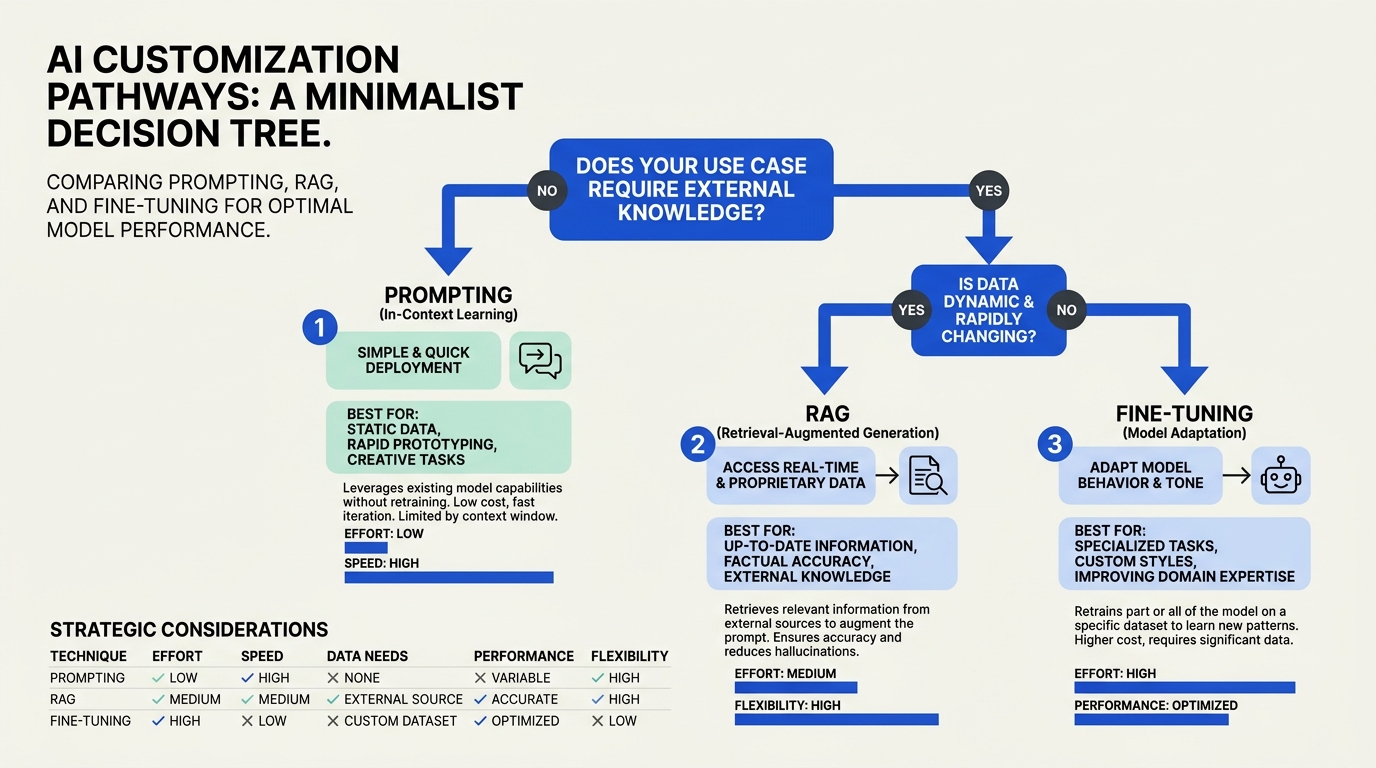
Before you fine-tune, ask:
- Have you exhausted prompting and RAG? Most domain problems are solved better at the application layer.
- Do you have enough labeled data? LoRA fine-tunes typically want 1K-10K high-quality examples; full fine-tunes want 100K+.
- Is the latency or cost benefit worth the operational work? Fine-tuning adds versioning, eval gates, and deployment complexity.
If yes to all three, proceed. If not, prompt + RAG first.
What you need
- Llama 4 Scout —
meta-llama/Llama-4-Scout-17B-16Eon Hugging Face (gated; accept license first) - Hardware: 4x H100 80GB for full LoRA, or a single 80GB A100 for 4-bit QLoRA, per fine-tuning practice reports
- Tooling: Unsloth for QLoRA on a single GPU, or torchtune / LlamaFactory for multi-GPU
- Tracking: Weights & Biases or MLflow
Step 1 — Dataset preparation
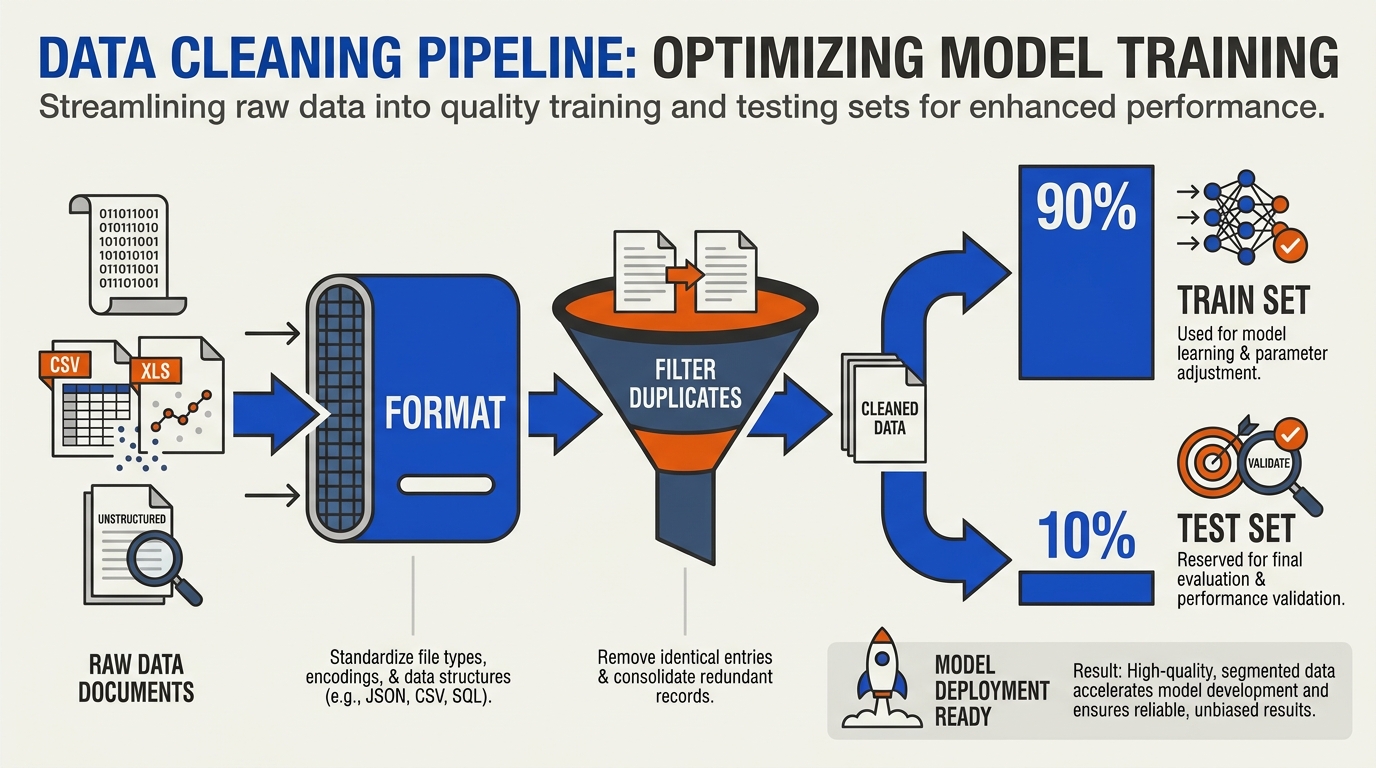
Llama 4's chat template expects a specific format. For a supervised fine-tuning task, structure each example as:
example = {
    "messages": [
        {"role": "system", "content": "You are a contracts analyst..."},
        {"role": "user", "content": "Identify the indemnification clause in: ..."},
        {"role": "assistant", "content": "<your target output>"},
    ]
}
Quality matters more than quantity. Filter:
- Remove examples with garbled formatting
- Remove duplicates (exact and near-duplicate)
- Hold out 10% as a test set; never train on it
- Ensure label distribution matches production (don't oversample easy classes)
Convert to jsonl:
import json

with open("train.jsonl", "w") as f:
    for ex in train_examples:
        f.write(json.dumps(ex) + "\n")
Step 2 — QLoRA setup with Unsloth
Unsloth currently supports QLoRA fine-tuning of Llama 4 Scout in 4-bit precision on a single GPU. Code:
from unsloth import FastLanguageModel
import torch

max_seq_length = 4096  # or higher up to 10M
dtype = None
load_in_4bit = True

model, tokenizer = FastLanguageModel.from_pretrained(
    model_name="unsloth/Llama-4-Scout-17B-16E",
    max_seq_length=max_seq_length,
    dtype=dtype,
    load_in_4bit=load_in_4bit,
)

model = FastLanguageModel.get_peft_model(
    model,
    r=16,
    target_modules=[
        "q_proj", "k_proj", "v_proj", "o_proj",
        "gate_proj", "up_proj", "down_proj",
    ],
    lora_alpha=16,
    lora_dropout=0,
    bias="none",
    use_gradient_checkpointing="unsloth",
    random_state=3407,
)
Rank 16 is a reasonable default; rank 32-64 for harder tasks. Higher rank = more parameters trained = more overfitting risk.
Step 3 — Format data with the chat template
def format_prompts(examples):
    convs = examples["messages"]
    texts = [
        tokenizer.apply_chat_template(
            conv, tokenize=False, add_generation_prompt=False
        )
        for conv in convs
    ]
    return {"text": texts}

from datasets import load_dataset
ds = load_dataset("json", data_files="train.jsonl", split="train")
ds = ds.map(format_prompts, batched=True)
Verify a few formatted examples by hand. Llama 4's special tokens differ from Llama 3; a misformatted dataset trains the model on garbage.
Step 4 — Train
from trl import SFTTrainer
from transformers import TrainingArguments

trainer = SFTTrainer(
    model=model,
    tokenizer=tokenizer,
    train_dataset=ds,
    dataset_text_field="text",
    max_seq_length=max_seq_length,
    args=TrainingArguments(
        per_device_train_batch_size=2,
        gradient_accumulation_steps=4,
        warmup_steps=10,
        num_train_epochs=2,  # 2-3 is typical; more risks overfit
        learning_rate=2e-4,
        fp16=not torch.cuda.is_bf16_supported(),
        bf16=torch.cuda.is_bf16_supported(),
        logging_steps=10,
        optim="adamw_8bit",
        weight_decay=0.01,
        lr_scheduler_type="linear",
        seed=3407,
        output_dir="outputs",
        report_to="wandb",
    ),
)

trainer.train()
Watch the training and validation loss curves. If validation loss starts climbing while training loss falls, you are overfitting — stop early or reduce epochs.
Step 5 — Eval
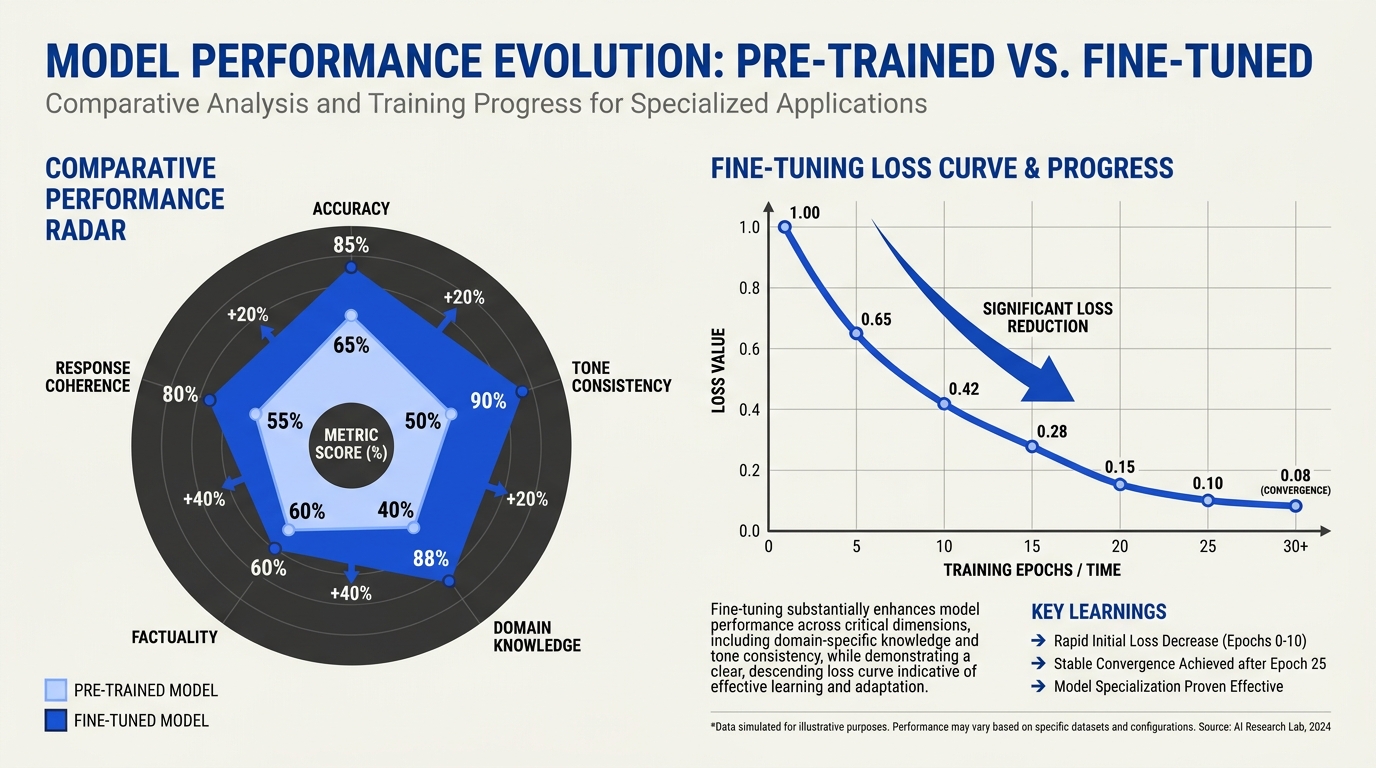
The most important step. Hold-out test set with task-specific metrics:
FastLanguageModel.for_inference(model)

def predict(messages):
    prompt = tokenizer.apply_chat_template(
        messages, tokenize=False, add_generation_prompt=True
    )
    inputs = tokenizer([prompt], return_tensors="pt").to("cuda")
    out = model.generate(
        **inputs,
        max_new_tokens=256,
        temperature=0.0,
        do_sample=False,
    )
    return tokenizer.decode(out[0], skip_special_tokens=True)

# Run over your held-out set
predictions = [predict(ex["messages"][:-1]) for ex in test_set]
references = [ex["messages"][-1]["content"] for ex in test_set]

# Score with task-appropriate metric (exact match, F1, BLEU, LLM-as-judge)
score = compute_metric(predictions, references)
print(f"Test score: {score:.3f}")
Compare to:
- The base Llama 4 Scout zero-shot
- A frontier model (GPT-4o, Claude) zero-shot
- Your prior production baseline
If your fine-tune doesn't beat the base model + a good prompt, the fine-tune is not earning its keep.
Step 6 — Save and merge
For deployment, save the LoRA adapter or merge it into the base model:
# Save just the adapter (small, ~100MB)
model.save_pretrained("llama4-scout-mydomain-lora")
tokenizer.save_pretrained("llama4-scout-mydomain-lora")

# Or merge into base for single-file deployment
merged = model.merge_and_unload()
merged.save_pretrained("llama4-scout-mydomain-merged")
Merged models are larger but simpler to serve. Adapters are easier to swap and version.
Step 7 — Deployment
Options:
- vLLM — high-throughput inference with adapter loading; the standard 2026 production server
- TGI (Text Generation Inference) — Hugging Face's server; production-ready
- Ollama — for local / dev
- Hosted — Together AI, Fireworks, AWS Bedrock, Azure, GCP all support Llama 4 hosting with adapter support
Example with vLLM:
python -m vllm.entrypoints.openai.api_server \
  --model meta-llama/Llama-4-Scout-17B-16E \
  --enable-lora \
  --lora-modules mydomain=llama4-scout-mydomain-lora
Then call OpenAI-compatible:
from openai import OpenAI
client = OpenAI(base_url="http://localhost:8000/v1", api_key="dummy")
resp = client.chat.completions.create(
    model="mydomain",
    messages=[{"role": "user", "content": "..."}],
)
Common pitfalls
- Training on your eval set. Always hold out before any preprocessing.
- Wrong chat template. Llama 4's template differs from Llama 3; verify by hand.
- Too many epochs. 2-3 is usually right; 5+ overfits on most domain tasks.
- No baseline comparison. Always compare against base model + good prompt; sometimes the prompt wins.
- Catastrophic forgetting. Heavy fine-tuning on a narrow task can degrade general capability. Use rank 8-16 and limited epochs to mitigate.
When fine-tuning earned its keep

Three signals that justify the operational cost:
- 5%+ accuracy gain on your domain eval over base + best prompt
- 50%+ reduction in inference cost vs. frontier model with comparable quality
- Latency reduction sufficient to unlock new product surfaces
Without one of these, stay with prompting + RAG. Fine-tuning is a real engineering investment; the benefit needs to clear the bar.
Frequently Asked Questions
Can I fine-tune Llama 4 Scout on a single GPU?
How many examples do I need for a useful fine-tune?
When does fine-tuning beat prompt + RAG?
Discussion
Related Posts



Ready to automate customer conversations?
Launch AI voice agents and WhatsApp bots with CallMissed — one API, 22+ Indian languages.