
Prompt Caching Explained: Anthropic, OpenAI, and the Math



How prompt caching works at Anthropic and OpenAI in 2026 — cache breakpoints, write and read pricing, TTL, breakeven math, and how to design cache-friendly prompts.
Prompt caching is the single highest-leverage cost lever for most production LLM workloads in 2026. The idea is simple — reuse the prefill compute of a previously seen prompt prefix instead of recomputing it. The implementations are different across providers, and the math of when it pays off is worth understanding before you turn it on.
What is actually being cached
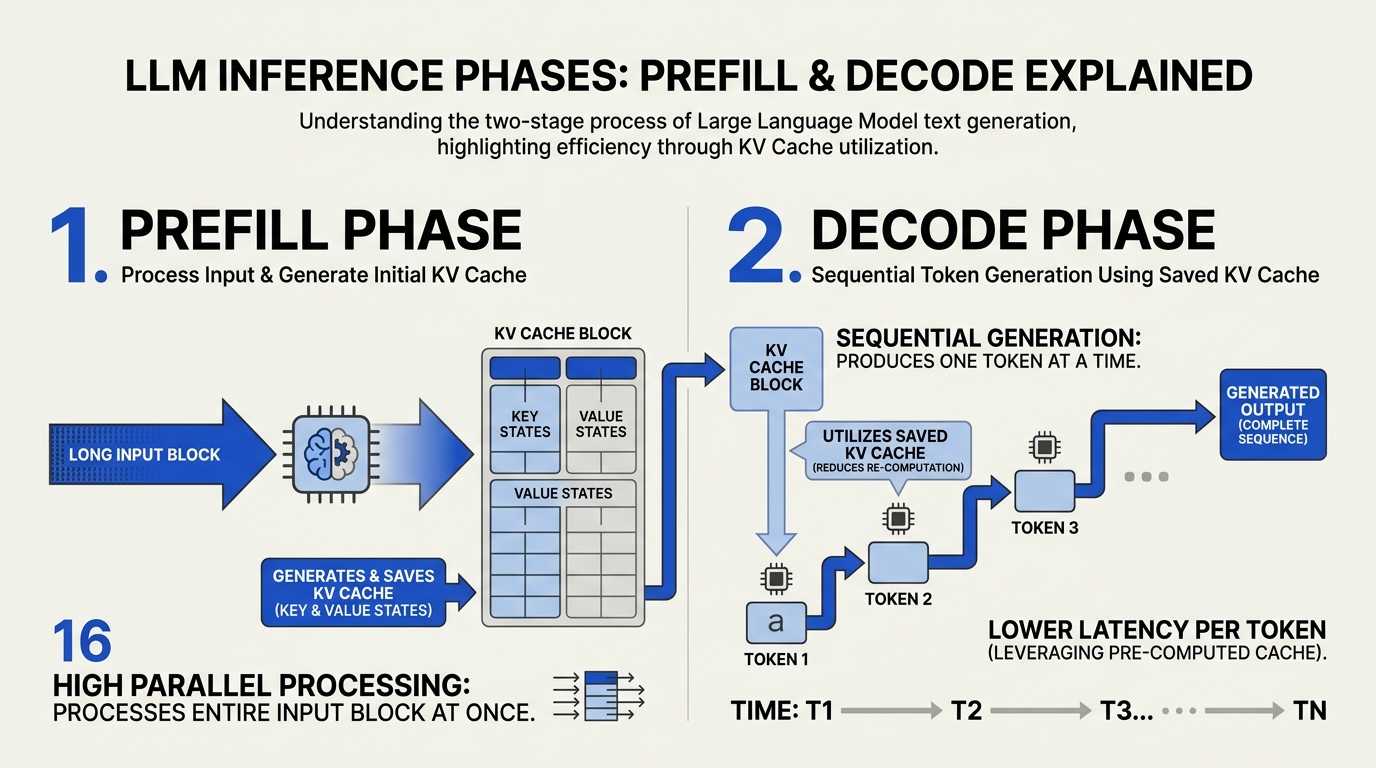
When an LLM processes a prompt, it goes through two phases:
- Prefill — the model attends over the entire input prompt and computes the KV cache (key-value tensors for each transformer layer).
- Decode — the model generates output tokens one at a time using the KV cache.
Prefill is dominated by the prompt length. For a 50,000-token prompt + 200 tokens of output, prefill is the overwhelming majority of the cost. Prompt caching reuses the KV cache for a prompt prefix you have already processed, skipping the prefill for that prefix entirely.
Anthropic's prompt caching
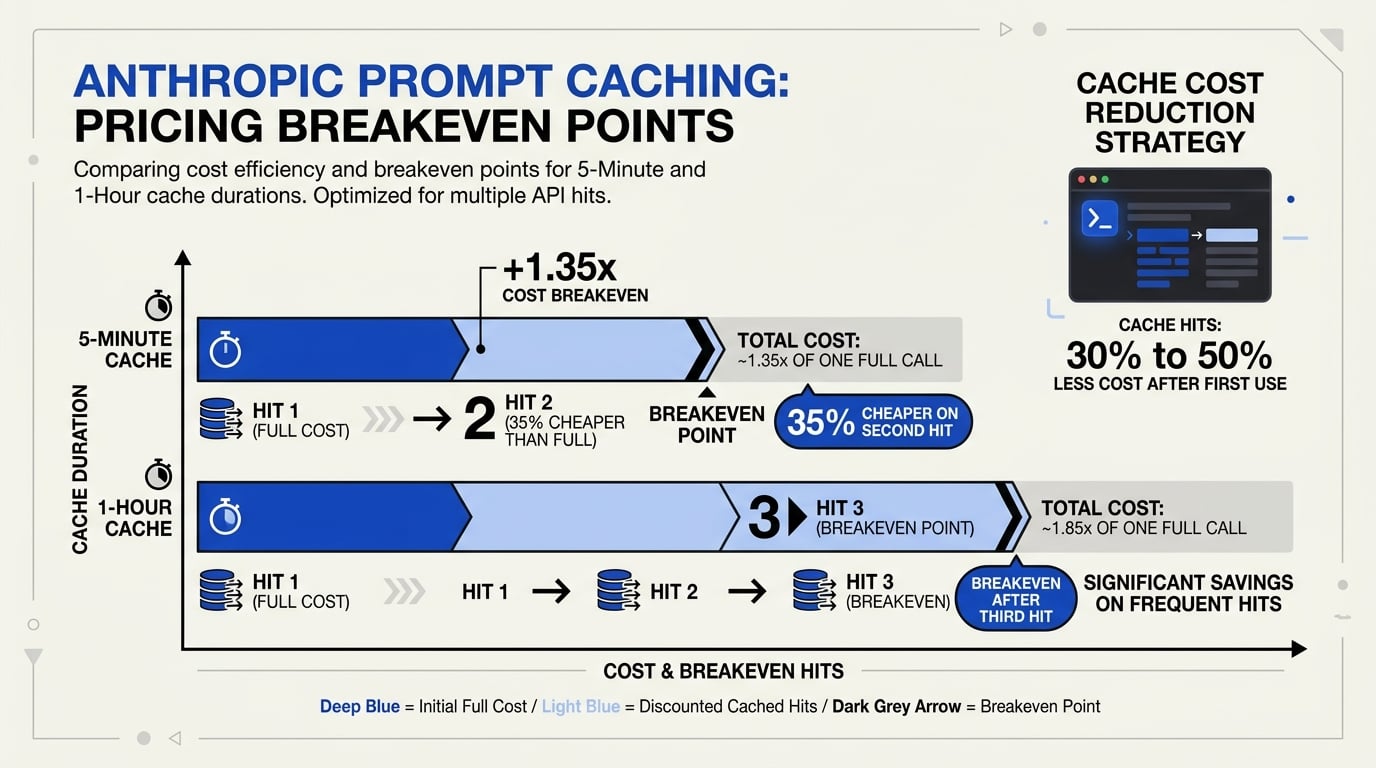
Anthropic's implementation is explicit and tunable. You mark a cache_control breakpoint in your prompt; everything before it can be cached.
Pricing as documented (Anthropic prompt caching docs):
- 5-minute cache write: 1.25× the base input price
- 1-hour cache write: 2× the base input price
- Cache read: 0.10× the base input price
Breakeven math: with the 5-minute cache, one write at 1.25× plus one read at 0.10× costs 1.35× the price of just paying input twice (2.0×) — so breakeven is at the second cache hit. With the 1-hour cache, write is 2× and reads are 0.10× — so breakeven is at the third cache hit.
Up to 4 cache breakpoints per request are supported. Caches are scoped per workspace as of February 2026 (formerly per organization). (Anthropic docs)
OpenAI's prompt caching
OpenAI's implementation is automatic. You do not mark anything; the platform detects shared prefixes (≥1024 tokens) across recent requests and serves cache hits when available.
Pricing as reported (DigitalOcean blog, OpenRouter):
- Cache read: 0.25–0.50× input price (depending on model)
- Cache write: no separate write fee (cost folded into the original request)
Cache TTL is reportedly several minutes (often 5–10 with extensions on use). [Unverified — exact policy can shift]
The behavioral difference: OpenAI is opt-out, Anthropic is opt-in. Anthropic gives you more control and a steeper discount on hits; OpenAI gives you a smaller discount with no work to claim it.
Designing prompts for caching
The win pattern: put the stable prefix first, the variable suffix last.
A canonical layout:
[1] System prompt + role definition          ← cached
[2] Tool definitions                          ← cached
[3] Few-shot examples                         ← cached
[4] Knowledge base context (if static)        ← cached
[--- cache breakpoint ---]
[5] User's variable input                     ← not cached
If your conversation has a long history, append the new turn at the end and put the cache breakpoint between the stable history and the new turn. Each additional turn extends the cached prefix — the cache grows with the conversation.
When caching does not help (or hurts)
- Variable system prompts — if your system prompt includes dynamic data (a timestamp, a per-request user ID at the top), the prefix is different every time and the cache never hits.
- Low-frequency calls — if the cache TTL is 5 minutes and you call once every 10 minutes, you write the cache and never read it. Net cost is higher than no caching.
- Tiny system prompts — under ~1024 tokens (OpenAI's minimum) or under the model's prefix-length threshold, caching does not engage.
- Frequent prompt churn — if your team A/B-tests system prompts daily, every change invalidates cache; account for that cost when iterating.
A quick decision check
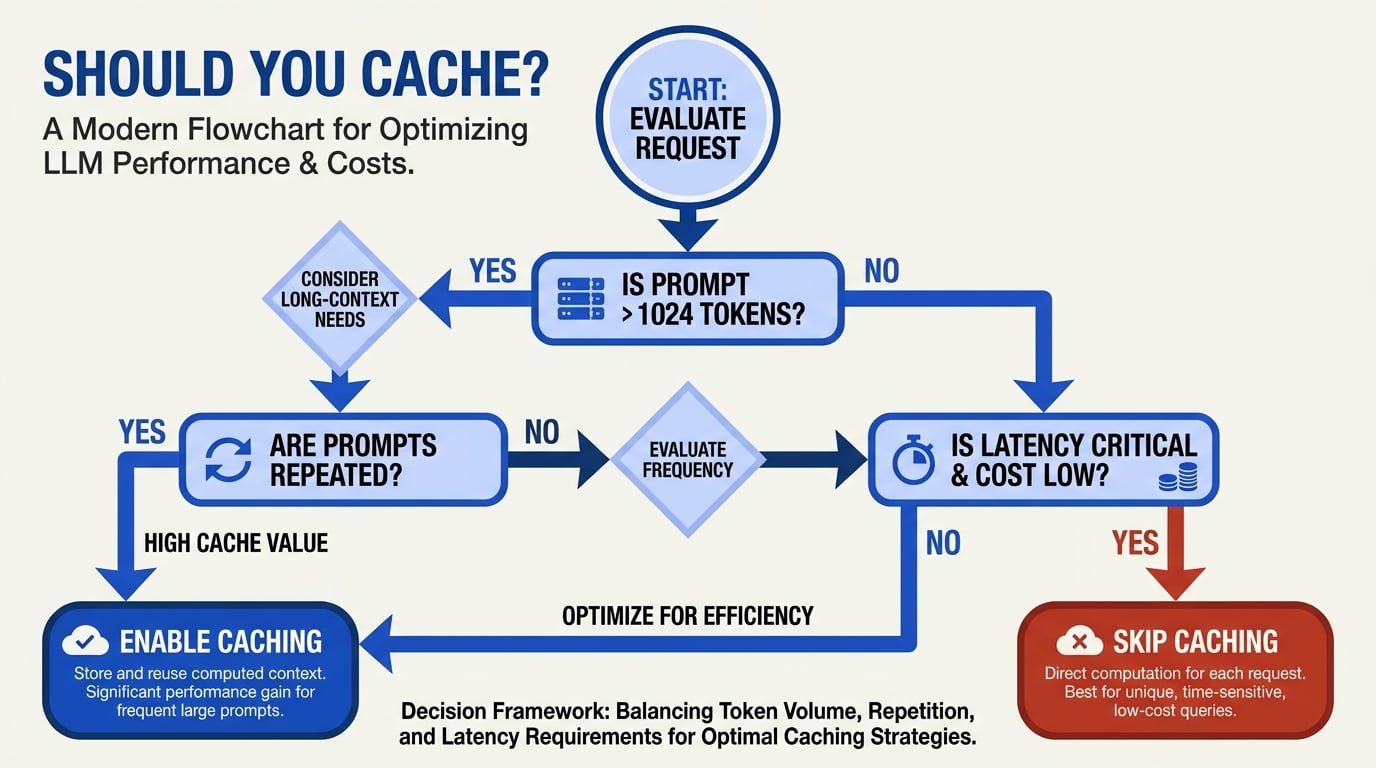
Caching pays off when:
- The cached prefix is meaningfully large (≥1K tokens, often much more)
- The same prefix is hit at least 2–3 times within the cache TTL
- The variable suffix is small relative to the cached prefix
Practical setting: a customer-support agent with a 10K-token system prompt + tools + few-shot, hit 100 times per minute, will see 80–95% cost reduction on the cached portion of input. A one-off batch job that calls the same system prompt 5 times across an hour will not.
Cache hits in observability
If you log per request, capture:
cache_creation_input_tokens(Anthropic) / inferred from response (OpenAI)cache_read_input_tokensinput_tokens(uncached)output_tokens
A simple cache-effectiveness metric: cache_read_tokens / (cache_read_tokens + input_tokens). Healthy values for a stable agent are 0.7–0.95. Below 0.3, your cache is mostly missing — investigate prefix stability.
Bottom line
Prompt caching is the closest thing to free money in 2026 LLM operations. On Anthropic, mark a breakpoint after your stable prefix; on OpenAI, structure prompts so stable content is at the front. With both, watch your cache hit rate as a first-class metric. Workloads that get this right routinely shave 50–90% off input cost; workloads that ignore it leave that money on the table.
Frequently Asked Questions
How much does prompt caching actually save?
Should I use the 5-minute or 1-hour cache on Anthropic?
Is OpenAI's cache as good as Anthropic's?
Discussion
Related Posts



Ready to automate customer conversations?
Launch AI voice agents and WhatsApp bots with CallMissed — one API, 22+ Indian languages.